
Esky KF06A
Esky Key Finder Locator User Manual
Model: KF06A
Brand: Esky
Introduction
Welcome to the Esky Key Finder Locator user manual. This guide provides detailed instructions on how to set up, operate, and maintain your Esky Key Finder Locator, ensuring you can easily find your lost items.
Package Contents
The Esky Key Finder Locator package includes the following items:
- 1 x Remote Transmitter
- 6 x Receivers (color-coded)
- 1 x Base Stand for Transmitter
- 6 x Keyrings
- 7 x CR2032 Batteries (1 pre-installed in remote, 6 in receivers)
- 3 x Hook-and-Loop Stickers
- 3 x Adhesive Pads
- 1 x User Manual

Image: Complete package contents of the Esky Key Finder Locator.
Product Overview
The Esky Key Finder system consists of a remote transmitter and multiple color-coded receivers, designed for easy item location.

Image: The Esky Key Finder remote transmitter and its six receivers.
Remote Transmitter
The remote transmitter features six color-coded buttons, each corresponding to a specific receiver. Pressing a button activates its paired receiver.
Receivers
The receivers are small, lightweight tags that can be attached to various items. Each receiver emits an 85dB sound and flashes its built-in LED light when activated by its corresponding button on the transmitter.

Image: Front and back of the Esky Key Finder remote transmitter.
Setup
Battery Installation (Transmitter)
The remote transmitter comes with one CR2032 battery pre-installed. If replacement is needed, please refer to the "Maintenance" section.
Attaching Receivers to Items
The receivers can be attached to your items using the provided keyrings, adhesive pads, or hook-and-loop stickers, depending on your needs.
- For keys, bags, or pet collars, use the provided keyrings.
- For TV remotes, phones, or wallets, use the adhesive pads.
- For items requiring temporary attachment, use the hook-and-loop stickers.

Image: Three ways to attach the Esky Key Finder receivers.
Operation
Finding a Lost Item
To locate an item, simply press the corresponding color-coded button on the remote transmitter.
The receiver attached to the item will emit a loud 85dB sound and flash its built-in LED light, guiding you to its location. The tracking range is up to 100 feet (30 meters), even through walls, doors, and furniture.

Image: Illustration of the Esky Key Finder's tracking range.
Note: Obstacles like walls may slightly reduce the volume. For best results, use in an open area or keep doors open.

Image: Using the Esky Key Finder in an open area for optimal sound.
Maintenance
Battery Replacement for Receivers
Each receiver uses one CR2032 coin battery, which can last up to one year. Follow these steps to replace the battery:
- Open the receiver cover using a small screwdriver (not included).
- Carefully remove the old CR2032 battery.
- Insert a new CR2032 battery with the positive (+) side facing up.
- Press to close the receiver cover securely.

Image: Step-by-step guide for receiver battery replacement.
Battery Replacement for Transmitter
The transmitter also uses a CR2032 battery. To replace, locate the battery compartment on the back of the transmitter, open it, replace the battery, and close the compartment securely.
Troubleshooting
- Receiver not beeping or LED not flashing:
- Check if the receiver's battery is dead. Replace the CR2032 battery as described in the "Maintenance" section. Ensure the battery is inserted correctly with the positive (+) side up.
- Short tracking range or weak sound:
- The range can be affected by thick walls or metal objects. Try moving closer to the general area of the lost item. Ensure there are no significant obstructions between the transmitter and receiver. Replace receiver batteries if they are old.
- Transmitter buttons not responding:
- Check the battery in the remote transmitter. Replace if necessary.
- Accidental activation:
- Ensure the transmitter buttons are not being pressed inadvertently when stored.
Specifications
| Feature | Detail |
|---|---|
| Model | KF06A |
| Sound Level | Up to 85dB |
| Tracking Range | Up to 100 ft (30 m) |
| Battery Type | CR2032 (for both transmitter and receivers) |
| Battery Life | Up to 1 year (receivers) |
| Material | Acrylonitrile Butadiene Styrene (ABS) |
| Product Dimensions (Transmitter) | Approx. 4.39" L x 2.16" W x 1.42" Th |
| Product Dimensions (Receiver) | Approx. 1.85" L x 1.26" W x 0.2" Th |
| Receiver Weight | Approx. 10g |
| FCC ID | 2AAXF-KF06A |
| Made In | China |
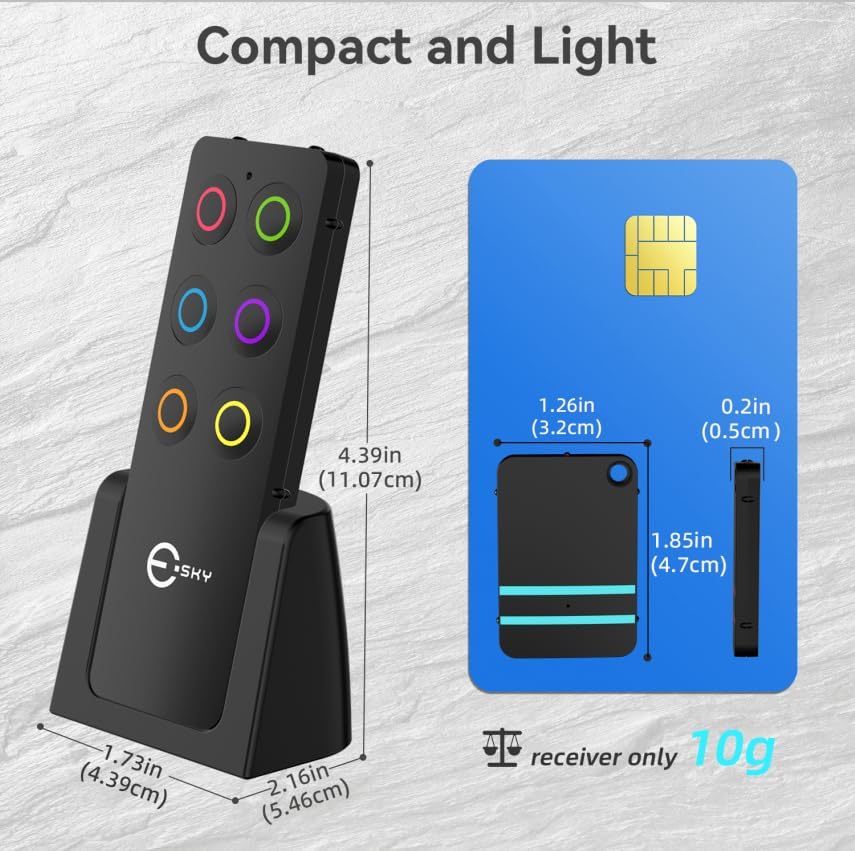
Image: Dimensions of the Esky Key Finder remote and receiver.
Safety Information
WARNING:
- This product contains a button or coin cell battery.
- A swallowed button cell or coin battery can cause internal chemical burns in as little as 2 hours and lead to death.
- Keep new and used batteries away from children.
- If you suspect a battery has been swallowed or inserted inside any part of the body, seek immediate medical attention.
Dispose of batteries properly according to local regulations. Do not expose the device to extreme temperatures or moisture.
Warranty and Support
For product support, please contact Esky customer service through their official channels.
This product typically comes with a standard return policy. Please refer to your purchase documentation for specific warranty details and return periods.
Related documentsKF06A


Ask a question about this manual
Ask about setup, troubleshooting, compatibility, parts, safety, or missing instructions. Manuals+ will review the question and use this page’s manual context to help answer it.