
1. Introduction
This manual provides comprehensive instructions for the installation, operation, and maintenance of the Cisco Wired Microphone Kit (model CP-8832-MIC-WIRED=) designed for the Cisco IP Conference Phone 8832. This kit is intended to expand the audio coverage of your conference phone, ensuring clear communication in larger meeting environments.
2. Package Contents
Verify that all items are present in the package:
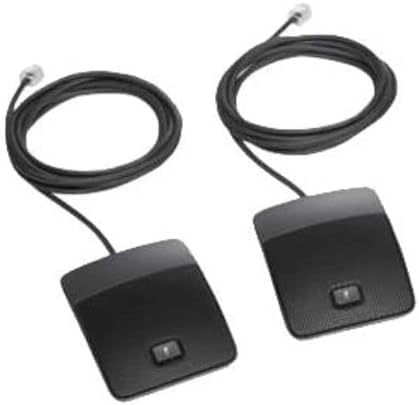
- Two (2) Cisco Wired Microphones
3. Product Overview
The Cisco Wired Microphone Kit enhances the audio capture capabilities of the Cisco IP Conference Phone 8832. Each microphone features a durable anodized aluminum top housing and is equipped with a wired connection for reliable performance. These microphones are specifically designed to extend the coverage area, allowing for up to 22 participants in a 20x34-foot room, compared to the base unit's 20x20-foot coverage for up to 10 participants.
4. Setup Instructions
Follow these steps to connect the wired microphones to your Cisco IP Conference Phone 8832:
- Power Off: Ensure the Cisco IP Conference Phone 8832 is powered off before connecting the microphones.
- Locate Ports: Identify the microphone expansion ports on the Cisco IP Conference Phone 8832 base unit. These ports are typically located on the side or rear of the device and may be labeled.
- Connect Microphones: Carefully insert the connector of each wired microphone into an available microphone port on the conference phone. Push firmly until a secure connection is established.
- Position Microphones: Strategically place the microphones within the conference room to optimize audio capture. For best results, position them equidistant from participants and the main conference phone. Avoid placing them directly next to speakers or in areas with excessive background noise.
- Power On: Power on the Cisco IP Conference Phone 8832. The system should automatically detect the connected microphones.
5. Operating Instructions
Once connected, the wired microphones operate in conjunction with the Cisco IP Conference Phone 8832. They automatically extend the audio pickup range, allowing participants further from the main unit to be heard clearly. No additional configuration is typically required for basic operation. The microphones will activate automatically when the conference phone is in an active call.
6. Maintenance
To ensure optimal performance and longevity of your Cisco Wired Microphones, follow these maintenance guidelines:
- Cleaning: Keep the microphones clean by wiping them with a soft, dry cloth. Avoid using liquid cleaners, abrasive materials, or solvents, as these can damage the finish or internal components.
- Storage: Store the microphones in a dry, dust-free environment when not in use.
- Cable Care: Avoid placing heavy objects on the microphone cables or bending them sharply to prevent internal wire damage.
- Disassembly: Do not attempt to disassemble the microphones. Refer to qualified service personnel for any repairs or internal issues.
7. Troubleshooting
If you encounter issues with your Cisco Wired Microphone Kit, consult the following table for potential solutions:
| Problem | Possible Cause | Solution |
|---|---|---|
| Microphones not detected by the conference phone. | Loose cable connection. Conference phone not restarted after connection. | Ensure both microphone cables are securely connected to the conference phone. Power cycle (turn off and then on) the Cisco IP Conference Phone 8832. |
| Poor audio quality or participants cannot hear clearly. | Improper microphone placement. Obstructions blocking microphones. Excessive background noise. | Reposition microphones for optimal coverage, ensuring they are equidistant from speakers. Remove any objects blocking the microphone grilles. Minimize background noise in the conference room. |
| Microphone cable appears damaged. | Physical damage to the cable. | Discontinue use of the damaged microphone. Contact Cisco support or your reseller for replacement options. |
8. Specifications
| Brand | Cisco |
| Model | CP-8832-MIC-WIRED= |
| Material | Aluminum |
| Color | Black |
| Item Weight (per microphone) | Approximately 2.35 ounces |
| Product Dimensions (per microphone) | Approximately 9.45 x 9.84 x 1.57 inches |
| Compatibility | Cisco IP Conference Phone 8832 |
| Coverage Expansion | Extends coverage for rooms up to 20x34 feet (up to 22 participants) |
9. Warranty and Support
Warranty: This Cisco Wired Microphone Kit is covered by a 1-year standard replacement warranty from the date of purchase. This warranty covers defects in materials and workmanship under normal use.
Support: For technical assistance, troubleshooting, or to initiate a warranty claim, please contact your authorized Cisco reseller or visit the official Cisco support website for detailed contact information and resources.

