
STREETZ PB-1080
STREETZ 5000mAh USB Power Bank PB-1080 Instruction Manual
Model: PB-1080
Introduction
Thank you for choosing the STREETZ 5000mAh USB Power Bank. This device is designed to provide portable power for your mobile devices, ensuring you stay connected wherever you are. It features a 5000mAh lithium-ion battery, a USB Type-A output for charging devices, a Micro-B input for charging the power bank, and an integrated LED flashlight. Please read this manual carefully before using the product to ensure proper operation and safety.
Important Safety Information
- Do not expose the power bank to extreme temperatures, direct sunlight, or fire.
- Do not immerse the power bank in water or other liquids.
- Avoid dropping or subjecting the power bank to strong impacts.
- Do not attempt to disassemble, repair, or modify the power bank.
- Keep out of reach of children.
- Use only certified charging cables and adapters.
- If the power bank becomes excessively hot, emits an odor, or changes shape during charging or use, discontinue use immediately.
Package Contents
- STREETZ 5000mAh USB Power Bank (PB-1080)
- USB Charging Cable (Micro-B to USB-A)
- Instruction Manual
Product Overview
Familiarize yourself with the components of your STREETZ Power Bank:
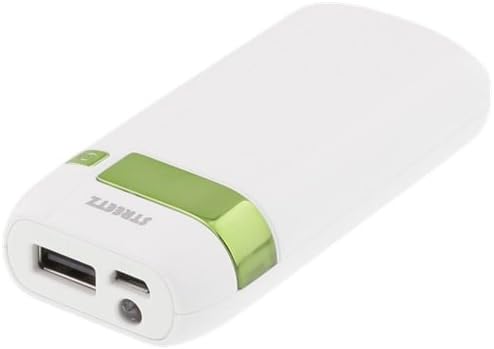
Image: The STREETZ 5000mAh Power Bank, white with a green accent. It features a USB Type-A output port, a Micro-B input port, and an LED flashlight on one end. A power button and battery indicator lights are visible on the top surface.
- USB Type-A Output Port: Connect your device's charging cable here.
- USB Micro-B Input Port: Connect the included USB cable to charge the power bank.
- LED Flashlight: Provides illumination.
- Power Button: Activates the power bank and flashlight.
- Battery Indicator Lights: Shows the remaining battery capacity.
Setup and Initial Charging
Before using your power bank for the first time, it is recommended to fully charge it.
- Connect the small end of the included USB charging cable (Micro-B) to the USB Micro-B Input Port on the power bank.
- Connect the larger end of the USB charging cable (USB-A) to a USB wall adapter (not included) or a computer's USB port.
- The battery indicator lights will illuminate and flash to show the charging progress. All lights will be solid when the power bank is fully charged.
- Disconnect the cable once fully charged.
Operating Instructions
Charging External Devices
- Connect your device's charging cable (e.g., USB-A to Lightning, USB-A to USB-C, or USB-A to Micro-B) to the USB Type-A Output Port on the power bank.
- Connect the other end of the cable to your mobile device.
- The power bank will automatically begin charging your device. If not, press the Power Button once.
- The battery indicator lights will show the remaining power.
- Disconnect your device once it is fully charged or when you wish to stop charging.
Using the LED Flashlight
- To turn on the flashlight, press and hold the Power Button for approximately 2-3 seconds.
- To turn off the flashlight, press and hold the Power Button again for approximately 2-3 seconds.
Checking Battery Level
- Press the Power Button once briefly. The battery indicator lights will illuminate to show the current charge level.
- Each light typically represents a percentage of the total capacity (e.g., 4 lights = 75-100%, 3 lights = 50-75%, etc.).
Maintenance
- Clean the power bank with a soft, dry cloth. Do not use harsh chemicals or abrasive materials.
- Store the power bank in a cool, dry place away from direct sunlight and extreme temperatures.
- If storing for an extended period, charge the power bank to approximately 50-75% every 3 months to maintain battery health.
Troubleshooting
| Problem | Possible Cause | Solution |
|---|---|---|
| Power bank not charging. | Low battery; faulty cable or adapter; loose connection. | Ensure the power bank is connected to a working power source. Try a different USB cable or wall adapter. Check all connections. |
| Device not charging from power bank. | Power bank battery is empty; faulty cable; device not compatible; power bank not activated. | Charge the power bank. Try a different charging cable for your device. Ensure your device is compatible with 5V/1A charging. Press the power button once to activate output. |
| Flashlight not working. | Low battery; incorrect operation. | Charge the power bank. Ensure you are pressing and holding the power button for 2-3 seconds to activate/deactivate. |
Specifications
| Brand: | STREETZ |
| Model: | PB-1080 |
| Battery Capacity: | 5000 mAh |
| Battery Type: | Lithium Ion |
| Input: | 1 x USB Micro-B Female |
| Output: | 1 x USB Type-A Female, 5V 1A |
| Voltage: | 5 Volts |
| Amperage: | 1 Amps |
| Compatible Devices: | Smartphone |
| Dimensions: | 9.6 x 4.3 x 2.2 cm |
| Weight: | 119 g (0.12 Kilograms) |
| Features: | Built-in LED flashlight, Battery indicator |
Warranty and Support
For warranty information or technical support, please refer to the documentation provided at the point of purchase or visit the official STREETZ website. Keep your proof of purchase for warranty claims.
Ask a question about this manual
Ask about setup, troubleshooting, compatibility, parts, safety, or missing instructions. Manuals+ will review the question and use this page’s manual context to help answer it.