
JOINLGO V80-4GW
JOINLGO V80-4GW 4-Channel GPS 4G WiFi 1080P Fleet Truck DVR Camera Kit User Manual
Introduction
This manual provides detailed instructions for the installation, operation, and maintenance of your JOINLGO V80-4GW 4-Channel GPS 4G WiFi 1080P Fleet Truck DVR Camera Kit. Please read this manual thoroughly before using the product to ensure proper functionality and safety.
Product Overview
The JOINLGO V80-4GW is a comprehensive vehicle surveillance system designed for fleet and truck applications. It features a 4-channel 1080P DVR with GPS, 4G, and WiFi connectivity for remote viewing and tracking. The system includes IP68 waterproof IR cameras and a 10-inch IPS touchscreen monitor for local control and display.
Key Features:
- 4-Channel 1080P Recording: Real-time 1920x1080 @30fps recording across all four channels.
- 10-inch IPS Touchscreen: High-resolution 1280x800 display for easy menu navigation and live view.
- Integrated GPS: Precise vehicle positioning and location recording in video streams.
- 4G & WiFi Connectivity: Enables remote live view, playback, and data transmission via PC, web, or smartphone apps.
- IP68 Waterproof Cameras: Durable, full-metal cameras with IR LEDs for night vision and 2.0MP IMX307 sensor with WDR.
- G-Sensor: Detects sudden movements like hard acceleration, braking, speeding, and impacts, saving key event footage.
- Motion Detection: Customizable alarm time and detection areas with app notifications.
- Loop Recording: Supports up to 2TB SD card storage (memory cards not included).
- Delay Record: Records up to 24 hours after vehicle shutdown, with an 8-second backup via built-in capacitors.
- 4-CH Alarm Input: Supports four triggers, enabling auto full-screen display on alert and footage locking.
- Geo Fence: Set routes and receive alerts for deviations.
- HDMI Output: Connects to external monitors or TVs.
- USB Port: For video backup or mouse connection.
What's in the Box
Verify that all components are present before proceeding with installation.
- Mobile DVR x 1
- 10" IPS Screen x 1
- IR Camera x 4
- 5mt (16ft) cable x 1
- 10mt (33ft) cable x 2
- 15mt (50ft) cable x 1
- Power Cable
- Adapter Alarm Cable
- WiFi Antenna
- 4G LTE Antenna
- GPS Antenna (3m)
- Key
- Remote Controller
- Remote Extension Cable (1.5m)
- User Manual
- Warranty Card
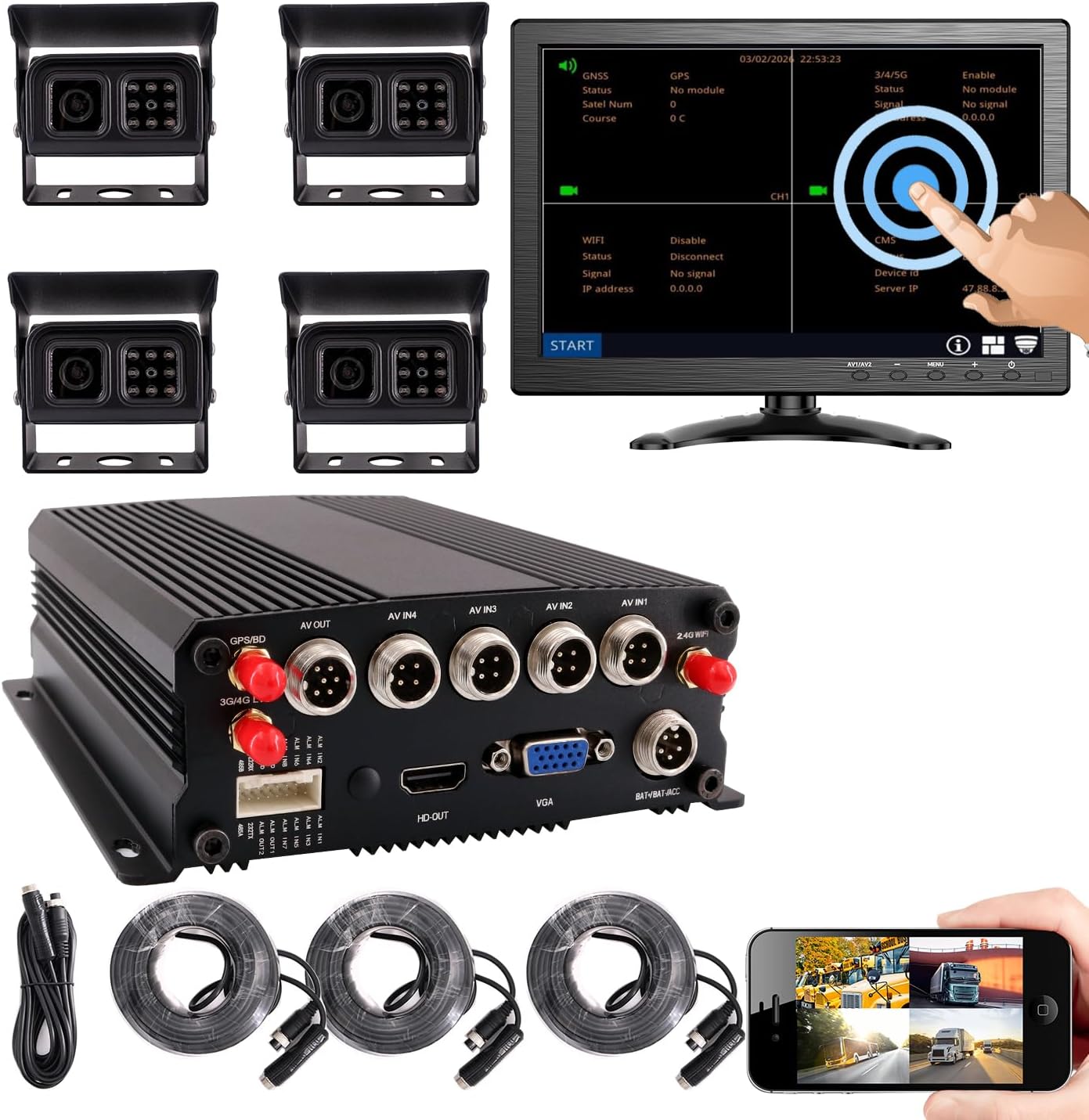
Image: All components included in the JOINLGO V80-4GW DVR Camera Kit, including the DVR unit, 10-inch monitor, four cameras, and various cables and accessories.

Image: A diagram illustrating the main components of the JOINLGO V80-4GW kit, including the Mobile DVR, 10" IPS Screen, IR Cameras, and various lengths of cables.
Setup
1. DVR and Monitor Placement
Mount the Mobile DVR securely in a suitable location within the vehicle, ensuring it is protected from excessive vibration and moisture. Position the 10-inch IPS touchscreen monitor in a location that provides clear visibility for the driver without obstructing the view of the road.

Image: Detailed view of the 10-inch IPS Touch Screen, showing its dimensions, 1280x800 resolution, touchscreen control, and easy installation with VGA+DC 2m cable.
2. Camera Installation
Install the four IR cameras in desired locations around the vehicle (e.g., front, rear, sides). Ensure the cameras have a clear field of view and are securely mounted. The cameras are IP68 waterproof and designed for outdoor use.

Image: Close-up of an IP68 weatherproof IR camera, highlighting its 1080P AHD NTSC mode, IR LEDs for night vision, full metal build, and SONY brand sensor for image quality. Includes a diagram of the 4-PIN connector.
3. Wiring Connections
Connect the cameras to the DVR using the provided 4-pin aviation cables. These specialized connectors ensure signal stability. Connect the monitor to the DVR via the VGA or HDMI output. Connect the GPS, 4G LTE, and WiFi antennas to their respective ports on the DVR.

Image: Diagram showing the DVR unit with its various ports, including AV IN, AV OUT, HD OUT, VGA, GPS, 4G, and WiFi antenna connections, and how they connect to the monitor, cameras, and power source.
4. Power Connection
Connect the DVR to the vehicle's power supply using the power cable. Ensure proper polarity. The system supports delay recording, drawing power from the vehicle's battery for up to 24 hours after shutdown.
5. SD Card Installation
Insert up to two SD cards (not included) into the designated slots on the DVR. The system supports up to 2TB of storage for loop recording.

Image: Illustration of the DVR unit with two SD card slots, indicating support for up to 2TB of storage and H.265 coding for efficient storage.
Operating Instructions
1. Powering On and Initial Setup
Once all connections are secure, turn on the vehicle's ignition. The DVR and monitor should power on automatically. Follow the on-screen prompts for initial setup, including date, time, and language settings.
2. Touchscreen Navigation
The 10-inch IPS monitor features a touchscreen interface for easy menu navigation. Tap icons to select options, swipe to scroll, and double-tap to view a channel in full-screen mode.

Image: A hand interacting with the 10-inch touchscreen monitor, demonstrating menu navigation and live view of multiple camera feeds.
3. Recording Functions
- Loop Recording: The system automatically records over the oldest footage when the SD card is full, ensuring continuous recording.
- Delay Record: The DVR continues to record for up to 24 hours after the vehicle's engine is shut off, drawing power from the battery.
- G-Sensor Event Recording: In the event of sudden movements (e.g., hard braking, collision), the G-sensor triggers the DVR to save and lock the relevant footage, preventing it from being overwritten.
- 4-CH Alarm Input: When an alarm is triggered via one of the four alarm inputs, the system can automatically switch to a full-screen display of the relevant camera and lock the footage.

Image: Diagram illustrating the Intelligent Alarm Process, including Trigger Alarm, Lock Video, APP Push, and Alarm Report. It also shows Motion Detection, G-sensor, and 4-CH Trigger functionalities.

Image: An illustration depicting a collision scenario, explaining how the MDVR records and locks key accident footage, with a super-capacitor ensuring operation for 8 seconds after engine shutdown.

Image: A visual comparison between low frame rate (15 fps) and high frame rate (30 fps) recording, demonstrating the enhanced motion detail provided by 30 fps.
4. Remote Live View and Tracking
Utilize the integrated 4G and WiFi modules to access remote live view and playback of footage. Download the CMS APP for iOS/Android smartphones or access via PC/web interface. The built-in GPS module allows for precise vehicle positioning and tracking.

Image: Displays the remote live view functionality on various devices, including a smartphone, tablet, and desktop computer, showing real-time camera feeds and map tracking.

Image: A detailed view of the remote live view interface, showcasing dashboard analytics, various reports, video playback, and track playback features available on the CMS platform.
5. Motion Detection
Configure motion detection settings through the DVR menu. You can schedule alarm working times and define specific detection areas. When motion is detected, the system can trigger an alarm, record footage, and send notifications to your smartphone app.

Image: An illustration of a truck with designated motion detection zones, demonstrating how users can set up specific areas for monitoring and receive alerts on their app.
6. Geo Fence
Set up virtual boundaries or routes using the Geo Fence feature. If the vehicle deviates from the predefined area or route, the system will generate an alert, which can be sent to your monitoring platform or app.
7. Mirror Image and Multi-mode Display
The DVR supports horizontal and vertical flipping for any camera channel, allowing for flexible camera mounting. The monitor also supports various multi-mode display options to view multiple camera feeds simultaneously.

Image: Icons illustrating horizontal and vertical image flip options, along with various multi-mode display layouts for viewing multiple camera feeds on the monitor.
8. Remote Control Operation
The included remote controller and extended remote receiver allow for convenient operation of the DVR without needing to directly access the unit. Point the remote at the extended receiver to navigate menus and control functions.

Image: An illustration showing the remote control and its extended IR receiver, demonstrating how the remote can be used to operate the DVR from a distance within the vehicle cabin.
Maintenance
1. General Care
The DVR features an aluminum die-cast chassis with a fanless design, making it durable and adaptable to various working environments. The cameras are IP68 waterproof. Regularly clean the camera lenses and monitor screen with a soft, damp cloth. Avoid using harsh chemicals.

Image: An illustration highlighting the full-metal, ultra-durable, and heat-efficient design of the DVR and the IP68 waterproofing of the cameras, suitable for extreme temperatures from -40°C to 55°C.
2. SD Card Management
Periodically check the status of your SD cards. While loop recording manages storage, it is recommended to back up important footage regularly. Replace SD cards if they show signs of degradation or error.
Troubleshooting
If you encounter issues with your JOINLGO V80-4GW system, refer to the following common solutions:
- No Power: Check all power connections, ensure the vehicle's battery is charged, and verify the ignition is on.
- No Camera Display: Ensure camera cables are securely connected to the DVR. Check camera settings in the DVR menu.
- No Recording: Verify that SD cards are properly inserted and not full. Check recording settings in the DVR menu. Format SD cards if necessary (this will erase all data).
- Remote View Issues: Ensure the 4G module has a valid SIM card and data plan, or that the WiFi module is connected to a stable network. Check antenna connections.
- GPS Not Working: Ensure the GPS antenna is properly connected and has a clear view of the sky.
- Touchscreen Unresponsive: Try restarting the DVR. If the issue persists, contact customer support.
For further assistance, please contact JOINLGO customer support.
Specifications
| Feature | Detail |
|---|---|
| Model Number | V80-4GW |
| Product Dimensions | 11.02 x 7.87 x 13.78 inches |
| Item Weight | 8.93 pounds |
| Connectivity Technology | Wired (4-pin aviation connectors), 4G, WiFi, GPS |
| Camera Resolution | 1080P (1920x1080) |
| Frame Rate | 30fps |
| Monitor Size | 10-inch IPS Touch Screen |
| Monitor Resolution | 1280x800 |
| Storage Capacity | Up to 2TB (2 x 1TB SD cards, not included) |
| Video Compression | H.265 |
| Camera Waterproof Rating | IP68 |
| Operating Temperature | -40°C to 55°C (-40°F to 131°F) |
| Batteries | 1 CR2 battery required (included) |
Warranty and Support
The JOINLGO V80-4GW comes with a 2-year warranty. For technical support, warranty claims, or any questions regarding the product, please contact JOINLGO customer service through the official website or your purchase platform.
Related documentsV80-4GW


Ask a question about this manual
Ask about setup, troubleshooting, compatibility, parts, safety, or missing instructions. Manuals+ will review the question and use this page’s manual context to help answer it.