
Introduction
This manual provides essential information for the safe operation, maintenance, and troubleshooting of your Snapper XD 82V MAX Cordless Electric 19" Push Lawn Mower. Please read it thoroughly before using the product to ensure proper function and to prevent injury.

Figure 1: Snapper XD 82V MAX 19-inch Push Lawn Mower with grass bag attached.
Safety Information
WARNING: Read all safety warnings and instructions. Failure to follow the warnings and instructions may result in electric shock, fire, and/or serious injury.
- Always wear appropriate personal protective equipment, including eye protection, hearing protection, and sturdy footwear.
- Keep children and bystanders away while operating the lawn mower.
- Do not operate the mower in wet conditions or rain.
- Inspect the area to be mowed and remove any objects that could be thrown by the blade.
- Never place hands or feet near or under the mower deck while the motor is running.
- Disconnect the battery pack before cleaning, servicing, or when the mower is not in use.
- Use only Snapper XD 82V MAX batteries and chargers.
- Store the mower and batteries in a dry, secure location, away from moisture and extreme temperatures.
Package Contents
Verify that all items are present in the package:
- Snapper XD 82V MAX 19" Push Lawn Mower
- (2) Briggs & Stratton 82V Lithium-ion 2.0 Batteries
- Rapid Charger
- Grass Collection Bag
- Side Discharge Chute
- Mulching Plug
- Instruction Manual
Setup
1. Handle Assembly and Adjustment
The mower handle may require minor assembly or adjustment for comfortable operation. Secure the handle in place using the provided locking mechanisms. The handle height can be adjusted to suit the operator's height for optimal ergonomics.

Figure 2: Close-up of the mower handle with controls and adjustment points.
2. Battery Charging
Before first use, fully charge both 82V Lithium-ion batteries using the rapid charger. Connect the charger to a standard power outlet and insert the battery. The charger will indicate when the battery is fully charged.
- Charging Times:
- 2.0 Ah Battery: Approximately 13 minutes to 50% charge, 30 minutes to 100% charge.
- 4.0 Ah Battery (if applicable): Approximately 25 minutes to 50% charge, 60 minutes to 100% charge.
Note: Maximum initial battery voltage (measured without workload) is 82-volts. The nominal voltage is 72-volts.

Figure 3: Snapper XD 82V MAX Lithium-Ion battery. Ensure proper insertion into the charger.
3. Installing the Battery
Open the battery compartment cover on the mower. Insert a fully charged battery pack into the battery slot until it clicks into place. Close the cover securely.
4. Adjusting Cutting Height
The mower features a single-lever, 7-position height adjustment. Move the lever to select your desired cutting height. Refer to the markings on the mower deck for height settings.
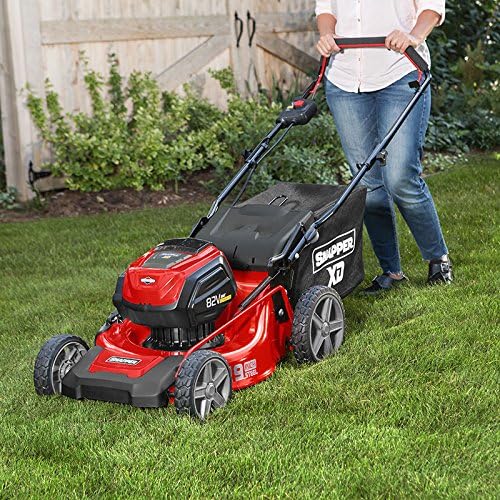
Figure 4: The Snapper XD mower in operation, illustrating the cutting height adjustment lever on the side.
5. Selecting Mowing Mode (Mulch, Bag, Side Discharge)
Your mower supports three mowing modes:
- Mulching: For returning fine grass clippings to the lawn. Ensure the mulching plug is installed and the side discharge chute is closed.
- Bagging: For collecting grass clippings. Attach the grass collection bag to the rear of the mower and ensure the mulching plug is removed.
- Side Discharge: For discharging clippings out the side. Attach the side discharge chute and ensure the mulching plug is removed.

Figure 5: Snapper XD 19-inch mower configured for bagging, with the grass collection bag attached to the rear.

Figure 6: Snapper XD 19-inch mower configured for side discharge, showing the chute attached to the side.
Operating Instructions
1. Starting the Mower
Ensure a charged battery is installed. Press and hold the safety button, then pull the bail lever towards the handle. The mower will start. Release the safety button once the mower is running.
2. Mowing Techniques
Push the mower at a comfortable, steady pace. The smart, efficient load-sensing technology will automatically adjust power to the cutting blades based on grass density, optimizing battery life and cutting performance.
For best results, avoid cutting more than one-third of the grass blade length at a time. Overlapping cutting paths slightly will ensure an even cut.
3. Stopping the Mower
Release the bail lever to stop the mower blade. The motor will cease operation. Always remove the battery pack when leaving the mower unattended or before performing any adjustments or maintenance.
Maintenance
1. Cleaning
After each use, disconnect the battery and clean the mower deck, blade, and grass bag. Remove any accumulated grass clippings or debris. A brush or damp cloth can be used. Do not use a high-pressure washer directly on electrical components.
2. Battery Care and Storage
To prolong battery life, store batteries in a cool, dry place. It is recommended to charge batteries at least once every two months, even during off-season storage, to prevent deep discharge and potential damage.
3. Blade Inspection and Sharpening
Regularly inspect the cutting blade for sharpness and damage. A dull or damaged blade can lead to poor cutting performance and increased battery drain. If necessary, have the blade sharpened or replaced by a qualified service technician.
4. Vertical Storage
The Snapper XD mower is designed for compact vertical storage. Fold the handle down and store the mower upright to save space in your garage or shed. Ensure the battery is removed before storing.

Figure 7: The Snapper XD mower folded for compact vertical storage.
Troubleshooting
| Problem | Possible Cause | Solution |
|---|---|---|
| Mower does not start | Battery not fully charged or improperly installed. Safety button/bail lever not engaged. | Ensure battery is fully charged and correctly inserted. Fully engage safety button and bail lever. |
| Reduced run time | Battery not fully charged. Mowing thick or wet grass. Dull blade. | Fully charge battery. Avoid mowing wet grass. Sharpen or replace blade. |
| Uneven cut | Dull or damaged blade. Incorrect cutting height setting. | Sharpen or replace blade. Adjust cutting height evenly. |
| Excessive vibration | Damaged or unbalanced blade. Loose components. | Inspect blade for damage; replace if necessary. Check all fasteners for tightness. |
Specifications
| Brand | Snapper |
| Model Number | 1687915 |
| Power Source | Battery Powered (82V MAX Lithium-ion) |
| Cutting Width | 19 Inches |
| Cutting Height Positions | 7 Positions |
| Operation Mode | Manual Push |
| Material | Alloy Steel Deck |
| Item Weight | 59.5 Pounds |
| Product Dimensions (D x W x H) | 20.5"D x 18"W x 45"H |
| Battery Average Run Time | Up to 45 minutes (per 2.0Ah battery) |
Warranty and Support
Manufacturer Warranty: This product comes with a 5-year product warranty and a 2-year battery warranty.
For customer support, service, or warranty claims, please contact Snapper customer service. Refer to the official Snapper website or your purchase documentation for contact details.
You can also visit the Snapper Store on Amazon for additional product information and resources.

