
Introduction
This manual provides comprehensive instructions for the setup, operation, and maintenance of your Nokta Digital HD-10 Mini / 6110 / 1461 Remote Control. Please read this guide carefully to ensure proper use and to maximize the performance of your device. Keep this manual for future reference.
Product Overview
The Nokta Digital HD-10 Mini / 6110 / 1461 Remote Control is designed to provide intuitive control over compatible television sets using infrared technology. Its ergonomic design and clearly labeled buttons ensure ease of use for various functions.
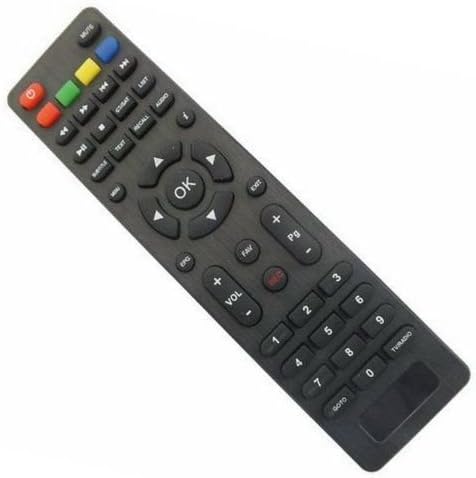
An image showing the Nokta Digital HD-10 Mini / 6110 / 1461 Remote Control. The remote is dark gray with various black buttons, including a central 'OK' button surrounded by directional arrows, number keys, volume controls, channel controls, and function buttons like 'MUTE', 'EPG', 'FAV', 'REC', 'EXIT', and colored function keys (red, green, yellow, blue).
Setup
1. Inserting Batteries
- Locate the battery compartment cover on the back of the remote control.
- Slide the cover downwards or press the latch to open it.
- Insert two AAA batteries (not included), ensuring the positive (+) and negative (-) terminals align with the indicators inside the compartment.
- Replace the battery compartment cover, ensuring it clicks securely into place.
2. Pairing with Your Television
This remote control operates using infrared (IR) technology. For most compatible televisions, no special pairing procedure is required. Simply point the remote control towards your television and press a button (e.g., Power) to test its functionality. If the television responds, the remote is ready for use.
Operating Instructions
Basic Functions
- Power Button (Red): Turns the television on or off.
- MUTE: Mutes or unmutes the television audio.
- VOL +/-: Increases or decreases the volume level.
- CH +/-: Changes the television channel up or down.
- Number Keys (0-9): Directly input channel numbers.
- OK Button: Confirms selections in menus.
- Directional Arrows (Up, Down, Left, Right): Navigates through menus and options.
- EXIT: Exits the current menu or screen.
Advanced Functions
- EPG: Accesses the Electronic Program Guide.
- FAV: Opens the list of favorite channels.
- REC (Red Circle): Initiates recording (if supported by the television/device).
- TEXT: Displays teletext.
- SUBTITLE: Toggles subtitles on or off.
- AUDIO: Selects audio tracks or modes.
- RECALL: Switches to the previously viewed channel.
- GOTO: Jumps to a specific time in media playback.
- TV/RADIO: Switches between TV and Radio modes.
- Colored Buttons (Red, Green, Yellow, Blue): Perform specific functions as indicated on-screen by the television.
- Pg +/-: Navigates through pages or lists.
Maintenance
- Cleaning: Use a soft, dry cloth to clean the remote control. Do not use liquid cleaners or abrasive materials.
- Battery Replacement: Replace batteries when the remote's response becomes sluggish or stops working. Always replace both batteries at the same time with new ones of the same type.
- Storage: If the remote control will not be used for an extended period, remove the batteries to prevent leakage and damage. Store in a cool, dry place.
Troubleshooting
- Remote not responding: Ensure batteries are inserted correctly with correct polarity. Replace old batteries with new ones. Ensure there are no obstructions between the remote and the television's IR receiver.
- Poor response: Check battery levels. Ensure you are within the effective range (up to 10 meters) and pointing the remote directly at the television.
- Specific buttons not working: This may indicate a compatibility issue with your television model for that specific function, or a fault with the remote.
Specifications
- Brand: Nokta
- Model Numbers: HD-10 Mini / 6110 / 1461
- Connectivity Technology: Infrared
- Compatible Devices: Television
- Maximum Range: 10 Meters
- ASIN: B078W9KQ49
- UPC: 674386416726
Warranty Information
This product is covered by a standard manufacturer's warranty. For specific details regarding warranty duration and terms, please refer to the documentation provided at the time of purchase or contact your retailer. Keep your proof of purchase for any warranty claims.
Support
For further assistance, technical support, or inquiries not covered in this manual, please contact the retailer where you purchased the product or visit the official Nokta website for customer service contact information.