
Edifier XM2BT
Edifier XM2BT Bluetooth 2.1 Multimedia Speaker System User Manual
Model: XM2BT
1. Introduction
Thank you for purchasing the Edifier XM2BT Bluetooth 2.1 Multimedia Speaker System. This manual provides essential information for the safe and efficient use of your new speaker system. Please read it thoroughly before operation and retain it for future reference.
2. Important Safety Instructions
- Read these instructions carefully.
- Keep these instructions for future reference.
- Heed all warnings.
- Follow all instructions.
- Do not use this apparatus near water.
- Clean only with a dry cloth.
- Do not block any ventilation openings. Install in accordance with the manufacturer's instructions.
- Do not install near any heat sources such as radiators, heat registers, stoves, or other apparatus (including amplifiers) that produce heat.
- Protect the power cord from being walked on or pinched, particularly at plugs, convenience receptacles, and the point where they exit from the apparatus.
- Only use attachments/accessories specified by the manufacturer.
- Unplug this apparatus during lightning storms or when unused for long periods of time.
- Refer all servicing to qualified service personnel. Servicing is required when the apparatus has been damaged in any way, such as power-supply cord or plug is damaged, liquid has been spilled or objects have fallen into the apparatus, the apparatus has been exposed to rain or moisture, does not operate normally, or has been dropped.
3. Package Contents
Please ensure all items are present in the package:
- Subwoofer unit
- Satellite speakers (2 units)
- Audio input cable (3.5mm to 3.5mm AUX)
- Remote control
- User Manual
4. Product Overview
The Edifier XM2BT system consists of a subwoofer and two satellite speakers, designed to deliver a balanced audio experience. The subwoofer houses the main controls and connectivity ports.

Figure 4.1: Rear view of the Edifier XM2BT subwoofer, showing input ports, power switch, and control knobs.
- 1. Bass Control Knob: Adjusts the bass level.
- 2. Speaker Out (L/R): Connects to the satellite speakers.
- 3. AUX Input: 3.5mm stereo input for external audio devices.
- 4. USB Port: For USB flash drive playback.
- 5. SD Card Slot: For SD card playback.
- 6. Power Switch: Turns the system on or off.
- 7. Power Cord: Connects to AC power outlet.
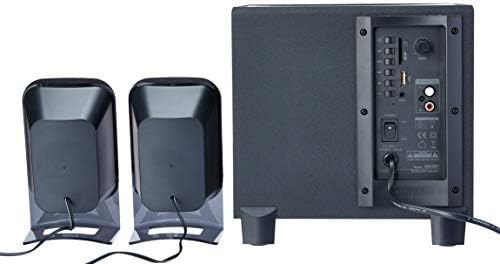
Figure 4.2: Complete Edifier XM2BT 2.1 speaker system from the rear, illustrating connections between subwoofer and satellite speakers.
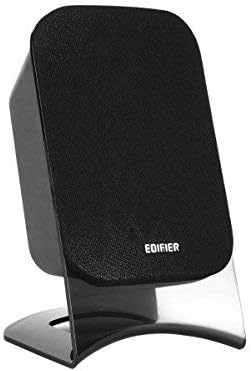
Figure 4.3: Close-up of a single Edifier XM2BT satellite speaker.
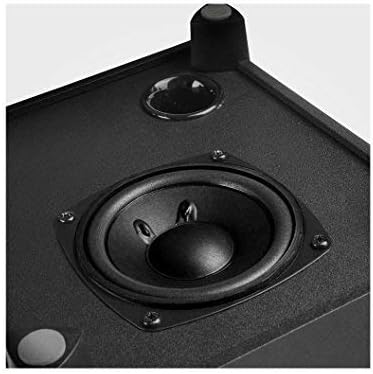
Figure 4.4: Close-up view of the subwoofer driver, located on the side of the main unit.
5. Setup Instructions
- Positioning Speakers: Place the subwoofer on a stable surface, preferably on the floor for optimal bass. Position the satellite speakers on either side of your listening area, facing towards you.
- Connect Satellite Speakers: Connect the cables from the two satellite speakers to the "Speaker Out" (L/R) ports on the rear panel of the subwoofer. Ensure correct polarity if applicable (usually indicated by color or markings).
- Connect Audio Source:
- AUX Input: Use the provided 3.5mm audio cable to connect your audio device (e.g., smartphone, computer) to the "AUX" input port on the subwoofer.
- USB/SD Card: Insert a USB flash drive or SD card containing audio files into the respective port/slot. The system will automatically switch to USB/SD mode if detected.
- Bluetooth: For Bluetooth connection, proceed to the "Operating Instructions" section for pairing details.
- Connect Power: Plug the power cord into a standard AC power outlet.
- Power On: Flip the "Power" switch on the rear panel of the subwoofer to the "ON" position. The system is now ready for operation.
6. Operating Instructions
6.1 Power On/Off
To power on the system, switch the power button on the rear panel to the "ON" position. To power off, switch it to "OFF".
6.2 Mode Selection
The XM2BT supports multiple input modes. Use the "MODE" button on the remote control or the main unit to cycle through the available inputs: Bluetooth, AUX, USB, and SD card.
6.3 Volume and Bass Control
- Volume: Adjust the master volume using the main volume knob on the subwoofer or the volume buttons on the remote control.
- Bass: Adjust the bass level using the "BASS" control knob on the rear panel of the subwoofer.
6.4 Bluetooth Pairing
- Switch the speaker system to Bluetooth mode. The indicator light will flash, indicating it is in pairing mode.
- On your audio device (e.g., smartphone, tablet), enable Bluetooth and search for available devices.
- Select "EDIFIER XM2BT" from the list of found devices.
- Once paired, the indicator light on the speaker system will become solid, and you will hear a confirmation tone.
- You can now play audio from your device through the XM2BT speakers.
6.5 USB/SD Card Playback
- Insert a USB flash drive or SD card into the corresponding slot on the subwoofer.
- The system will automatically detect the media and begin playback. If not, switch to USB or SD mode using the "MODE" button.
- Use the playback controls (Play/Pause, Next/Previous Track) on the remote control or main unit to manage your music.
7. Maintenance
- Cleaning: Use a soft, dry cloth to clean the surfaces of the speakers. Do not use liquid cleaners, aerosols, or abrasive materials.
- Storage: If storing the system for an extended period, unplug it from the power outlet and store it in a cool, dry place away from direct sunlight and extreme temperatures.
- Ventilation: Ensure that the ventilation openings on the subwoofer are not blocked to prevent overheating.
8. Troubleshooting
| Problem | Possible Cause | Solution |
|---|---|---|
| No sound |
|
|
| Bluetooth connection issues |
|
|
| USB/SD card not playing |
|
|
9. Specifications
| Feature | Detail |
|---|---|
| Brand | Edifier |
| Model Number | XM2BT |
| Speaker Type | 2.1 Multimedia Speaker System |
| Connectivity Technology | Wired, Bluetooth |
| Special Feature | Bluetooth, USB, SD Card, AUX Input |
| Power Source | Corded Electric |
| Max Speaker Output Power | 21 Watts |
| Product Dimensions | 32.3 x 31 x 27.7 cm (approx. 12.7 x 12.2 x 10.9 inches) |
| Item Weight | 3.55 kg (approx. 7.8 lbs) |
| Compatible Devices | Tablet, Laptop, Smartphone |
| Color | Black |
10. Warranty and Support
Edifier products are designed with quality and reliability in mind. For detailed warranty information, please refer to the warranty card included with your product or visit the official Edifier website. For technical support, product inquiries, or service, please contact Edifier customer service or visit the Edifier Brand Store.
Related documentsXM2BT


Ask a question about this manual
Ask about setup, troubleshooting, compatibility, parts, safety, or missing instructions. Manuals+ will review the question and use this page’s manual context to help answer it.