
Introduction
Thank you for choosing the Runleader Digital Kitchen Timer RL-KT002A. This device is designed to assist with various timing needs, offering dual count-down and count-up functions, a real-time clock display, and environmental temperature and humidity monitoring. Please read this manual thoroughly to understand its features and ensure correct operation.

Image 1: Front view of the Runleader Digital Kitchen Timer RL-KT002A, displaying the time, temperature, and humidity. The device is black with a clear LCD screen and gray control buttons.
Product Features
- Real-time Clock: Displays time in 12-hour format (AM/PM).
- Dual Count-Down Timers (T1 & T2): Track remaining time for two separate activities simultaneously. Timing range: 99 hours, 59 minutes, 59 seconds.
- Dual Count-Up Timers (T1 & T2): Function as stopwatches to measure elapsed time for two separate activities simultaneously. Timing range: 99 hours, 59 minutes, 59 seconds.
- Timing Value Storage: Ability to save a frequently used timing value for future recall.
- Temperature and Humidity Display: Shows current environmental temperature (switchable between °C and °F) and relative humidity.
- Adjustable Alarm: Beep alarm with High, Low, or Silence volume options.
- Mounting Options: Features a hanging hook, back magnet, and adjustable stand for versatile placement.
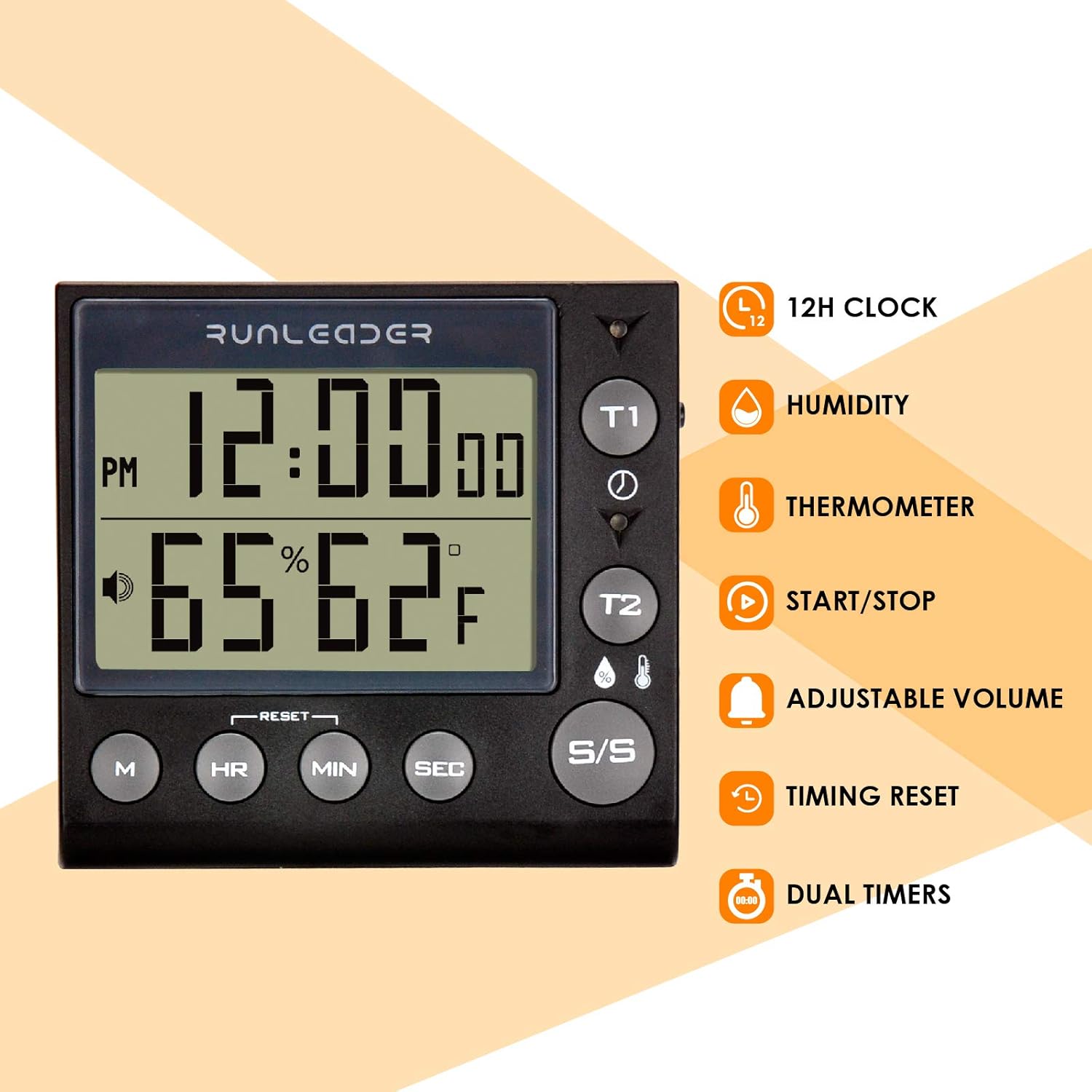
Image 2: Diagram illustrating the key features of the Runleader timer, including 12H clock, humidity, thermometer, start/stop, adjustable volume, timing reset, and dual timers.
Setup
1. Battery Installation
- Locate the battery compartment on the back of the timer.
- Open the battery compartment cover.
- Insert two (2) AAA batteries (not included), ensuring correct polarity (+/-).
- Close the battery compartment cover securely.
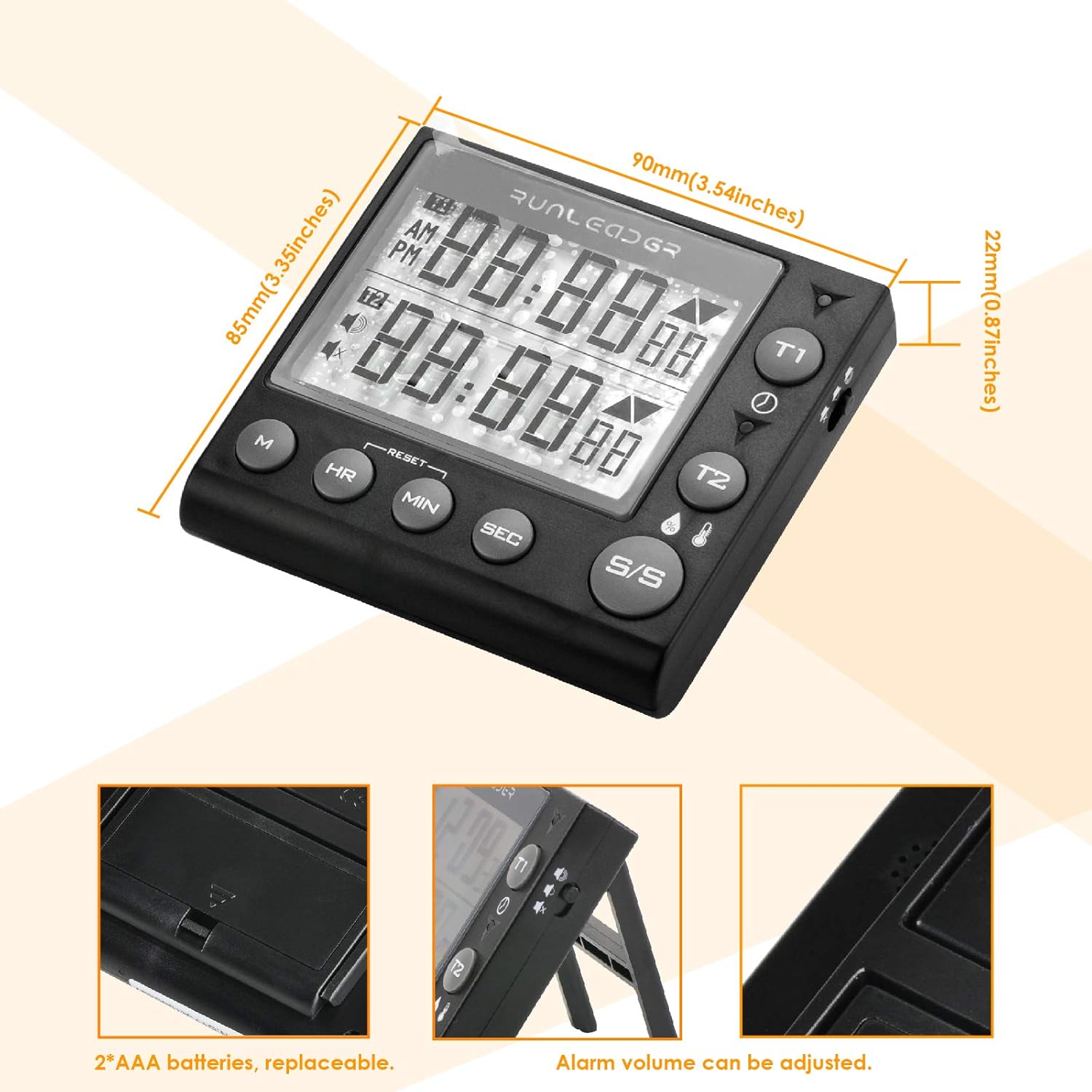
Image 3: Detailed view showing the battery compartment for two AAA batteries, product dimensions, and the alarm volume adjustment feature.
2. Initial Clock Setting
- In clock display mode, press the M button to enter setting mode. The hour digits will flash.
- Press HR to adjust the hour.
- Press MIN to adjust the minute.
- Press SEC to adjust the second.
- Press M again to confirm and exit setting mode. If no operation occurs for 10 seconds, the device will automatically save settings and exit.
3. Placement Options
- Magnetic Back: Attach the timer to metallic surfaces like refrigerators.
- Hanging Hook: Use the integrated hook to hang the timer on a wall or rack.
- Adjustable Stand: Fold out the stand for tabletop use.

Image 4: Visual representation of the timer's versatile mounting options, including a hanging hook, a back magnet for metal surfaces, and an adjustable stand for desktop use.
Operating Instructions
1. Clock Display
The timer defaults to displaying the real-time clock. The time is shown in 12-hour format with AM/PM indicators.
2. Count-Down Timer (T1 & T2)
- Press T1 or T2 to select the desired timer.
- Press HR, MIN, and SEC buttons to set the desired count-down time.
- Press S/S (Start/Stop) to begin the count-down.
- The indicator light will turn green when the timer starts. It will turn yellow when less than 1 minute remains, and red when the time has elapsed.
- To pause, press S/S again. Press S/S to resume.
- To reset a stopped timer, press the RESET button.

Image 5: The timer displaying a count-down for an activity, such as boiling eggs, demonstrating its ability to track remaining time.
3. Count-Up Timer (Stopwatch)
- Ensure the selected timer (T1 or T2) is set to 00:00:00.
- Press S/S to start the count-up.
- Press S/S again to pause. Press S/S to resume.
- To reset the count-up timer, press the RESET button when the timer is stopped.

Image 6: The timer functioning as a stopwatch, recording elapsed time for activities like studying or exercise.
4. Timing Value Storage
- To store a timing value, set the desired time using HR, MIN, and SEC buttons for either T1 or T2.
- While the timer is stopped and the desired value is displayed, press and hold the M button until the display indicates the value is saved.
- To recall the stored value, press the M button briefly.
- Note: The stored value will reset to 0 if the batteries are replaced.
5. Temperature and Humidity Display
The timer continuously displays the current ambient temperature and relative humidity. The temperature unit can be switched between Celsius (°C) and Fahrenheit (°F).
- To switch the temperature unit, press the °C/°F button (often combined with another button or a dedicated small button on the side/back).

Image 7: The timer displaying current humidity and temperature readings, suitable for monitoring environmental conditions.
6. Alarm Settings
- When a count-down timer reaches zero, an alarm will sound for approximately 1 minute.
- To stop the alarm, press the S/S button.
- To adjust the alarm volume (High/Low/Silence), locate the volume switch or button, typically on the side or back of the device.
Maintenance
- Cleaning: Wipe the timer with a soft, dry cloth. Do not use abrasive cleaners or immerse the device in water.
- Battery Replacement: Replace batteries when the display becomes dim or the device stops functioning. Always use two new AAA batteries.
- Storage: If storing the timer for an extended period, remove the batteries to prevent leakage.
Troubleshooting
| Problem | Possible Cause / Solution |
|---|---|
| Display is dim or blank. | Batteries are low or depleted. Replace with new AAA batteries. |
| Timer not starting/stopping. | Ensure the correct timer (T1 or T2) is selected. Press the S/S button firmly. |
| Alarm is not audible. | Check the alarm volume setting. It may be set to "Silence". Adjust to High or Low. |
| Clock time is incorrect after battery replacement. | The clock resets to default (12:00) upon battery replacement. Reset the time manually as per "Initial Clock Setting" instructions. |
| Stored timing value is lost. | Stored values are cleared when batteries are replaced. Re-save your desired timing value. |
Specifications
- Model: RL-KT002A
- Brand: Runleader
- Material: Acrylonitrile Butadiene Styrene (ABS)
- Product Dimensions: 0.87"D x 3.54"W x 3.35"H (22mm D x 90mm W x 85mm H)
- Item Weight: 91 Grams (3.21 ounces)
- Timing Range: 99 hours, 59 minutes, 59 seconds
- Power Source: 2 x AAA batteries (not included)
- Display: Digital LCD
- Features: Dual Count-Down/Count-Up, Real-time Clock, Temperature (°C/°F), Humidity, Alarm, Timing Memory
Warranty and Support
For warranty information or technical support, please refer to the product packaging or contact Runleader customer service directly. Contact details are typically available on the manufacturer's official website or through the retailer where the product was purchased.