
Runleader RL-KT002A
Runleader Digital Kitchen Timer User Manual
Model: RL-KT002A
Introduction
Thank you for choosing the Runleader Digital Kitchen Timer. This versatile device is designed to assist you with various timing needs, offering dual count-down and count-up functions, a real-time clock display, and environmental temperature and humidity monitoring. It is an ideal tool for cooking, baking, gym workouts, exams, meetings, and personal care routines.

Image: Front view of the Runleader Digital Kitchen Timer, displaying the current time, temperature, and humidity. The device is black with a clear digital screen and grey control buttons.
Setup
Battery Installation
The Runleader Digital Kitchen Timer requires two (2) AAA batteries (not included) for operation. Follow these steps to install the batteries:
- Locate the battery compartment cover on the back of the timer.
- Slide or lift the cover to open the compartment.
- Insert two AAA batteries, ensuring the correct polarity (+ and -) as indicated inside the compartment.
- Replace the battery compartment cover securely.
After battery installation, the clock value will reset to 12:00 by default. You will need to set the current time.
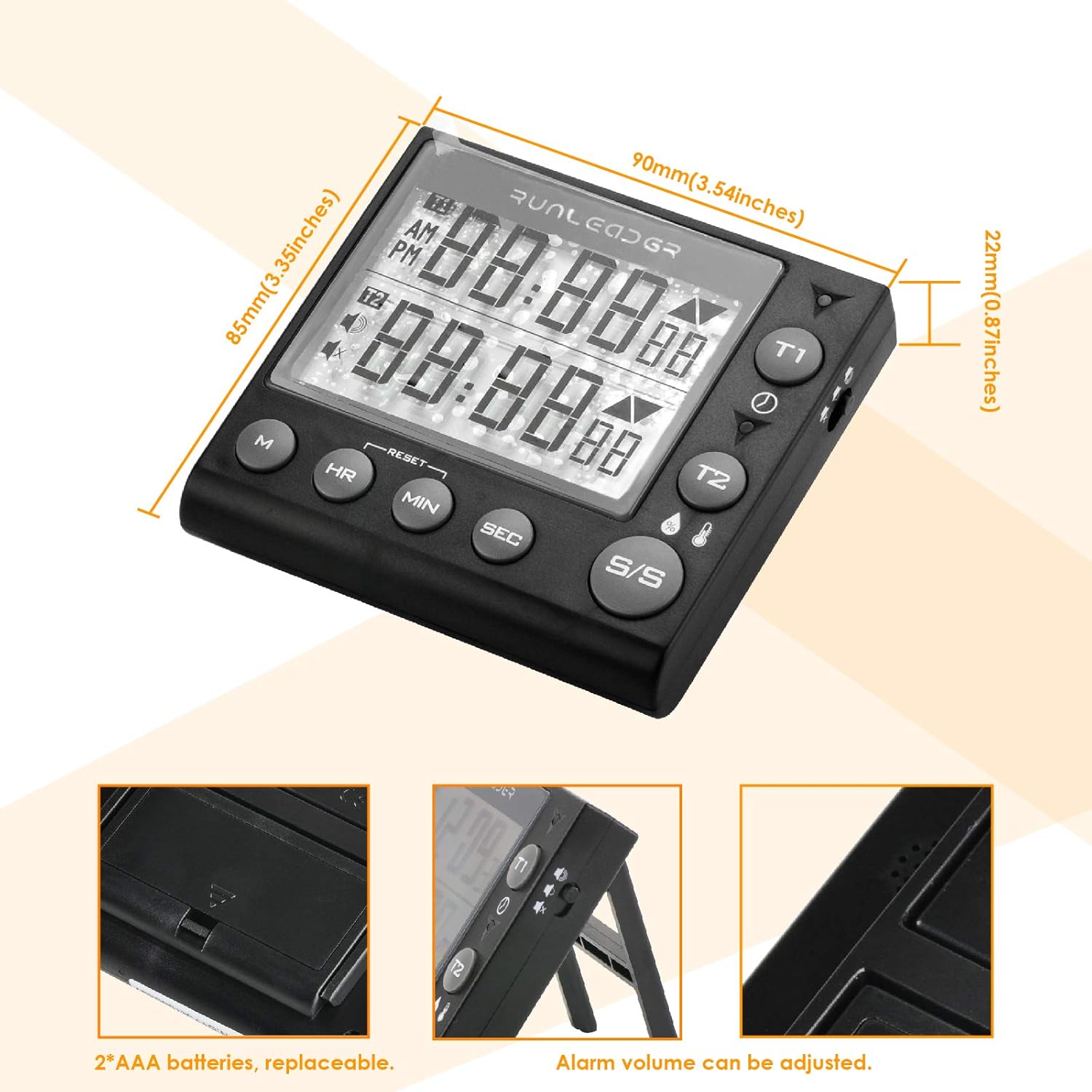
Image: Close-up view of the back of the Runleader Digital Kitchen Timer, highlighting the battery compartment and overall dimensions of the device.
Operating Instructions
Product Features Overview
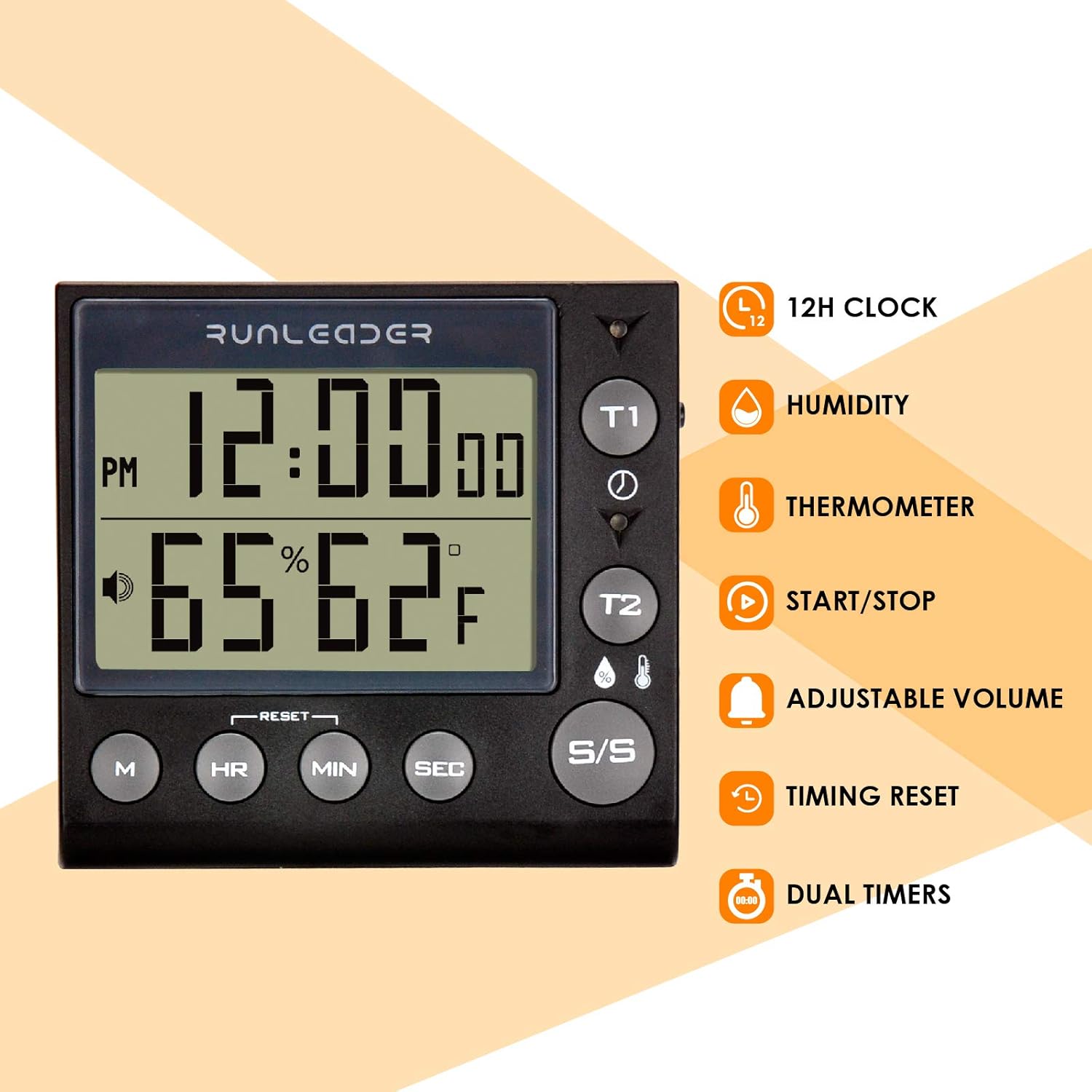
Image: The Runleader Digital Kitchen Timer displayed alongside icons representing its key features: 12-hour clock, humidity display, thermometer, start/stop function, adjustable volume, timing reset, and dual timers.
1. Real-time Clock Display
The timer displays the current time in a 12-hour format (A.M. and P.M.).
- To set the clock, press the M button to enter clock setting mode.
- Use the HR, MIN, and SEC buttons to adjust the hours, minutes, and seconds respectively.
- Press M again to confirm and exit, or wait 10 seconds for automatic exit and setting storage.
2. Dual Count-down & Count-up Timers
The device features two independent timers (T1 and T2) that can operate simultaneously for both count-down and count-up functions. The timing range is 99 hours, 59 minutes, and 59 seconds.
Count-down Timer Operation:
- Select the desired timer (T1 or T2) by pressing its respective button.
- Press HR, MIN, and SEC buttons to set the desired count-down time.
- Press the S/S (Start/Stop) button to begin the count-down.
- Indicator lights will show the status: Green for active, Yellow for less than 1 minute remaining, and Red when the time has arrived.
- To pause or resume, press S/S. To reset the timer when stopped, press the RESET button.

Image: The timer displaying two active countdowns, demonstrating its ability to track multiple events simultaneously, such as cooking different items.
Count-up Timer (Stopwatch) Operation:
- Select the desired timer (T1 or T2).
- Ensure the timer is reset to 00:00:00. If not, press the RESET button.
- Press the S/S button to start the count-up.
- Press S/S again to pause or stop the count-up.
- To reset the timer when stopped, press the RESET button.

Image: The timer displaying two active count-up timers, illustrating its use as a stopwatch for activities like studying or exercise.
Timing Value Storage:
The timer allows you to store a specific timing value for future use. This stored value will reset to 0 if the batteries are replaced.
- Set the desired time using HR, MIN, and SEC buttons.
- Press and hold the M button to save the current time as a stored value.
- To recall the stored value, press the M button briefly.
3. Temperature and Humidity Display
The timer continuously displays the current ambient temperature and humidity. You can switch between Celsius (℃) and Fahrenheit (℉) units.
- To switch temperature units, press the dedicated temperature/humidity button (often labeled with ℃/℉ or a thermometer icon).

Image: The timer showing its temperature and humidity display function, indicating current environmental conditions.
4. Alarm Reminder
When a count-down timer reaches zero, an alarm will sound for 1 minute. The alarm volume can be adjusted.
- To stop the alarm, press the S/S button.
- To adjust the alarm volume (High/Low/Silence), locate the volume control button (often indicated by a speaker icon) and press it repeatedly to cycle through the options.
Mounting Options
The Runleader Digital Kitchen Timer offers multiple convenient mounting options:
- Hanging Hook: Utilize the integrated hook to hang the timer on a wall hook or rack.
- Back Magnet: The strong magnet on the back allows you to attach the timer to metallic surfaces like refrigerators or ovens.
- Adjustable Stand: Use the foldable stand on the back to place the timer upright on a countertop or table.

Image: Visual representation of the timer's versatile mounting options, including a hanging hook, a strong back magnet for metal surfaces, and a foldable adjustable stand for tabletop use.
Maintenance
- Cleaning: Wipe the timer with a soft, damp cloth. Do not use abrasive cleaners or immerse the device in water.
- Battery Replacement: Replace batteries when the display dims or functions become erratic. Always use new AAA batteries and dispose of old batteries responsibly.
- Storage: Store the timer in a cool, dry place when not in use for extended periods. Remove batteries if storing for more than a few months to prevent leakage.
Troubleshooting
| Problem | Possible Cause | Solution |
|---|---|---|
| Display is blank or dim. | Low or dead batteries. | Replace with new AAA batteries. Ensure correct polarity. |
| Timer not responding to button presses. | Batteries are low or incorrectly installed. Device may be frozen. | Check battery installation and replace if necessary. Remove and reinsert batteries to reset the device. |
| Alarm is too loud/quiet or silent. | Alarm volume setting is incorrect. | Press the volume control button (speaker icon) to cycle through High, Low, and Silence settings. |
| Clock time resets after battery replacement. | This is normal behavior. | Reset the clock time manually after each battery replacement. |
Specifications
| Model Number | RL-KT002A |
| Brand | Runleader |
| Material | Acrylonitrile Butadiene Styrene (ABS) |
| Dimensions (L x W x H) | 3.54"W x 3.35"H x 0.87"D (90mm x 85mm x 22mm) |
| Item Weight | 91 Grams (3.21 ounces) |
| Timing Range | 99 hours, 59 minutes, 59 seconds |
| Power Source | 2 x AAA Batteries (not included) |
| UPC | 606412395187 |
| Manufacturer | Ningbo Jiangbei Run Leader Electronics Co., Ltd |
Warranty and Support
The Runleader Digital Kitchen Timer comes with a 2-year manufacturer warranty.
For warranty claims, technical support, or any inquiries regarding your product, please contact Runleader customer service through their official channels or the retailer where the product was purchased.
For more information, you may visit the Runleader Store on Amazon.
Ask a question about this manual
Ask about setup, troubleshooting, compatibility, parts, safety, or missing instructions. Manuals+ will review the question and use this page’s manual context to help answer it.