
1. Introduction
This manual provides essential information for the safe and effective use of your Fytoo 3.7V 600mAh 802540 Li-Po batteries. These batteries are designed as spare parts for various RC Quadcopters and Helicopters, ensuring extended flight times and reliable performance. Please read this manual thoroughly before use.

Image 1.1: Overview of the Fytoo 3.7V 600mAh Li-Po battery pack and packaging.
2. Package Contents
Verify that all items are present in the package:
- 3 x Fytoo 3.7V 600mAh 802540 Li-Po Batteries

Image 2.1: The packaging box for the Fytoo batteries.
3. Compatibility
These batteries are compatible with the following RC Quadcopter and Helicopter models:
- SYMA X5C-1
- SYMA X5C
- SYMA X5
- SYMA X5SC
- SYMA X5SW
- H9D
- H5C
- SS40
- FQ36
- T32
- T5W
- H42

Image 3.1: Examples of compatible drone models (SS40, FQ36, S5C, X5C).
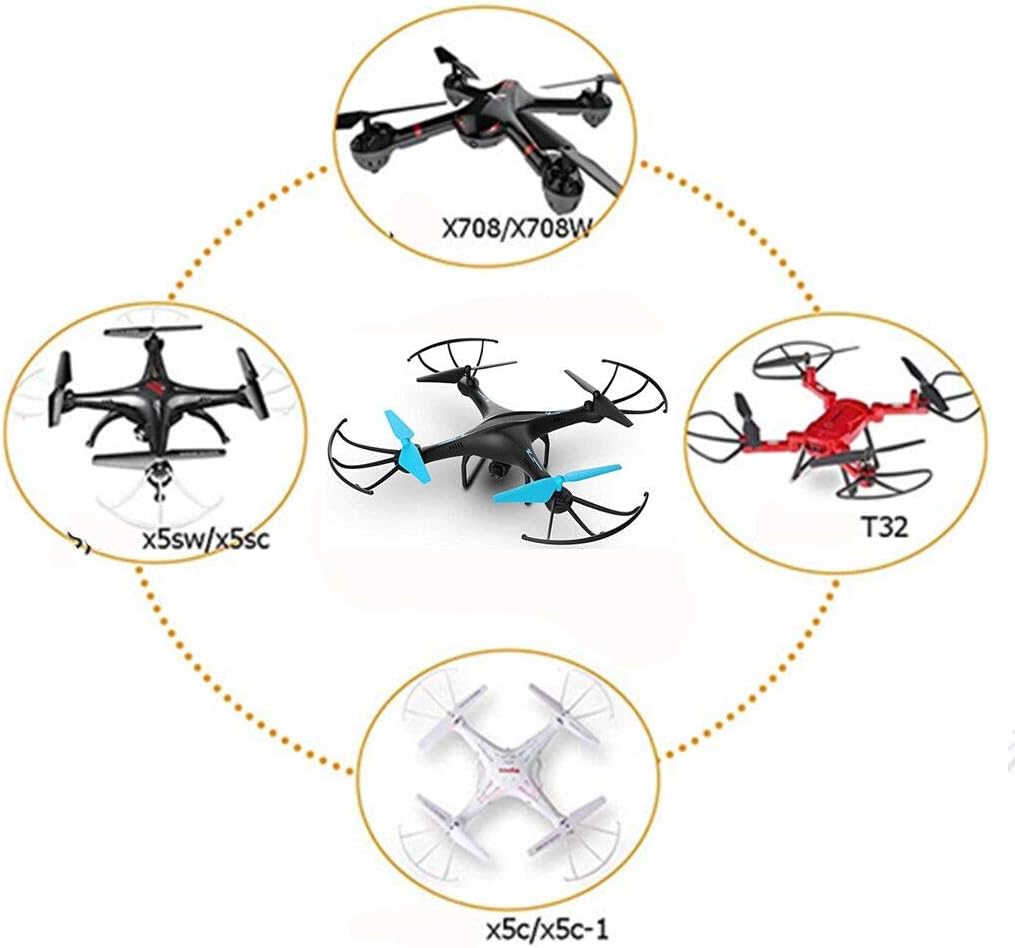
Image 3.2: Additional compatible drone models (X708/X708W, T32, X5C/X5C-1, X5SW/X5SC).
4. Setup and Installation
Follow these steps to install the battery into your compatible RC device:
- Power Off Device: Ensure your RC quadcopter or helicopter is completely powered off before attempting battery installation or removal.
- Locate Battery Compartment: Identify the battery compartment on your RC device. Refer to your device's specific user manual for exact location and opening instructions.
- Insert Battery: Carefully insert the Fytoo 3.7V 600mAh battery into the compartment, ensuring the connector aligns correctly. Do not force the battery.
- Connect Battery: Connect the battery's plug to the corresponding port in the device's battery compartment. Ensure a secure connection.
- Close Compartment: Close the battery compartment securely.

Image 4.1: A single Fytoo battery, showing its connector.
5. Operating Instructions
Proper charging and usage are crucial for battery longevity and safety.
5.1 Charging the Battery
Use only the charger specifically designed for your RC device and compatible with 3.7V Li-Po batteries. Overcharging or using an incompatible charger can damage the battery and pose a safety risk.
- Connect Battery to Charger: Plug the battery into the appropriate charging port on your charger.
- Connect Charger to Power: Plug the charger into a suitable power source (e.g., USB port, wall adapter).
- Monitor Charging: Observe the charger's indicator lights. Charging typically completes when the light changes color or turns off. Do not leave batteries unattended while charging.
- Disconnect After Charging: Once fully charged, disconnect the battery from the charger immediately.
5.2 Using the Battery
Once installed and charged, the battery powers your RC device. Always ensure the battery is securely connected before operation.

Image 5.1: Detailed view of the Fytoo battery label.
6. Maintenance and Storage
Proper maintenance extends battery life and ensures safe operation.
- Cool Down Before Recharge: Allow the battery to cool down completely after use and before recharging. This prevents overheating and prolongs battery life.
- Storage: Store batteries in a cool, dry place away from direct sunlight, heat sources, and flammable materials.
- Avoid Over-Discharge: Do not completely drain the battery. Stop using the device when you notice a significant drop in power.
- Regular Inspection: Periodically inspect batteries for any signs of damage, swelling, or leakage. Discontinue use immediately if any damage is observed.
- Disposal: Dispose of old or damaged batteries responsibly according to local regulations. Do not dispose of them in household waste.

Image 6.1: Safety instructions label on the battery.
7. Troubleshooting
If you encounter issues with your Fytoo batteries, consider the following common solutions:
| Problem | Possible Cause | Solution |
|---|---|---|
| Battery not charging |
|
|
| Drone not powering on with new battery |
|
|
| Short flight time |
|
|
8. Specifications
| Feature | Detail |
|---|---|
| Brand | Fytoo |
| Model Number | 802540 |
| Battery Cell Composition | Lithium Ion (Li-Po) |
| Voltage | 3.7V |
| Battery Capacity | 600 mAh (Milliampere Hour) |
| Recommended Uses | Drone, RC Quadcopter, Helicopter |
| Unit Count | 3 Count |
| Manufacturer | China |
| First Available Date | January 7, 2018 |
9. Support
For any questions, concerns, or assistance regarding your Fytoo batteries, please do not hesitate to contact our customer service. We are committed to providing excellent service.
Please refer to your purchase platform or packaging for specific contact details.