
Introduction
This Walfront DC 12V Electronic Load Tester is designed for precise constant current discharge and battery capacity testing. It features an intelligent design with a high-speed fan for efficient heat dissipation and multiple protection mechanisms to ensure safe and reliable operation. This module is ideal for testing power banks and other DC 12V power sources.
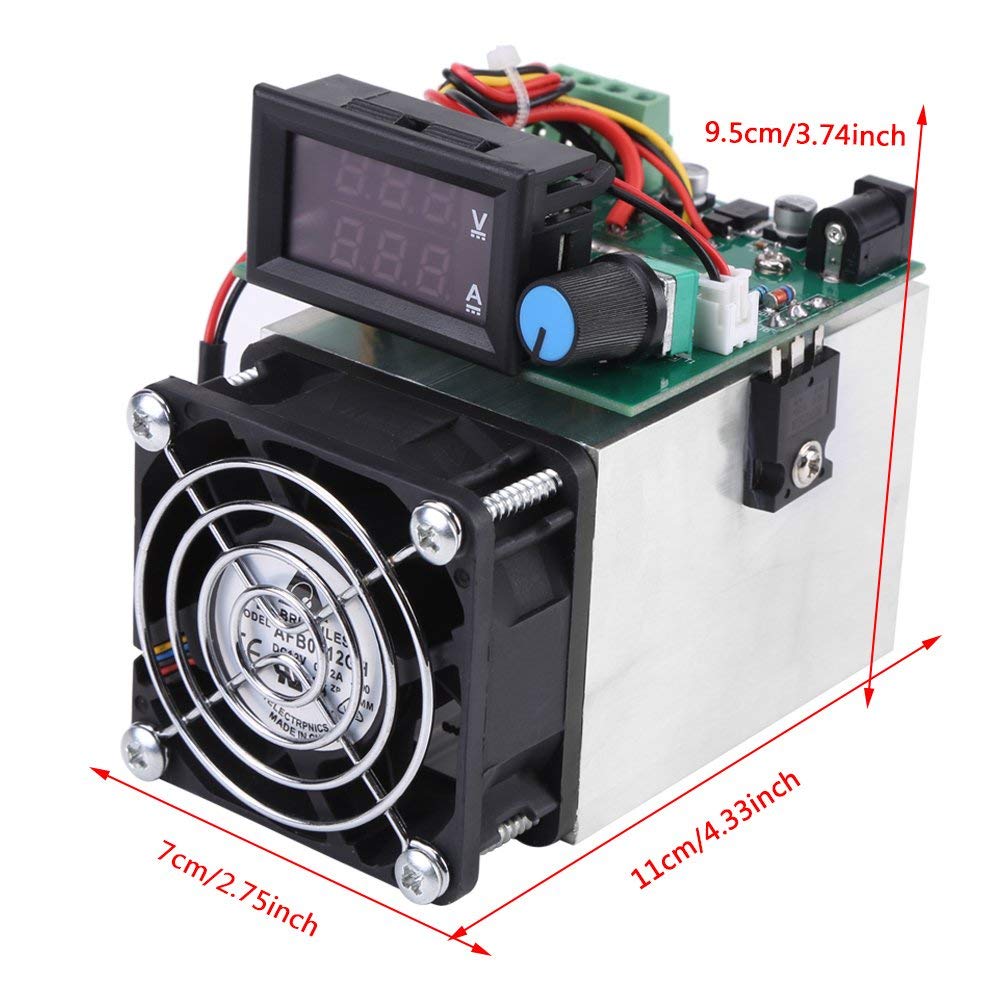
Figure 1: Walfront DC 12V Electronic Load Tester. This image shows the overall device with its fan, heat sink, control knob, and digital display, along with approximate dimensions.
Setup Instructions
- Power Supply Connection: Connect a DC 12V power supply to the device. Ensure the power supply is stable and within the specified voltage range (DC12V±5%).
- Initial State: Before connecting the load, ensure the constant current adjustment knob is turned fully anti-clockwise to its minimum setting. This ensures the device is in a stop state.
- Load Connection: Connect the power source or battery to be tested to the test input power port. Pay close attention to polarity; incorrect connection can damage the device. Refer to the wiring diagram below for correct connections.

Figure 2: Wiring Diagram. This diagram illustrates the correct connection points for the DC 12V input and the load terminals.
Safety Precautions:
- Always verify correct polarity before applying power.
- Ensure the working voltage is below 100V and the working power is below 100W to prevent damage.
- Operate in a well-ventilated area to assist with heat dissipation.
Operating Instructions
- Activate Electronic Load Mode: Once the 12V power supply is connected, the device will enter electronic load mode.
- Set Constant Current: Gradually turn the constant current adjustment knob clockwise to set the desired discharge current. The digital display will show the current (A) and voltage (V) readings.
- Monitor Readings: Observe the voltage and current values on the integrated digital display during the discharge process.
- Capacity Testing: The module can be used for detecting discharge battery capacity. The accuracy for capacity testing varies with current: 2.5% at 0.5A, 1.5% at 2A, and 1.2% at 5A and above.

Figure 3: Digital Display and Control Knob. This image highlights the integrated voltmeter and ammeter display, along with the constant current adjustment knob.
Fan Operation:
The integrated fan automatically adjusts its speed based on the heat sink temperature. This intelligent control ensures optimal cooling and protects the module from overheating during prolonged operation.
Maintenance
- Cleaning: Periodically clean the heat sink and fan to prevent dust accumulation, which can impede cooling performance. Use a soft brush or compressed air.
- Ventilation: Ensure the device is operated in an environment with adequate airflow to allow for proper heat dissipation.
- Storage: Store the device in a dry, cool place away from direct sunlight and extreme temperatures when not in use.
Troubleshooting
The electronic load tester is equipped with multiple protection features. If the device is not functioning as expected, consider the following:
- No Power/Display: Check the DC 12V power supply connection and ensure it is providing the correct voltage. Verify polarity.
- Unexpected Shutdown: The device has protection against overheating, overpower, and over-voltage. If it shuts down, check if the operating parameters (voltage, current, power) exceed the specified limits (e.g., above 100V or 100W). Allow the device to cool down if overheating is suspected.
- Incorrect Readings: Ensure all connections are secure and correct. Verify the input power source is stable.
- Fan Not Operating: The fan speed is temperature-controlled. If the device is cool, the fan may operate at a very low speed or be off. If the device is hot and the fan is not spinning, check for obstructions or contact customer support.
- Reverse Polarity Protection: The device includes reverse polarity protection. If the input is connected incorrectly, it will prevent damage but the device will not operate. Correct the polarity.
Specifications
| Feature | Specification |
|---|---|
| Power Supply | DC12V±5% |
| Fan Current | 0.72A |
| Constant Discharge Current Range | 0-10A (whole machine) |
| Working Mode | Single Mode Constant Current (CC) |
| Discharge Current Error | 0.7%±0.01A |
| Capacity Test Error | 0.5A: 2.5%, 2A: 1.5%, 5A and above: 1.2% |
| Maximum Power | 100W |
| Input Interface | 5.5 x 2.5mm |
| Dimensions (L x W x H) | Approx. 11 x 9.5 x 7cm / 4.3 x 3.7 x 2.7inch |
| Weight | 385g / 0.39 Kilograms |
| Color | Black, Silver |
Warranty Information
For warranty details regarding your Walfront DC 12V Electronic Load Tester, please refer to the retailer's return and warranty policy at the point of purchase. Alternatively, you may contact Walfront customer support directly for specific warranty terms and conditions.
Customer Support
Should you require technical assistance, have questions about product operation, or need to report an issue, please contact Walfront customer support. Please have your product model number (Walfrontwzsro3dynv) and purchase information ready when contacting support.
For general inquiries, you may visit the Walfront Store on Amazon.