
Introduction
Thank you for purchasing the Mayer Induction Cooker. This manual provides essential information for the safe and efficient operation, maintenance, and troubleshooting of your new appliance. Please read it thoroughly before first use and keep it for future reference.
Important Safety Instructions
To reduce the risk of fire, electric shock, injury to persons, or damage to the appliance, basic safety precautions should always be followed, including the following:
- Read all instructions carefully before using the appliance.
- Do not touch hot surfaces. Use handles or knobs.
- To protect against electric shock, do not immerse cord, plugs, or the appliance in water or other liquid.
- Close supervision is necessary when any appliance is used by or near children.
- Unplug from outlet when not in use and before cleaning. Allow to cool before putting on or taking off parts.
- Do not operate any appliance with a damaged cord or plug or after the appliance malfunctions or has been damaged in any manner. Return appliance to the nearest authorized service facility for examination, repair, or adjustment.
- The use of accessory attachments not recommended by the appliance manufacturer may cause injuries.
- Do not use outdoors.
- Do not let cord hang over edge of table or counter, or touch hot surfaces.
- Do not place on or near a hot gas or electric burner, or in a heated oven.
- Extreme caution must be used when moving an appliance containing hot oil or other hot liquids.
- Always attach plug to appliance first, then plug cord into the wall outlet. To disconnect, turn any control to "off", then remove plug from wall outlet.
- Do not use appliance for other than intended use.
- Notice: The ceramic plate is hot after cooking, please don't touch with your hand.
Product Overview
The Mayer Induction Cooker is designed for efficient and fast cooking. Familiarize yourself with its components:

Figure 1: Front-side view of the Mayer Induction Cooker, showing the control knob and cooking surface.

Figure 2: Top view of the Mayer Induction Cooker, highlighting the ceramic cooking plate and the "mayer" logo. A warning about the hot ceramic plate is visible.

Figure 3: Rear view of the Mayer Induction Cooker, showing the ventilation grilles and the attached power cord with a 3-pin plug.

Figure 4: The stainless steel cooking pot included with the induction cooker, featuring a glass lid and two side handles.

Figure 5: The Mayer Induction Cooker with the included cooking pot correctly positioned on its ceramic surface, ready for use.
Setup
- Unpacking: Carefully remove the induction cooker and all accessories from the packaging. Retain packaging for future storage or transport.
- Placement: Place the induction cooker on a stable, flat, heat-resistant surface. Ensure there is adequate ventilation around the unit (at least 10-15 cm clearance from walls or other objects). Do not place it on a metal surface.
- Power Connection: Ensure the voltage rating of the appliance matches your local power supply. Plug the power cord into a grounded electrical outlet.
- Cookware: Use only induction-compatible cookware. The included pot is suitable. Place the cookware centrally on the cooking zone.
Operating Instructions
- Power On: Ensure the cooker is plugged in and suitable cookware is placed on the ceramic plate. Turn the control knob from "OFF" to "ON".
- Select Power Level: Rotate the control knob to select the desired power level. The cooker offers 8 power levels: 500W, 800W, 1000W, 1300W, 1600W. Start with a lower setting and adjust as needed.
- Cooking: The induction cooker will begin heating the cookware rapidly. Monitor your cooking process.
- Power Off: After cooking, turn the control knob back to the "OFF" position. Unplug the appliance from the wall outlet.
- Cool Down: Allow the ceramic plate to cool completely before cleaning or storing. The surface will remain hot for some time after use.
Maintenance and Cleaning
Regular cleaning and maintenance will ensure the longevity and optimal performance of your induction cooker.
- Always unplug the appliance and allow it to cool completely before cleaning.
- Wipe the ceramic cooking surface with a damp cloth and mild detergent. For stubborn stains, use a non-abrasive cleaner specifically designed for ceramic cooktops.
- Do not use abrasive pads, harsh chemicals, or steel wool, as these can scratch or damage the surface.
- Clean the exterior housing with a soft, damp cloth. Do not immerse the unit in water or any other liquid.
- Ensure the ventilation openings are free from dust and debris. Use a soft brush or vacuum cleaner to gently clear them if necessary.
- The included pot can be washed with standard dishwashing detergent.
Troubleshooting
| Problem | Possible Cause | Solution |
|---|---|---|
| Cooker does not turn on. | Not plugged in; power outage; control knob not turned to "ON". | Check power cord connection; verify power supply; turn knob to "ON". |
| Cookware not heating. | Cookware is not induction-compatible; cookware not centered; cookware too small/large. | Use induction-compatible cookware; center cookware on the cooking zone; ensure cookware base diameter is appropriate. |
| Unusual noise during operation. | Normal fan operation; slight hum from induction coils. | This is usually normal. If noise is excessive or unusual, contact customer support. |
| Cooker shuts off unexpectedly. | Overheating protection activated; cookware removed; internal fault. | Allow unit to cool; ensure cookware is present; if problem persists, contact customer support. |
Specifications
- Brand: Mayer
- Model: B078SDBWNH
- Power: 1600W
- Power Levels: 8 (500W, 800W, 1000W, 1300W, 1600W)
- Control Type: Push Button / Rotary Knob
- Heating Elements: 1
- Special Features: Adjustable Power Levels, Fast Heating
- Dimensions (Package): 37.5 x 36.5 x 22 cm
- Weight (Package): 3.54 kg
- Included Components: Induction Cooker, Pot
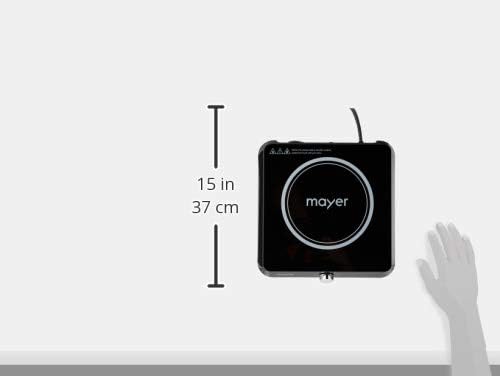
Figure 6: Approximate dimensions of the Mayer Induction Cooker, showing it is approximately 15 inches (37 cm) square.
Warranty and Support
This Mayer Induction Cooker comes with a 1 Year Local (Singapore) Manufacturer Warranty. Please retain your proof of purchase for warranty claims.
For technical support, service, or warranty inquiries, please contact Mayer customer service through their official channels.


