
1. Safety Instructions
Please read these safety instructions carefully before using the device. Failure to follow these instructions may result in electric shock, fire, or serious injury.
- Always disconnect the power plug from the socket before moving, cleaning, or performing any maintenance on the device.
- Do not operate the device with a damaged cord or plug. If the cord or plug is damaged, contact customer support.
- Keep the device out of reach of children and pets.
- Do not immerse the device in water or other liquids.
- Ensure the voltage indicated on the device matches your local power supply before connecting.
- Only use clean tap water in the water tank. Do not add essential oils or other additives directly into the water tank unless specifically designed for it, as this may damage the ultrasonic membrane.
- Do not block the air inlets or outlets.
- Place the humidifier on a stable, flat, and water-resistant surface, away from direct sunlight and heat sources.
Important Maintenance Reminder:

This image shows symbols for filter maintenance and water tank cleaning frequency.
- Filter Check: The filter must be checked and cleaned before each operation if necessary. Replace the filter if it is defective. Do not insert a wet filter; wait until it has dried.
- Water Tank Cleaning: The water tank should be cleaned every 3 days. Change the water in the tank every 3 days. Disconnect the device from the mains before cleaning.
2. Product Overview
The TROTEC B 5 E is an ultrasonic humidifier designed to improve indoor air quality by adding moisture to the air and featuring an integrated ionizer for air purification. It is suitable for rooms up to 30 m² / 75 m³.
Key Features:
- Humidifier and Air Washer functionality
- 360° rotatable mist nozzle for targeted humidification
- Three adjustable mist levels
- Integrated ionizer for enhanced air quality
- Automatic operation, Baby mode, and Night mode
- Digital display for humidity level
- Activatable LED lighting for the water tank
- Timer function for scheduled operation
Components:
- Main Unit with Control Panel
- Water Tank (4 Liters capacity)
- 360° Mist Nozzle
- Pre-filter
- Cleaning Brush
- Power Cable
- Instruction Manual
- Water filter or demineralizing cartridge (may include a silver ion stick for disinfection)

Front view of the TROTEC B 5 E Humidifier, highlighting its design and Intertek GS certification.
3. Setup
3.1 Unpacking
- Carefully remove the device from its packaging.
- Check for any signs of damage during transit. If damaged, do not operate and contact customer support.
- Remove all packaging materials and dispose of them responsibly.
3.2 Placement
- Place the humidifier on a firm, level, and water-resistant surface.
- Ensure there is at least 15 cm of space around the device for proper air circulation.
- Avoid placing the device near heat sources, direct sunlight, or electronic equipment sensitive to moisture.
3.3 Filling the Water Tank
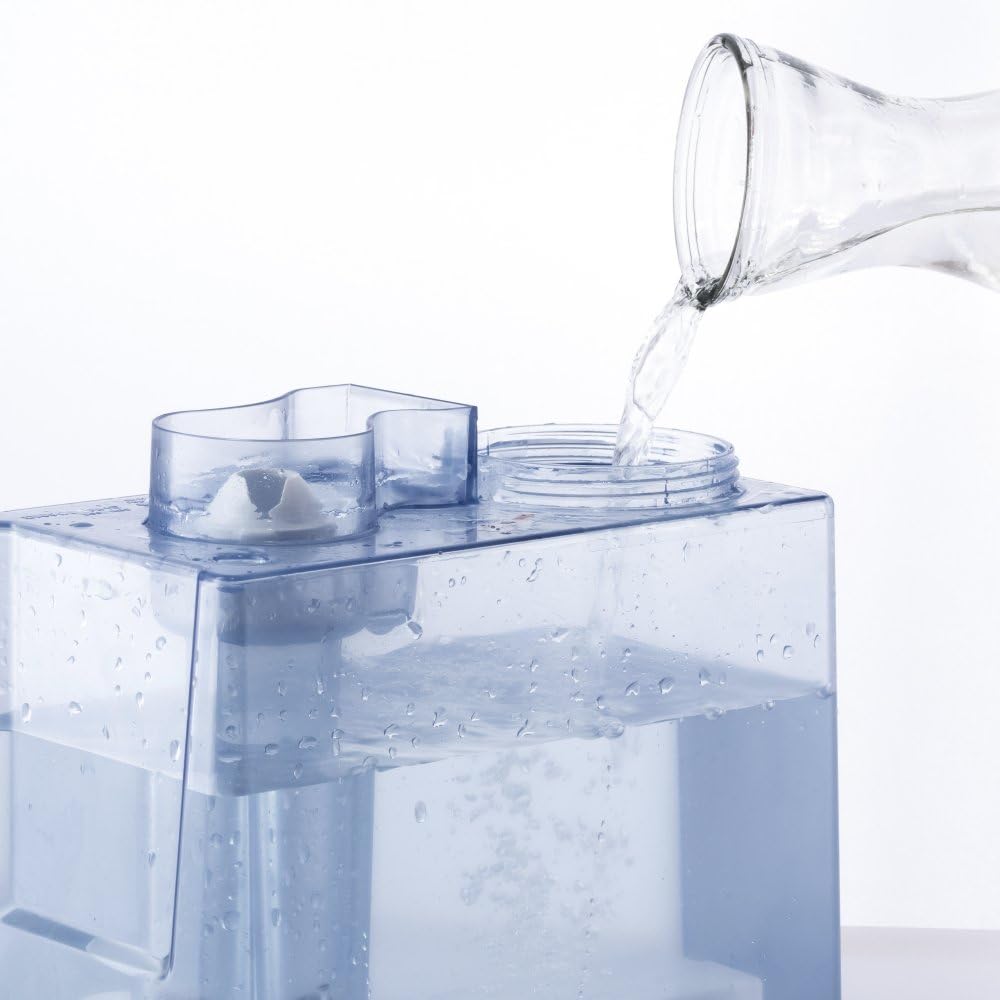
Illustration of filling the water tank.
- Remove the water tank from the main unit.
- Unscrew the cap at the bottom of the water tank.
- Fill the tank with clean, cool tap water. Do not exceed the maximum fill line.
- Screw the cap back on tightly.
- Place the filled water tank back onto the main unit, ensuring it is seated correctly.
3.4 Power Connection
- Plug the power cable into a suitable electrical outlet (230V).
- The device will emit a short beep, and the display will briefly illuminate.
4. Operation

Detailed view of the control panel with touch buttons.
4.1 Power On/Off
- Press the On/Off button (power symbol) to turn the device on or off.
4.2 Mist Level Adjustment
- Press the Mist button (cloud symbol) repeatedly to cycle through three mist output levels (Low, Medium, High). The selected level will be indicated on the display.
4.3 Humidity Setting
- Press the Humidity button (percentage symbol) to set your desired humidity level. The device will automatically maintain this level.
- The current room humidity is displayed when no specific target humidity is set.
4.4 Timer Function
- Press the Timer button (clock symbol) to set an operating time after which the device will automatically switch off. Each press increases the timer by one hour.
4.5 Night Mode (Sleep Mode)
- Press the Sleep button (moon symbol) to activate Night Mode. In this mode, the display lights are dimmed, and the device operates at a lower, quieter mist level.
4.6 Ionizer Function
- Press the Ionizer button (fan symbol with dots) to activate or deactivate the integrated ionizer, which helps to purify the air.
4.7 LED Lighting
- Press the Light button (sun symbol) to turn the water tank LED lighting on or off.
4.8 360° Mist Nozzle

The 360° rotatable mist nozzle allows for flexible mist direction.
- The mist nozzle on top of the device can be manually rotated 360 degrees to direct the mist flow as desired.
5. Maintenance
Regular cleaning and maintenance ensure optimal performance and extend the lifespan of your humidifier.
5.1 Cleaning the Water Tank
- Disconnect the device from the power supply.
- Remove the water tank and empty any remaining water.
- Clean the inside of the tank with a soft brush or cloth and mild detergent. Rinse thoroughly with clean water.
- Clean the water tank every 3 days to prevent mineral buildup and bacterial growth.
5.2 Cleaning the Ultrasonic Nebulizer

Removing the pre-filter and using the cleaning brush for the nebulizer.
- Disconnect the device from the power supply.
- Locate the ultrasonic nebulizer (the small metal disc) at the bottom of the water basin.
- Use the provided cleaning brush to gently remove any mineral deposits or residue from the surface of the nebulizer. Do not use abrasive materials or sharp objects.
- Wipe the water basin with a soft, damp cloth.
5.3 Filter Cleaning/Replacement
- The pre-filter should be checked and cleaned regularly.
- Remove the filter cover and take out the pre-filter.
- Clean the filter with a soft brush or vacuum cleaner to remove dust and debris. If heavily soiled, rinse with water and allow it to dry completely before reinserting.
- Replace the filter if it is damaged or no longer effective.
5.4 Storage
- If the device will not be used for an extended period, clean it thoroughly as described above.
- Ensure all parts are dry before storing.
- Store the device in a cool, dry place, away from direct sunlight and extreme temperatures.
6. Troubleshooting
If you encounter problems with your TROTEC B 5 E humidifier, please refer to the following table before contacting customer support.
| Problem | Possible Cause | Solution |
|---|---|---|
| No mist output | Water tank empty Ultrasonic nebulizer dirty Device not powered on | Refill water tank Clean nebulizer (see Section 5.2) Press On/Off button |
| Unusual noise or gurgling | Water level too low Device not on a flat surface | Refill water tank Place device on a stable, flat surface |
| White dust around device | Hard water used | Use distilled or demineralized water. Ensure water filter/demineralizing cartridge is installed and functioning. |
| Display not working | Night mode active Power issue | Press Sleep button to deactivate Night Mode Check power connection |
| Device leaks water | Water tank cap not tightened Water tank not seated correctly | Ensure water tank cap is securely tightened Re-seat water tank properly on the base |
7. Specifications

Dimensions of the TROTEC B 5 E Humidifier.
| Feature | Detail |
|---|---|
| Model | B 5 E |
| Brand | TROTEC |
| Operating Mode | Ultrasonic |
| Capacity | 4 Liters |
| Recommended Room Size | Up to 30 m² / 75 m³ |
| Power | 32.7 Watts |
| Voltage | 230 Volts |
| Runtime | Approx. 13 hours (on lowest setting) |
| Control Method | Touch Panel |
| Dimensions (D x W x H) | 17.5 cm x 28.5 cm x 29 cm |
| Weight | 3.34 Kilograms |
| Material | Durable plastic housing with stainless steel internal components |
| Filter Type | Pre-filter |
| Special Features | Timer, Ionizer, Night Mode, 360° Mist Nozzle |
| Color | Black |
8. Warranty and Support
TROTEC products are manufactured to high-quality standards and come with a manufacturer's warranty. For specific warranty terms and conditions, please refer to the documentation included with your purchase or visit the official TROTEC website.
If you require technical assistance, spare parts, or have any questions regarding your TROTEC B 5 E humidifier, please contact TROTEC customer support through their official channels. Ensure you have your model number (B 5 E) and purchase details available when contacting support.
For more information, visit: www.trotec.com

