
1. Introduction
This manual provides essential information for the safe and effective installation, operation, and maintenance of the Schneider Easy9 Miniature Circuit Breaker (MCB). The Easy9 MCB is designed for protection against overcurrents resulting from overload and short-circuit in electrical installations, primarily for home and hotel applications. Please read this manual thoroughly before any installation or operation.
2. Safety Information
WARNING: Risk of electric shock or fire.
- Installation and maintenance must be performed by qualified personnel only.
- Always disconnect power before working on electrical circuits.
- Ensure proper grounding and wiring according to local electrical codes.
- Do not use the device if it appears damaged.
- The MCB is designed for 415 Volts systems. Ensure compatibility with your electrical system.
3. Product Overview
The Schneider Easy9 MCB is a single-pole (1P) circuit breaker with a C-curve tripping characteristic and a 6 Amps current rating. It is designed for DIN rail mounting.
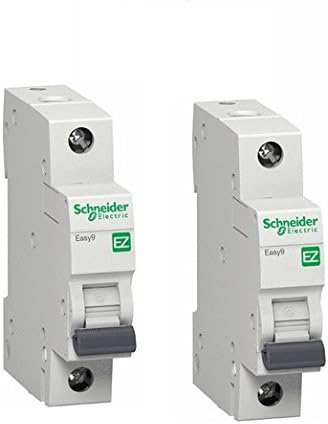
Image: Two Schneider Easy9 Miniature Circuit Breakers. These devices are white, featuring the green 'Schneider Electric' logo and 'EZ' symbol. The image clearly shows the toggle switch for manual operation and the terminal screws for electrical connections at the top and bottom of each unit.
Key Components:
- Toggle Switch: Used to manually switch the circuit breaker ON or OFF, and indicates the tripped state.
- Terminals: Screw terminals for connecting incoming and outgoing electrical wires.
- DIN Rail Clip: For secure mounting on a standard DIN rail.
4. Setup and Installation
Follow these steps for proper installation:
- Power Disconnection: Ensure that the main power supply to the distribution board is completely disconnected and locked out before beginning any work. Verify with a voltage tester.
- Mounting: Attach the Easy9 MCB onto a standard 35mm DIN rail. Ensure it clicks securely into place.
- Wiring:
- Connect the incoming phase wire to the top terminal of the MCB.
- Connect the outgoing phase wire to the bottom terminal of the MCB.
- Ensure all connections are tight and secure to prevent loose contacts and overheating. Recommended torque for terminal screws should be followed as per electrical standards.
- Verification: Double-check all wiring connections for correctness and tightness.
- Restore Power: Once installation is complete and verified, restore power to the distribution board.
5. Operating Instructions
Switching ON/OFF:
- To switch the circuit ON, push the toggle switch upwards to the 'I' (ON) position.
- To switch the circuit OFF, push the toggle switch downwards to the 'O' (OFF) position.
Tripping:
In the event of an overload or short-circuit, the MCB will automatically trip, moving the toggle switch to an intermediate or 'O' (OFF) position. This indicates a fault in the circuit it protects.
Resetting a Tripped MCB:
- Identify and rectify the cause of the trip (e.g., remove overloaded appliances, fix short circuits).
- Once the fault is cleared, push the toggle switch fully down to the 'O' (OFF) position, then push it upwards to the 'I' (ON) position to reset the MCB and restore power.
- If the MCB trips immediately after resetting, do not attempt to reset it again. There is still a fault in the circuit that needs professional attention.
6. Maintenance
Schneider Easy9 MCBs are generally maintenance-free. However, periodic checks are recommended:
- Visual Inspection: Periodically inspect the MCB for any signs of physical damage, discoloration, or loose connections.
- Terminal Tightness: With power disconnected, occasionally check the tightness of the terminal screws.
- Cleaning: If necessary, clean the exterior of the MCB with a dry, lint-free cloth. Do not use liquid cleaners or solvents.
Any repairs or internal inspections should only be carried out by qualified electricians.
7. Troubleshooting
| Problem | Possible Cause | Solution |
|---|---|---|
| MCB trips frequently. | Overload in the circuit, short circuit, or faulty appliance. | Reduce load, disconnect faulty appliances, check wiring for short circuits. If problem persists, consult an electrician. |
| MCB does not reset. | Persistent fault (short circuit/overload) or internal damage to MCB. | Ensure fault is cleared. If still unable to reset, the MCB may be damaged and needs replacement by a qualified electrician. |
| MCB feels hot to the touch. | Overload, loose connections, or internal fault. | Immediately disconnect power. Check for overload and tighten connections. Do not restore power until the cause is identified and rectified by a professional. |
8. Specifications
| Attribute | Value |
|---|---|
| Brand | Schneider Electric |
| Model | Easy9 |
| Current Rating | 6 Amps |
| Circuit Breaker Type | Standard Miniature Circuit Breaker (MCB) |
| Mounting Type | DIN Rail Mount |
| Number of Poles | 1 (Single Pole) |
| Voltage | 415 Volts |
| Tripping Curve | C Curve |
| Color | White |
| Dimensions (approx. for single unit) | Refer to product datasheet for exact dimensions. |
| Weight (for 10 units) | 2.75 pounds |
9. Warranty and Support
For warranty information and technical support, please refer to the official Schneider Electric website or contact their customer service. Keep your purchase receipt as proof of purchase.
Schneider Electric Official Website: www.se.com
For specific product inquiries or technical assistance, it is recommended to contact a certified Schneider Electric distributor or service center in your region.


