Introduction
Thank you for choosing the Redragon Nothosaur M606 Gaming Mouse. This manual provides detailed instructions to help you set up, operate, and maintain your new gaming mouse. Please read this manual thoroughly before use to ensure optimal performance and longevity of your device.
The Redragon Nothosaur M606 is a wired gaming mouse designed for precision and comfort, featuring adjustable DPI, programmable buttons, and customizable LED lighting.
Product Overview
The Redragon Nothosaur M606 gaming mouse is engineered for an enhanced gaming experience. It features a comfortable ergonomic design, a high-precision optical sensor, and customizable functions.

Figure 1: Redragon Nothosaur M606 Gaming Mouse, showcasing its design and red LED illumination.
Key Features:
- High-Precision Sensor: Equipped with a PMW3168 optical sensor for accurate tracking.
- Adjustable DPI: Four customizable DPI levels for varying sensitivity needs.
- Programmable Buttons: Side buttons can be configured for macros and in-game functions.
- LED Backlighting: Features 4 distinct lighting colors, each corresponding to a DPI setting.
- Ergonomic Design: Crafted for comfortable use during extended gaming sessions.

Figure 2: Various angles of the Redragon Nothosaur M606 mouse, highlighting its ergonomic shape and button placement.
Setup
- Unpack the Mouse: Carefully remove the Redragon Nothosaur M606 mouse from its packaging. Ensure all components are present (mouse, user manual).
- Connect to Computer: Plug the USB connector of the mouse into an available USB port on your computer.
- Driver Installation: The mouse is typically plug-and-play, and your operating system should automatically detect and install the necessary drivers. No additional software is required for basic functionality. For advanced customization of buttons and macros, please refer to the Redragon official website for any available software or drivers, though some models may not offer dedicated software.
- Test Functionality: Once connected, move the mouse to check cursor movement. Click the left and right buttons to ensure they are responsive.
Operating Instructions
DPI Adjustment
The Redragon Nothosaur M606 features a dedicated DPI button located behind the scroll wheel, allowing you to switch between four preset DPI levels. Each DPI level is indicated by a specific LED color:
- Red LED: 1000 DPI
- Blue LED: 1600 DPI
- Green LED: 2400 DPI
- Purple LED: 3200 DPI
Press the DPI button repeatedly to cycle through these sensitivity settings to find the one that best suits your needs.
Programmable Buttons
The mouse includes side buttons that can be configured for macros and in-game functions. While the mouse is plug-and-play for basic use, advanced customization for these buttons typically requires specific software. Please check the Redragon support website for any available software for the M606 model to set up macros.
LED Lighting
The Nothosaur M606 features dynamic LED backlighting. The color of the LED lighting directly corresponds to the currently selected DPI setting, as detailed in the DPI Adjustment section. There is no independent control for the LED colors; they change automatically with DPI selection.
Maintenance
Proper maintenance ensures the longevity and optimal performance of your Redragon Nothosaur M606 mouse.
- Cleaning: Use a soft, dry cloth to wipe the surface of the mouse. For stubborn dirt, slightly dampen the cloth with water or a mild cleaning solution. Avoid using harsh chemicals or abrasive materials.
- Sensor Cleaning: Occasionally, dust or debris may accumulate around the optical sensor. Use a cotton swab lightly dampened with isopropyl alcohol to gently clean the sensor area. Ensure the mouse is disconnected from the computer before cleaning.
- Cable Care: Avoid sharp bends or excessive pulling on the USB cable to prevent damage.
- Storage: When not in use, store the mouse in a clean, dry environment away from extreme temperatures.
Troubleshooting
If you encounter issues with your Redragon Nothosaur M606 mouse, refer to the following common solutions:
- Mouse Not Responding:
- Ensure the USB cable is securely plugged into a working USB port on your computer.
- Try plugging the mouse into a different USB port.
- Restart your computer.
- Erratic Cursor Movement:
- Clean the optical sensor at the bottom of the mouse.
- Ensure you are using the mouse on a clean, non-reflective, and uniform surface (e.g., a mouse pad).
- Check for any physical obstructions around the sensor.
- DPI Button Not Changing Sensitivity/Color:
- Press the DPI button firmly.
- Ensure the mouse is properly connected and recognized by your computer.
- Side Buttons Not Working:
- For basic forward/backward functionality, ensure your operating system or browser supports these actions.
- For custom macros, verify that any necessary Redragon software is installed and configured correctly (if available for this model).
Specifications
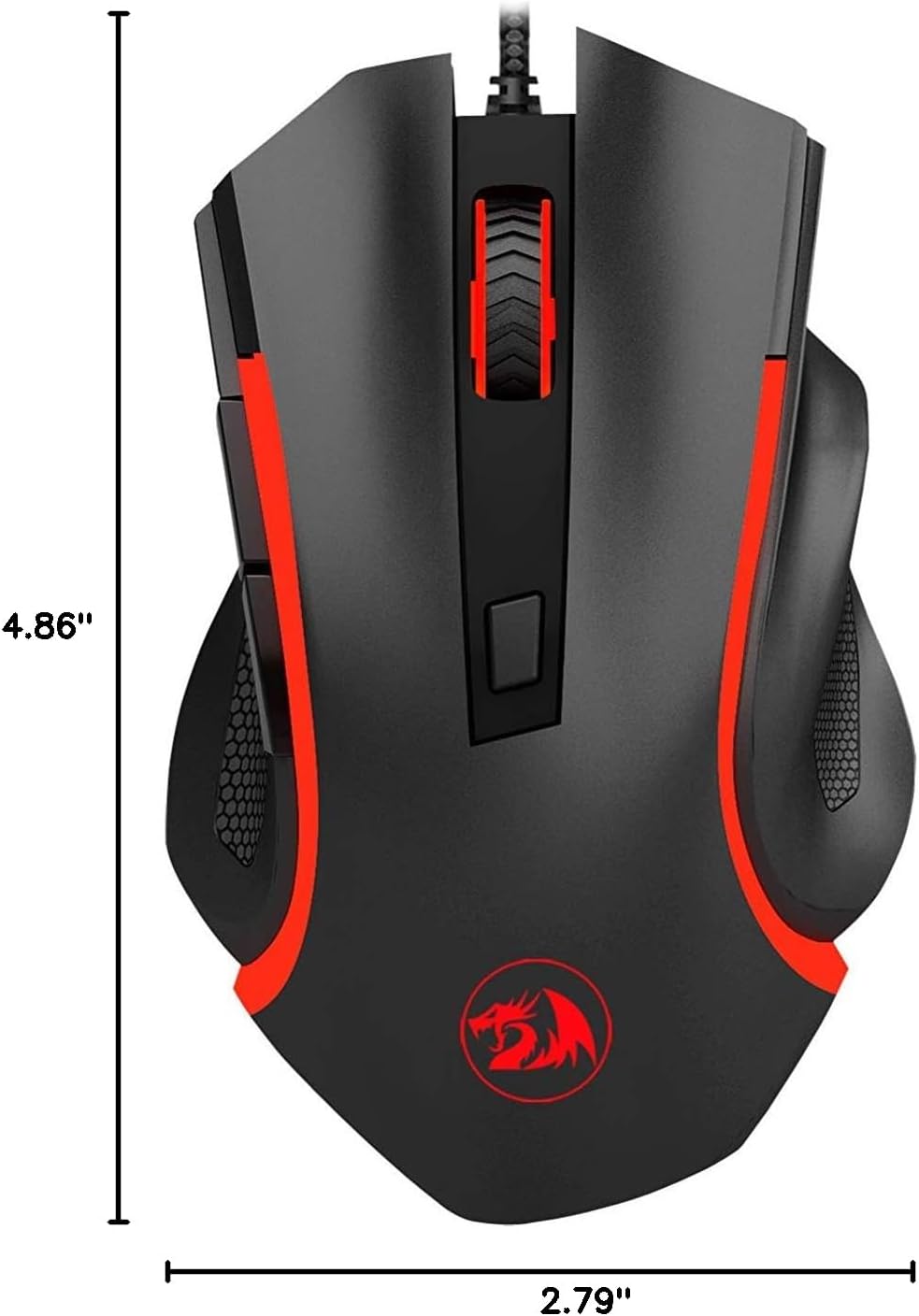
Figure 3: Physical dimensions of the Redragon Nothosaur M606 mouse.
| Feature | Detail |
|---|---|
| Model Number | M606 |
| Connectivity Technology | Wired (USB) |
| Movement Detection Technology | Optical (PMW3168 Sensor) |
| DPI Settings | 1000 / 1600 / 2400 / 3200 DPI |
| Special Feature | LED Backlit (4 Colors corresponding to DPI) |
| Buttons | 6 (Left, Right, Scroll Click, DPI, 2 Side Buttons) |
| Product Dimensions | 4.84 x 2.91 x 0.1 inches (approx. 12.3 x 7.4 x 0.25 cm) |
| Item Weight | 0.01 ounces (approx. 0.28 grams) - Note: This weight seems unusually low and may be a data entry error. Actual weight is likely higher. |
| Color | Black with Red accents |
| Manufacturer | Redragon |
Warranty Information
Redragon products typically come with a limited manufacturer's warranty. The specific terms and duration of the warranty may vary by region and retailer. Please refer to the warranty card included with your purchase or visit the official Redragon website for detailed warranty information and registration procedures.
Keep your proof of purchase (receipt or invoice) as it will be required for any warranty claims.
Support
For further assistance, technical support, or to download the latest drivers and software (if available for your model), please visit the official Redragon support website:
You may also find helpful FAQs and community forums on their website.


