
1. Introduction
This manual provides instructions for the UBay RMT-17 Replacement Remote Control, designed for various Westinghouse TV models. This remote control is a direct replacement and requires no programming for most compatible televisions. Please read this manual carefully to ensure proper operation and to troubleshoot common issues.

Image 1.1: The UBay RMT-17 Replacement Remote Control. This image shows the full remote control from a slight angle, highlighting its black finish and button layout.
2. Compatibility
The UBay RMT-17 remote control is compatible with the following Westinghouse TV models:
- LD-2480, LD-3280, RMT17, LD2480, LD3280
- VR2218, VR-2218, VR3215, VR-3215, VR-2418, VR2418
- EW24T3LW, EW19S4JW, LD-3240, LD3240, EW32S3PW, EW19S4JW, EW24T3LW
- CW24T9BW, CW24T9PW, DW32H1G1, DW37H1G1, EU24H1G1
- EW32S5KW, EW37S5KW, EW39T5KW, EW50T5KW
- 504C2216104, RT504C2216104, VR2680DF, VR2215, VR-2215, EU24H1G1, VR-2680DF
- LE19B13200, LE19B13200A, LE19B13200B, LE19B13200C, LE19B13200E, LE19B13200F
- LE22B13800, LE22B13800B, LE22B13800C, LE24C2380, LE26B13200
- LE32B13200, LE32B13200A, LE32B13200B, LE32F2220A, LE32F2220B
- LE39F2280, LE39F2280A, LE42F2280, LE42F2280A, LE42F2280B, LE46F2380A
- TV-5620-121, TV5620121, RC2012V, 504C1931102
- LED19VH50, LED22VF50, LED22VH50, LED26VF50
3. Setup
3.1 Battery Installation
- Locate the battery compartment on the back of the remote control.
- Slide open the battery cover.
- Insert two (2) AAA batteries (not included), ensuring the positive (+) and negative (-) terminals match the diagrams inside the compartment.
- Close the battery cover securely.
3.2 Initial Use
This replacement remote control is designed to work directly with compatible Westinghouse TV models without any programming or pairing. After installing the batteries, it should be ready for immediate use.
4. Operating Instructions
The UBay RMT-17 remote control features standard buttons for TV operation. Refer to the image below for a visual guide to the button layout and their general functions.
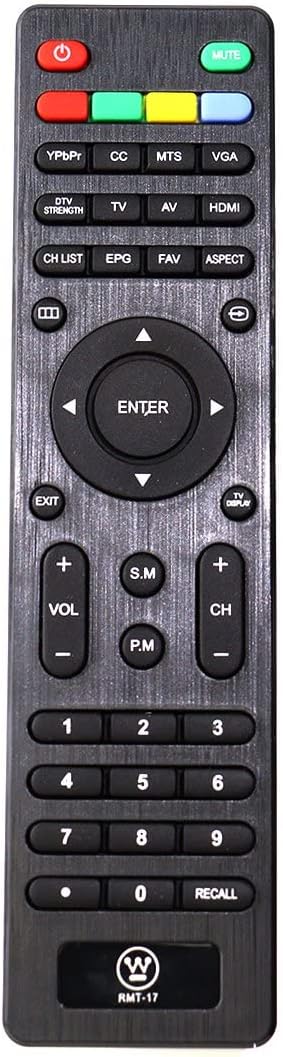
Image 4.1: Front view of the UBay RMT-17 remote control, detailing the layout of all buttons. Key buttons include Power (red), Mute (green), Input Selectors (YPbPr, CC, MTS, VGA, TV, AV, HDMI), Channel/Volume controls, Number Pad, and Navigation buttons.
- Power Button (Red): Turns the TV on or off.
- Mute Button (Green): Mutes or unmutes the TV audio.
- Input Buttons (YPbPr, CC, MTS, VGA, TV, AV, HDMI): Selects different input sources for the TV.
- DTV Strength: Displays digital TV signal strength.
- CH LIST: Accesses the channel list.
- EPG: Opens the Electronic Program Guide.
- FAV: Accesses favorite channels.
- ASPECT: Changes the screen aspect ratio.
- Navigation Pad (Up, Down, Left, Right, ENTER): Navigates menus and confirms selections.
- EXIT: Exits the current menu or function.
- TV DISPLAY: Displays TV information.
- VOL +/-: Adjusts the volume level.
- CH +/-: Changes the TV channel.
- S.M (Sound Mode): Cycles through sound modes.
- P.M (Picture Mode): Cycles through picture modes.
- Number Pad (0-9): Directly enters channel numbers.
- RECALL: Returns to the previously viewed channel.
5. Maintenance
5.1 Battery Replacement
Replace batteries when the remote's response becomes sluggish or stops working. Always replace both batteries with new ones of the same type (AAA). Do not mix old and new batteries, or different types of batteries.
5.2 Cleaning
To clean the remote control, gently wipe it with a soft, dry cloth. For stubborn dirt, a slightly damp cloth can be used, followed by a dry cloth. Avoid using harsh chemicals or abrasive cleaners, as these can damage the remote's surface or internal components.
6. Troubleshooting
6.1 Remote Control Not Working
If the remote control does not function as expected, try the following steps:
- Check Batteries: Ensure batteries are inserted correctly with the correct polarity (+/-) and are not depleted. Replace with fresh AAA batteries if necessary.
- Reset the Remote:
- Remove the batteries from the remote.
- Press every button on the remote at least one time to drain any residual power.
- Re-insert the batteries back into the remote.
- Test the remote control.
- Reset the TV: Sometimes, the issue might be with the television itself.
- Unplug the TV from the power outlet.
- Press and hold the TV's power button for five seconds.
- Plug the TV back in and turn it on.
- Test the remote control.
- Obstruction: Ensure there are no obstructions between the remote control and the TV's infrared sensor.
- Line of Sight: Point the remote directly at the TV's sensor.
7. Specifications
| Feature | Detail |
|---|---|
| Brand | UBay |
| Model Number | Ubay RMT-17 |
| Compatible Devices | Television (Various Westinghouse models) |
| Power Source | 2 x AAA Batteries (not included) |
| Color | Black |
| Special Feature | Ergonomic design |
| Package Dimensions | 6.89 x 1.77 x 0.63 inches |
| Item Weight | 2.08 ounces |
8. Warranty and Support
This product is a replacement remote control. For specific warranty information, please refer to the seller or the original product packaging. For further assistance or troubleshooting beyond this manual, please contact the seller directly through the platform where the purchase was made.
For information regarding your Westinghouse television, please consult your TV's original user manual or the Westinghouse support website.