
1. Introduction and Overview
The Maxima M-ICE 28 is a professional ice cube machine designed for commercial environments such as cocktail bars, fast-food restaurants, and cafes. It is engineered for efficient and reliable ice production, ensuring a consistent supply of ice for your needs.
Key features of the Maxima M-ICE 28 include:
- Produces up to 28 kg of hollow, bullet-shaped ice cubes within 24 hours.
- Integrated storage compartment with a capacity of 7 kg of ice.
- Compact design, ideal for under-counter or bar installation.
- Air-cooled system, suitable for indoor use.
- Equipped with overload protection for safe operation.
- Efficient cooling system utilizing R290 refrigerant.
- Constructed with 18/8 stainless steel housing and door, and an ABS interior for durability and hygiene.
- Features adjustable feet for stable placement.
- Includes necessary supply hoses for water connection and a practical ice scoop.
- Control panel with warning lights indicating errors, full storage, and low water levels.

Figure 1.1: Front perspective view of the Maxima M-ICE 28 Ice Cube Machine.
2. Safety Instructions
Please read all safety instructions carefully before operating the appliance to prevent injury or damage. Keep this manual for future reference.
- Ensure the appliance is properly grounded and connected to a suitable power supply (230V).
- Do not immerse the appliance, cord, or plug in water or other liquids.
- Keep the appliance out of reach of children and unauthorized personnel.
- Always unplug the appliance from the power outlet before cleaning, maintenance, or when not in use.
- Do not block the ventilation openings on the appliance. Ensure adequate air circulation around the unit.
- The refrigerant used in this machine is R290. Servicing should only be performed by qualified personnel.
- Do not operate the appliance if the power cord or plug is damaged, or if the appliance malfunctions or has been damaged in any way. Contact a qualified service technician.
- Use only original accessories and parts provided or approved by Maxima.
3. Setup
3.1 Unpacking
Carefully remove the ice machine from its packaging. Inspect the appliance for any signs of damage during transit. Retain the packaging materials for future transport or storage.
3.2 Placement
Place the ice machine on a stable, level surface. The adjustable feet allow for precise leveling. Ensure there is sufficient space around the unit, especially at the rear, for proper air circulation as it is air-cooled. Avoid placing the machine near heat sources or in direct sunlight.

Figure 3.1: Side view of the Maxima M-ICE 28, highlighting the ventilation grille for air cooling.
3.3 Water Connection
Connect the provided supply hoses to a potable water source and to the water inlet on the ice machine. Ensure all connections are secure and leak-free. A drain hose is also included and should be connected to a suitable drainage point.

Figure 3.2: The included water supply hoses and ice scoop.
3.4 Electrical Connection
Plug the power cord into a grounded 230V electrical outlet. Ensure the outlet meets the power requirements of the machine (240W).

Figure 3.3: The 230V power plug for the ice machine.
4. Operating Instructions
4.1 First Use
Before first use, it is recommended to clean the interior of the ice machine. After cleaning, discard the first batch of ice produced to ensure optimal hygiene.
4.2 Powering On/Off
To turn on the machine, press the power button on the control panel. The machine will begin its ice production cycle. To turn off, press the power button again.
4.3 Ice Production
Once powered on and connected to water, the machine will automatically start producing ice. The ice cubes are hollow and bullet-shaped. The machine will pause production when the storage bin is full and resume when ice is removed.
4.4 Indicator Lights
The control panel features warning lights to provide operational status:
- Error Indicator: Illuminates if a malfunction occurs. Refer to the troubleshooting section.
- Full Bin Indicator: Lights up when the ice storage compartment is full. Production will temporarily stop.
- Low Water Indicator: Indicates that the water level is too low. The machine will pause until water supply is restored.

Figure 4.1: The Maxima M-ICE 28 with its front door open, revealing the ice storage bin and the control panel above.
5. Maintenance and Cleaning
Regular cleaning and maintenance are crucial for the longevity and hygienic operation of your ice machine.
5.1 Exterior Cleaning
The housing and door, made of 18/8 stainless steel, can be easily cleaned with a damp cloth. For stubborn stains, use a mild, non-abrasive cleaner. Always wipe dry with a soft, dry cloth after cleaning to prevent water spots.
5.2 Interior Cleaning
The interior chamber, made of ABS, can also be cleaned with a damp cloth. For thorough cleaning, use a food-safe cleaning solution. Rinse thoroughly and ensure the interior is dry before resuming operation.
5.3 Air Filter Cleaning
Periodically check and clean the air filter located at the rear of the machine to ensure optimal cooling efficiency. A clogged filter can reduce performance and increase energy consumption.

Figure 5.1: Rear view of the Maxima M-ICE 28, illustrating the internal components and the ventilation area that requires periodic cleaning.
6. Troubleshooting
This section provides solutions to common issues you might encounter with your Maxima M-ICE 28 ice machine. For problems not listed here, please contact customer support.
| Problem | Possible Cause | Solution |
|---|---|---|
| Machine not producing ice | No power; Water supply off; Clogged water inlet; High ambient temperature. | Check power connection; Ensure water supply is on; Clean water inlet filter; Ensure proper ventilation. |
| Low water indicator on | Water supply off or low pressure; Water inlet clogged. | Check water supply and pressure; Clean water inlet filter. |
| Full bin indicator on, but bin not full | Sensor malfunction or obstruction. | Check for ice or debris obstructing the sensor; Contact service if issue persists. |
| Unusual noise during operation | Loose components; Fan obstruction; Compressor issue. | Check for loose parts; Clear any fan obstructions; If noise persists, contact qualified service personnel. |
7. Specifications
Detailed technical specifications for the Maxima M-ICE 28 Ice Cube Machine:
- Model Name: Ice machine 28kg/day - Bullet Cubes - Air-cooled
- Model Number: 09300126
- Product Dimensions (W x D x H): 51 x 39.8 x 60.8 cm
- Product Weight: 32 kg
- Ice Production Capacity: Up to 28 kg per 24 hours
- Ice Storage Capacity: 7 kg
- Voltage: 230V
- Wattage: 240W
- Material: 18/8 Stainless Steel (housing and door), ABS (interior)
- Refrigerant: R290
- Cooling Type: Air-cooled (from the side/rear)
- Ice Cube Type: Hollow, bullet-shaped
- Origin: China
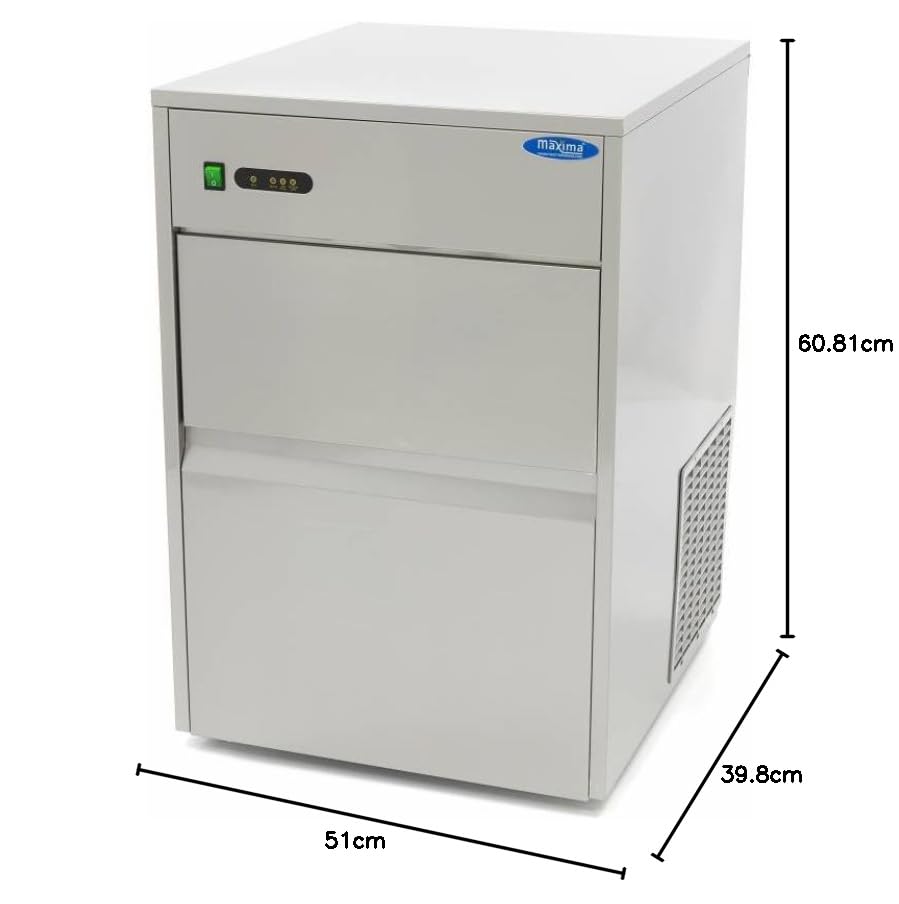
Figure 7.1: Dimensional diagram of the Maxima M-ICE 28 ice machine.


