
1. Important Safety Instructions
Please read all instructions carefully before using this treadmill. Keep this manual for future reference.
- General Safety: Always consult a physician before starting any exercise program. Stop exercising immediately if you feel faint, dizzy, or experience pain.
- Supervision: This appliance is not intended for use by persons with reduced physical, sensory, or mental capabilities, or lack of experience and knowledge, unless they have been given supervision or instruction concerning use of the appliance by a person responsible for their safety. Children should be supervised to ensure that they do not play with the appliance.
- Emergency Stop: Always attach the safety key clip to your clothing before starting the treadmill. In case of an emergency, pulling the safety key will immediately stop the machine.
- Electrical Safety: Ensure the treadmill is plugged into a properly grounded outlet. Do not use extension cords. Keep the power cord away from heated surfaces. Unplug the treadmill when not in use or before cleaning/maintenance.
- Placement: Place the treadmill on a flat, stable surface with at least 2 feet (0.6 meters) of clear space on each side and 6 feet (1.8 meters) behind it. Do not operate in damp or wet locations.
- Weight Capacity: Do not exceed the maximum user weight capacity of 220 pounds (100 kg).
- Footwear: Always wear appropriate athletic footwear when using the treadmill.
2. Product Overview
The GYMAX Foldable Treadmill is designed for home use, offering a compact and efficient way to perform walking, jogging, and light running exercises. It features a durable running belt, an LCD monitor for tracking workout data, and preset programs for varied training.

Image 2.1: The GYMAX Foldable Treadmill shown in both operational and folded states, highlighting its compact design.
Key Features:
- Durable Running Belt: Constructed from PVC with a rough, wear-resistant, and anti-slip surface. Features a high-elastic Bakelite board for shock absorption.
- LCD Monitor: Displays time, speed, distance, and calories burned.
- Pulse Sensor: Integrated into the handgrips for heart rate monitoring.
- Speed Adjustment: Range from 0.5 to 7.5 MPH.
- Preset Programs: 12 pre-programmed workouts (P1-P12).
- Foldable Design: Space-saving design with built-in wheels for easy transport and storage.
- Sturdy Frame: Made of high-quality steel, supporting up to 220 lbs.
- Emergency Stop: Safety key for immediate shutdown.
3. Assembly Instructions
The GYMAX Foldable Treadmill is designed for easy assembly. Follow these steps carefully.
3.1 Unpacking
- Carefully remove all components from the packaging.
- Place the main frame of the treadmill on a flat, stable surface.
- Verify that all parts listed in the packing list are present. If any parts are missing or damaged, contact customer service.
3.2 Step-by-Step Assembly
Assembly typically involves a 2-step tool-free folding and setup process. Refer to the diagram below for visual guidance.

Image 3.1: Illustration of the 2-step tool-free folding and setup process, along with details of the transport wheels and adjustment knobs.
- Unfold the Frame: Gently lift the console frame from its folded position until it locks into place. Ensure the locking mechanism is securely engaged.
- Secure the Handrails: Fasten the handrails using the provided knobs or bolts. Ensure they are tightened to prevent wobbling during use.
- Connect Console Cables: Carefully connect any pre-attached cables from the console to the main frame, ensuring a snug fit.
- Insert Safety Key: Place the safety key into its designated slot on the console. The treadmill will not operate without the safety key in place.
- Power Connection: Plug the power cord into a grounded electrical outlet.
4. Operating the Treadmill
Familiarize yourself with the control panel and operating procedures before beginning your workout.

Image 4.1: Overview of the treadmill console, showing the adjustable angle, bottle holder, device holder, shortcut keys, and heart rate sensors.
4.1 Control Panel Functions
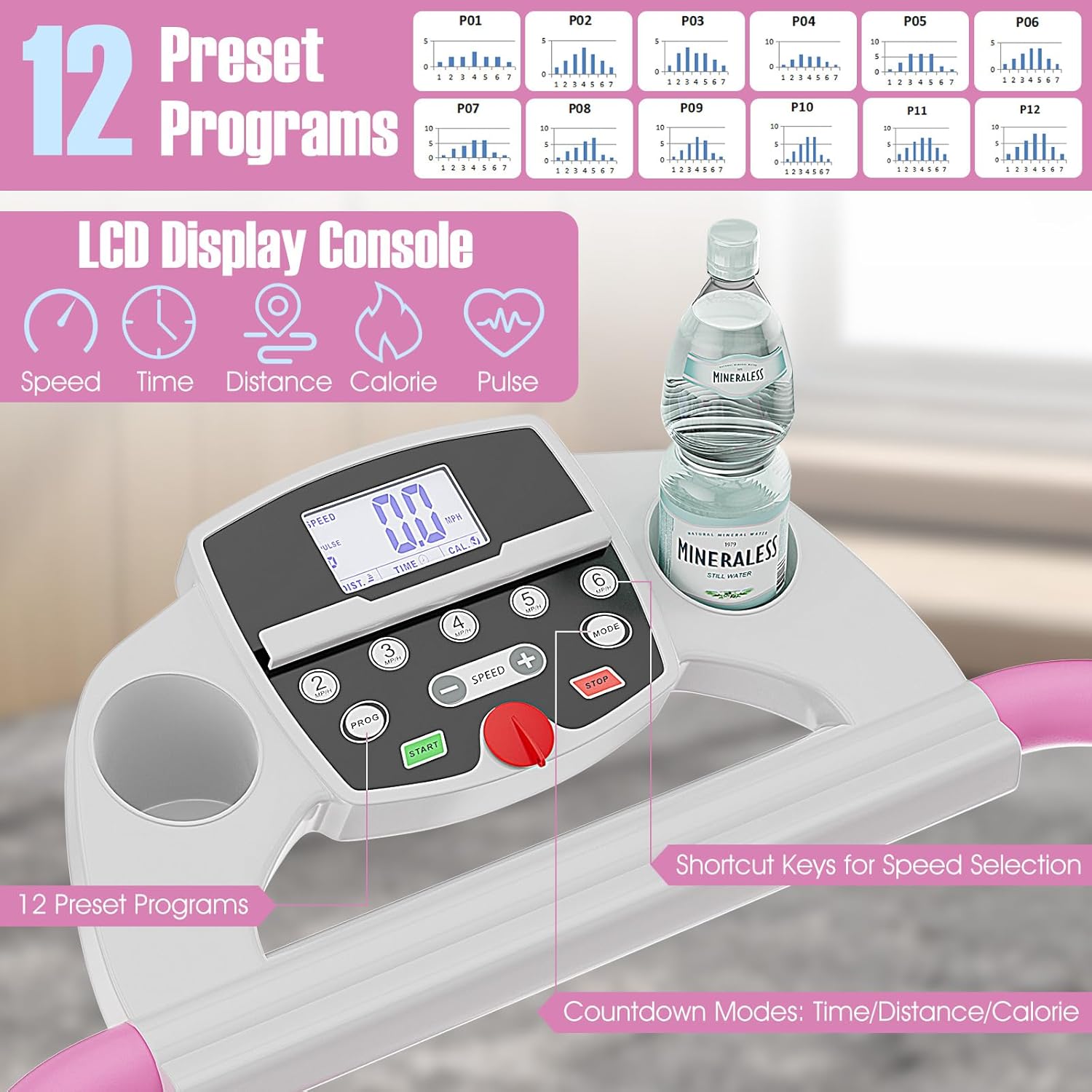
Image 4.2: Detailed view of the LCD display console, illustrating the 12 preset programs, speed shortcut keys, and countdown modes.
- LCD Display: Shows workout data such as Time, Speed, Distance, Calories, and Pulse.
- START Button: Initiates the treadmill belt movement.
- STOP Button: Halts the treadmill belt movement.
- SPEED +/- Buttons: Adjusts the running speed incrementally.
- PROG Button: Selects from the 12 preset programs (P1-P12).
- MODE Button: Cycles through different display modes or sets countdown targets (Time, Distance, Calories).
- Shortcut Keys: Direct buttons for quick speed selection.
4.2 Starting and Stopping
- Ensure the safety key is properly inserted and clipped to your clothing.
- Step onto the treadmill side rails.
- Press the START button. The treadmill will begin with a low speed (e.g., 0.5 MPH) after a short countdown.
- To stop, press the STOP button. The belt will gradually slow down and come to a complete stop. Alternatively, pull the safety key for an immediate stop.
4.3 Speed Adjustment
Use the SPEED +/- buttons to increase or decrease the running speed. The speed range is 0.5 to 7.5 MPH. For quick adjustments, use the dedicated speed shortcut keys on the console.
4.4 Preset Programs (P1-P12)
The treadmill offers 12 pre-programmed workouts. To select a program:
- While the treadmill is stopped, press the PROG button repeatedly to cycle through programs P1-P12.
- Once your desired program is displayed, press START to begin the workout. The program will automatically adjust speed according to its pre-set profile.
4.5 Heart Rate Monitoring
To monitor your heart rate, grasp the pulse sensors on the handrails with both hands. Your heart rate will be displayed on the LCD screen after a few seconds. For accurate readings, ensure your hands are clean and firmly placed on the sensors.
4.6 Emergency Stop
The safety key is a critical safety feature. In an emergency, such as losing balance or feeling unwell, pulling the safety key from its slot will immediately stop the treadmill belt, preventing potential injury.

Image 4.3: Illustration of the treadmill's motor, highlighting its 2HP peak power, 0.5-7.5 MPH speed range, and quiet operation (≤65dB Noise Level).
5. Maintenance and Care
Regular maintenance ensures the longevity and safe operation of your treadmill.
5.1 Cleaning
- Always unplug the treadmill before cleaning.
- Wipe down the console and exterior surfaces with a soft, damp cloth. Avoid abrasive cleaners or solvents.
- Periodically vacuum under the treadmill to prevent dust and debris buildup from affecting motor performance.
5.2 Lubrication
The running belt and deck require periodic lubrication to reduce friction and extend the life of the treadmill. Refer to your specific model's instructions for the type of lubricant and frequency. Generally, apply silicone lubricant under the running belt every few months, depending on usage.
5.3 Belt Adjustment
If the running belt feels loose or is slipping, it may need adjustment. Consult the detailed instructions in your full product manual for proper belt tensioning and centering procedures. Incorrect adjustment can damage the belt or motor.
5.4 Storage
To store the treadmill, ensure it is turned off and unplugged. Follow the folding instructions (refer to Section 3.2) to fold the console frame down. Use the built-in transport wheels to move the folded treadmill to a suitable storage location. Store in a dry, cool place away from direct sunlight.

Image 5.1: Diagram illustrating the multi-layered, shock-absorbing running area designed for joint protection.
6. Troubleshooting
This section addresses common issues you might encounter with your treadmill.
| Problem | Possible Cause | Solution |
|---|---|---|
| Treadmill does not start | Power cord not plugged in; Safety key not inserted; Circuit breaker tripped. | Ensure power cord is securely plugged in; Insert safety key correctly; Reset circuit breaker. |
| Running belt slips or hesitates | Belt too loose; Belt needs lubrication. | Adjust belt tension (refer to full manual); Lubricate the running deck. |
| Unusual noise during operation | Loose components; Motor or belt issue. | Check and tighten all visible bolts and screws; If noise persists, contact customer support. |
| Inaccurate heart rate reading | Hands not firmly on sensors; Dry hands. | Ensure firm contact with both sensors; Lightly moisten hands if too dry. |
| Display not working | Loose cable connection; Power issue. | Check console cable connections; Verify power supply. |
If you encounter a problem not listed here, or if the suggested solutions do not resolve the issue, please contact GYMAX customer support for assistance.
7. Product Specifications
Detailed technical information for the GYMAX Foldable Treadmill.

Image 7.1: Diagram showing the treadmill's dimensions and key specifications such as voltage, running area, weight capacity, and item weight.
- Model: B078NPX1CV
- Brand: GYMAX
- Product Dimensions (Operational): 124 cm (L) x 61 cm (W) x 113 cm (H) / 49" (L) x 23.5" (W) x 38.5" (H)
- Product Dimensions (Folded): Approximately 60 cm (L) x 60 cm (W) x 122 cm (H) / 23.5" (L) x 23.5" (W) x 48" (H)
- Item Weight: 25.85 kg / 57 lbs
- Maximum Weight Capacity: 220 lbs (100 kg)
- Running Area: 40" x 14"
- Speed Range: 0.5 - 7.5 MPH
- Horsepower: 2 HP (Peak)
- Number of Programs: 12 Preset Programs
- Display Type: LCD
- Meter Functions: Heart Rate Monitor, Step Counter (implied by data monitoring)
- Power Source: Corded Electric (AC 110V 60Hz)
- Material: Acrylonitrile Butadiene Styrene (ABS), Alloy Steel, Polyvinyl Chloride (PVC)
8. Warranty and Support
GYMAX products are manufactured to high-quality standards. For specific warranty details regarding your treadmill, please refer to the warranty card included with your purchase or visit the official GYMAX website. If you require technical support, have questions about assembly, operation, or maintenance, please contact GYMAX customer service. Keep your purchase receipt and model number handy when contacting support.

