
1. Introduction
This manual provides instructions for the Fancy Buying 65W AC Adapter, designed for Dell laptops. This charger is compatible with various Dell Inspiron, Latitude, and Vostro series models, offering both 4.5x3.0mm and 7.4x5.0mm round tip connectors to ensure broad compatibility. It delivers 19.5V at 3.34A for a total of 65W, and is also suitable for 45W devices.
The adapter features built-in safety protections against overheating, short-circuiting, over-voltage, and over-current, ensuring reliable and safe charging. Its durable construction includes high-density nylon fibers for the cable, designed to withstand extensive use.

Image 1.1: The Fancy Buying 65W Laptop Charger, including the main adapter unit and two interchangeable tips (4.5x3.0mm and 7.4x5.0mm).
2. Setup Instructions
- Unpack the Charger: Carefully remove the AC adapter, power cord, and the two interchangeable DC tips from the packaging.
- Connect the Power Cord: Insert the AC power cord into the adapter's input port. Ensure a firm connection.
- Select the Correct DC Tip: Identify the appropriate DC connector tip for your Dell laptop. The charger includes two common sizes: 4.5x3.0mm (smaller pin) and 7.4x5.0mm (larger pin).
- Attach the DC Tip: Connect the selected DC tip to the adapter's output cable. Push firmly until it clicks into place.
- Connect to Laptop: Insert the DC connector tip into your laptop's charging port.
- Plug into Power Outlet: Plug the AC power cord into a standard wall outlet (100-240V, 50-60Hz). The indicator light on the adapter should illuminate, signaling power is supplied.

Image 2.1: Illustration of the two included DC connector tips (4.5x3.0mm and 7.4x5.0mm) and how they connect to the main cable.

Image 2.2: Visual representation of the power adapter's dimensions and the two distinct connector tip sizes, highlighting the 4.5x3.0mm and 7.4x5.0mm options.
3. Operating Instructions
Once properly connected, the Fancy Buying 65W AC Adapter will begin charging your Dell laptop. The adapter is designed to automatically detect and deliver the appropriate power (up to 65W) required by your device. It is compatible with both 65W and 45W Dell laptops that use the specified round barrel connectors.
- Charging Indication: A small LED indicator on the adapter unit will typically light up green when power is being supplied. Your laptop's charging indicator will also show its charging status.
- Optimal Performance: For best results, ensure the adapter is placed in a well-ventilated area to prevent overheating. Avoid covering the adapter during use.
- Compatibility: This charger is suitable for a wide range of Dell Inspiron, Latitude, and Vostro models. Refer to your laptop's specifications to confirm the required voltage and wattage.

Image 3.1: A compatibility chart indicating the adapter's output (19.5V, 3.34A, 65W) and its suitability for 45W Dell laptops, while clarifying it is not for 90W devices.
4. Maintenance
Proper care and maintenance will extend the lifespan of your Fancy Buying AC adapter.
- Cable Care: Avoid sharp bends, kinks, or excessive pulling on the cables. Do not wrap the cable too tightly around the adapter. Use the included magic tape strap for neat storage.
- Cleaning: Disconnect the charger from both the power outlet and your laptop before cleaning. Use a soft, dry cloth to wipe the adapter and cables. Do not use liquid cleaners or solvents.
- Storage: Store the adapter in a cool, dry place when not in use. Avoid extreme temperatures or humid environments.
- Inspection: Periodically inspect the cables and connectors for any signs of damage, such as fraying, cuts, or bent pins. If damage is observed, discontinue use and replace the adapter.

Image 4.1: Detailed views of the charger's construction, including the robust copper interface, anti-interference wiring, durable ABS+PC plastic shell, and the convenient magic tape strap for cable management.
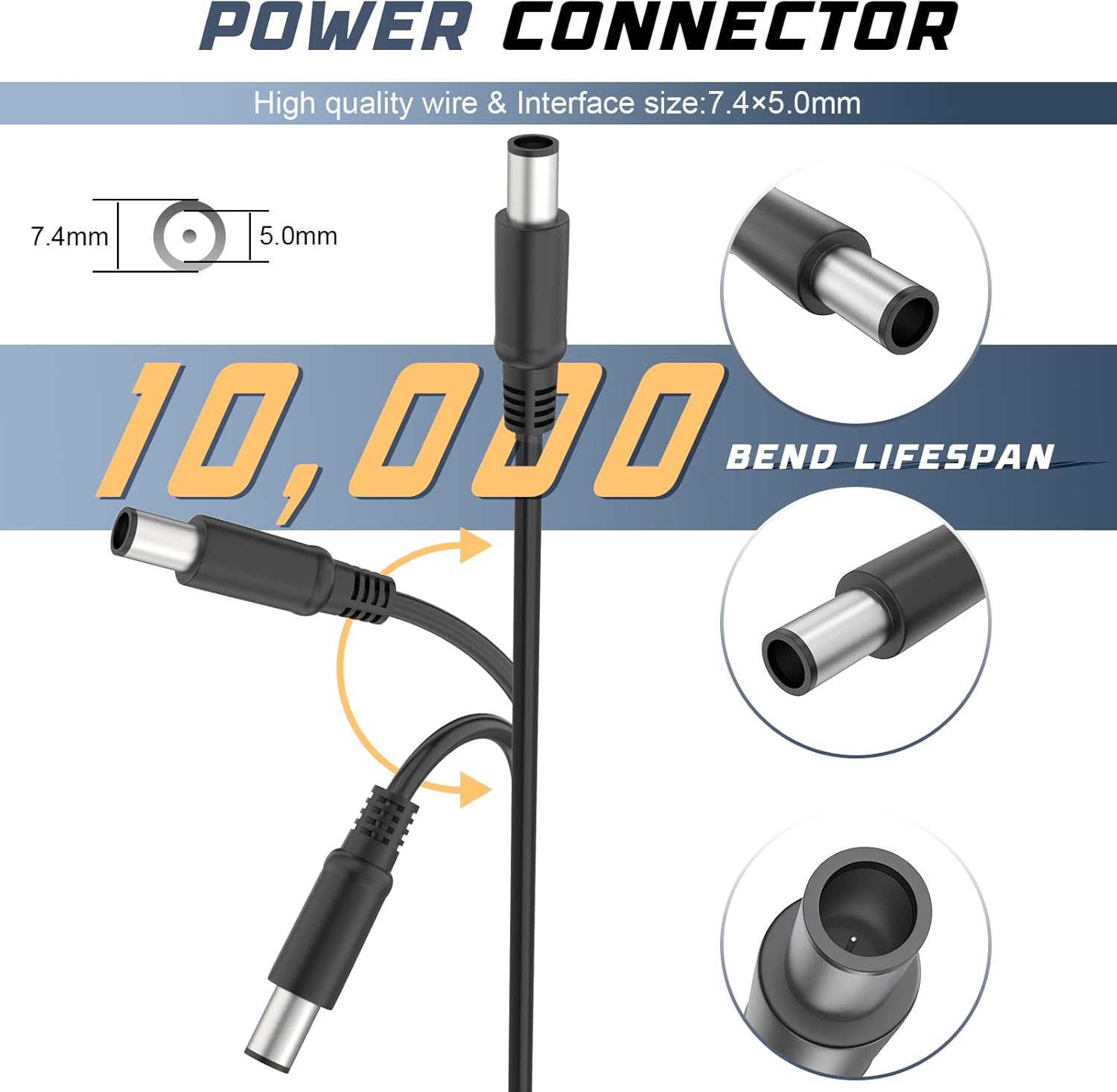
Image 4.2: Visual demonstration of the power connector's durability, highlighting its ability to withstand 10,000 bend cycles, ensuring a long lifespan.
5. Troubleshooting
If you encounter issues with your Fancy Buying 65W AC Adapter, refer to the following common problems and solutions:
- No Power Indicator Light:
- Ensure the AC power cord is securely plugged into both the adapter and the wall outlet.
- Verify the wall outlet is functional by plugging in another device.
- Check for any visible damage to the power cord or adapter.
- Laptop Not Charging:
- Confirm that the correct DC tip is firmly attached to the adapter cable and fully inserted into the laptop's charging port.
- Restart your laptop.
- Ensure your laptop model is compatible with a 65W or 45W charger and the specific connector tip.
- If the adapter feels excessively hot, disconnect it and allow it to cool down. The built-in protection may have activated.
- Intermittent Charging:
- Check all connections for looseness.
- Inspect the DC tip and laptop charging port for debris or damage.
- Avoid bending the cable near the connectors during use.
The adapter includes multiple safety protections:
- Overheating Protection: Prevents the adapter from reaching unsafe temperatures.
- Short Circuiting Protection: Safeguards against electrical shorts.
- Over Voltage Protection: Protects devices from excessive voltage input.
- Over Current Protection: Prevents damage from excessive current flow.

Image 5.1: Visual representation of the charger's integrated safety features, including protection against overheating, short-circuiting, over-voltage, and over-current.
6. Specifications
| Feature | Detail |
|---|---|
| Brand | Fancy Buying |
| Model Number | LD-065/334/195/011 |
| Input Voltage | 100-240V~1A, 50-60Hz |
| Output Voltage | 19.5V |
| Output Current | 3.34A |
| Wattage | 65W (also compatible with 45W devices) |
| Connector Type | Barrel Connector (4.5x3.0mm and 7.4x5.0mm) |
| Compatible Devices | Dell Laptops (Inspiron, Latitude, Vostro series) |
| Included Components | AC Adapter, AC Power cord, 2 DC Tips |
| Safety Protections | Overheating, Short Circuiting, Over Voltage, Over Current |
| Cable Durability | 10,000 bend lifespan (connector) |
| Item Weight | 0.35 Kilograms |
| Material | Plastic (ABS + PC shell) |
7. Warranty and Support
For warranty information and customer support, please refer to the documentation included with your purchase or visit the official Fancy Buying website. Typically, Fancy Buying products undergo rigorous quality control and are designed for durability.
If you experience any issues that cannot be resolved using the troubleshooting steps in this manual, please contact Fancy Buying customer service for assistance. When contacting support, have your product model number (LD-065/334/195/011) and purchase details available.
Why Choose Fancy Buying Chargers?
- Safety: Every charger is built as a safety device with certified components and strict inspections.
- Protection: Smart protection chips monitor power in real-time, cutting power instantly if voltage spikes, current surges, or overheating occurs.
- Durability: Double-molded connector heads with long strain relief resist thousands of plug/unplug cycles. Abrasion-resistant cables and efficient heat dissipation ensure long-term reliability.