
1. Product Overview
The Xiaomi PLM06ZM 20000mAh Dual Port Fast Charging Power Bank is a portable charging solution designed to provide reliable power for your electronic devices. Featuring a high-capacity 20000mAh Lithium-Ion battery, it allows for multiple charges of smartphones, tablets, and other USB-enabled gadgets. Its dual USB output ports enable simultaneous charging of two devices, enhancing convenience.
This power bank incorporates advanced circuit chip protection, offering nine layers of safety against various electrical issues. It is built with a durable, anti-slip, and comfortable eco-friendly material casing.

Image 1.1: Front view of the Xiaomi PLM06ZM 20000mAh Power Bank.

Image 1.2: The power bank showcasing its dual USB output and compact design.
2. Package Contents
- Xiaomi PLM06ZM 20000mAh Dual Port Fast Charging Power Bank
- USB Charging Cable (for recharging the power bank)
- User Manual
3. Setup and Initial Charging
Before first use, fully charge your power bank. This ensures optimal performance and battery longevity.
- Connect the Power Bank: Use the provided USB charging cable to connect the power bank's Micro-USB input port to a USB wall charger (not included) or a computer's USB port.
- Charging Indication: The LED indicator lights on the power bank will illuminate to show the charging progress. All four LEDs will be steadily lit when the power bank is fully charged.
- Charging Time: The initial full charge may take several hours.
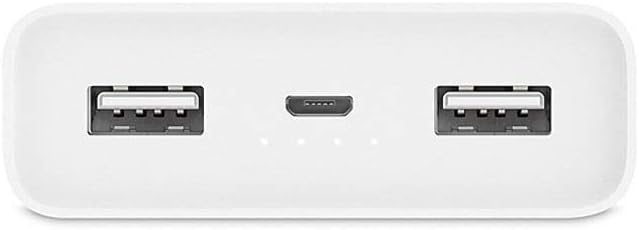
Image 3.1: Top view of the power bank, illustrating the USB output ports, Micro-USB input port, and LED indicator lights.
4. Operating Instructions
4.1 Charging Your Devices
The power bank features two USB-A output ports for charging external devices.
- Connect Device: Connect your device's charging cable to one of the USB-A output ports on the power bank.
- Start Charging: The power bank will automatically begin charging your device. If charging does not start, press the power button on the side of the power bank once.
- Dual Charging: You can charge two devices simultaneously by connecting them to both USB-A output ports.

Image 4.1: The power bank actively charging a smartphone.

Image 4.2: The power bank connected to and charging two devices.
4.2 Checking Battery Level
Press the power button once to check the remaining battery level. The LED indicators will light up:
- 4 LEDs: 75% - 100% charged
- 3 LEDs: 50% - 75% charged
- 2 LEDs: 25% - 50% charged
- 1 LED: 0% - 25% charged (recharge soon)

Image 4.3: Side view of the power bank, indicating the location of the power button.
5. Maintenance
- Cleaning: Use a soft, dry cloth to clean the power bank. Avoid using harsh chemicals or abrasive materials.
- Storage: Store the power bank in a cool, dry place away from direct sunlight, extreme temperatures, and humidity.
- Regular Use: To maintain battery health, it is recommended to fully charge and discharge the power bank at least once every three months if not in regular use.
- Avoid Drops: Protect the device from drops and impacts, which can damage internal components.
6. Troubleshooting
- Power Bank Not Charging:
- Ensure the charging cable is securely connected to both the power bank and the power source.
- Try a different USB wall adapter or USB port.
- Check if the charging cable is damaged; try a different cable.
- Device Not Charging from Power Bank:
- Ensure the power bank has sufficient charge (check LED indicators).
- Press the power button on the power bank to initiate charging.
- Try a different charging cable for your device.
- Ensure your device is compatible with USB charging.
- Slow Charging:
- Ensure you are using a fast-charging compatible wall adapter for recharging the power bank.
- For device charging, ensure your device and cable support fast charging.
- Charging multiple devices simultaneously may reduce individual charging speeds.
7. Specifications
| Model Number | VXN4220GL (PLM06ZM) |
| Battery Capacity | 20000 mAh |
| Battery Cell Composition | Lithium Polymer |
| Number of Charging Ports | 2 (USB-A Output) |
| Input Port | Micro-USB |
| Special Features | Fast Charging |
| Voltage | 4.4 Volts |
| Product Dimensions | 6.76 x 2.39 x 13.55 cm |
| Item Weight | 330.5 Grams |
| Color | White |
| Manufacturer | Xiaomi |
8. Safety Information
This power bank is designed with multiple safety features to protect both the device and your connected electronics:
- Circuit Chip Protection: Incorporates nine layers of circuit chip protection.
- Overcurrent Protection: Guards against excessive output current.
- Overvoltage Protection: Prevents damage from output overvoltage.
- Overcharging Protection: Protects the battery from being overcharged.
- Short Circuit Protection: Automatically shuts down in case of a short circuit.
General Safety Precautions:
- Do not expose the power bank to water, fire, or extreme temperatures.
- Do not disassemble or attempt to repair the power bank.
- Keep out of reach of children.
- Dispose of the power bank responsibly according to local regulations.
9. Warranty and Support
Specific warranty details are not provided within this manual. For warranty information, technical support, or service inquiries, please refer to the official Xiaomi website or contact your local authorized dealer. Keep your purchase receipt as proof of purchase.