
Introduction
Welcome to the comprehensive user manual for your new NUWAVE Brio 3-Quart Digital Air Fryer. This appliance is designed to provide a healthier way to cook your favorite foods, utilizing rapid air circulation technology for crispy results with little to no oil. Please read this manual thoroughly before operating the appliance to ensure safe and efficient use.
Important Safety Information
Always follow basic safety precautions when using electrical appliances to reduce the risk of fire, electric shock, and injury.
- Read all instructions before use.
- Do not touch hot surfaces. Use handles or knobs.
- To protect against electric shock, do not immerse cord, plugs, or the main unit in water or other liquid.
- Close supervision is necessary when any appliance is used by or near children.
- Unplug from outlet when not in use and before cleaning. Allow to cool before putting on or taking off parts.
- Do not operate any appliance with a damaged cord or plug or after the appliance malfunctions or has been damaged in any manner.
- The use of accessory attachments not recommended by the appliance manufacturer may cause injuries.
- Do not use outdoors.
- Do not let cord hang over edge of table or counter, or touch hot surfaces.
- Do not place on or near a hot gas or electric burner, or in a heated oven.
- Extreme caution must be used when moving an appliance containing hot oil or other hot liquids.
- Always attach plug to appliance first, then plug cord into the wall outlet. To disconnect, turn any control to "off", then remove plug from wall outlet.
- Do not use appliance for other than intended use.
Product Overview
The NUWAVE Brio 3-Quart Digital Air Fryer features intuitive digital controls and a compact design, making it a versatile addition to any kitchen.

Figure 1: The NUWAVE Brio 3-Quart Digital Air Fryer shown with its non-stick baking pan, stainless-steel reversible rack, and a recipe book. This image highlights the compact design and included accessories.

Figure 2: A closer look at the bundle contents, including the main air fryer unit, non-stick baking pan, stainless-steel reversible rack, and the Brio's fry pan basket net. A recipe book is also visible.
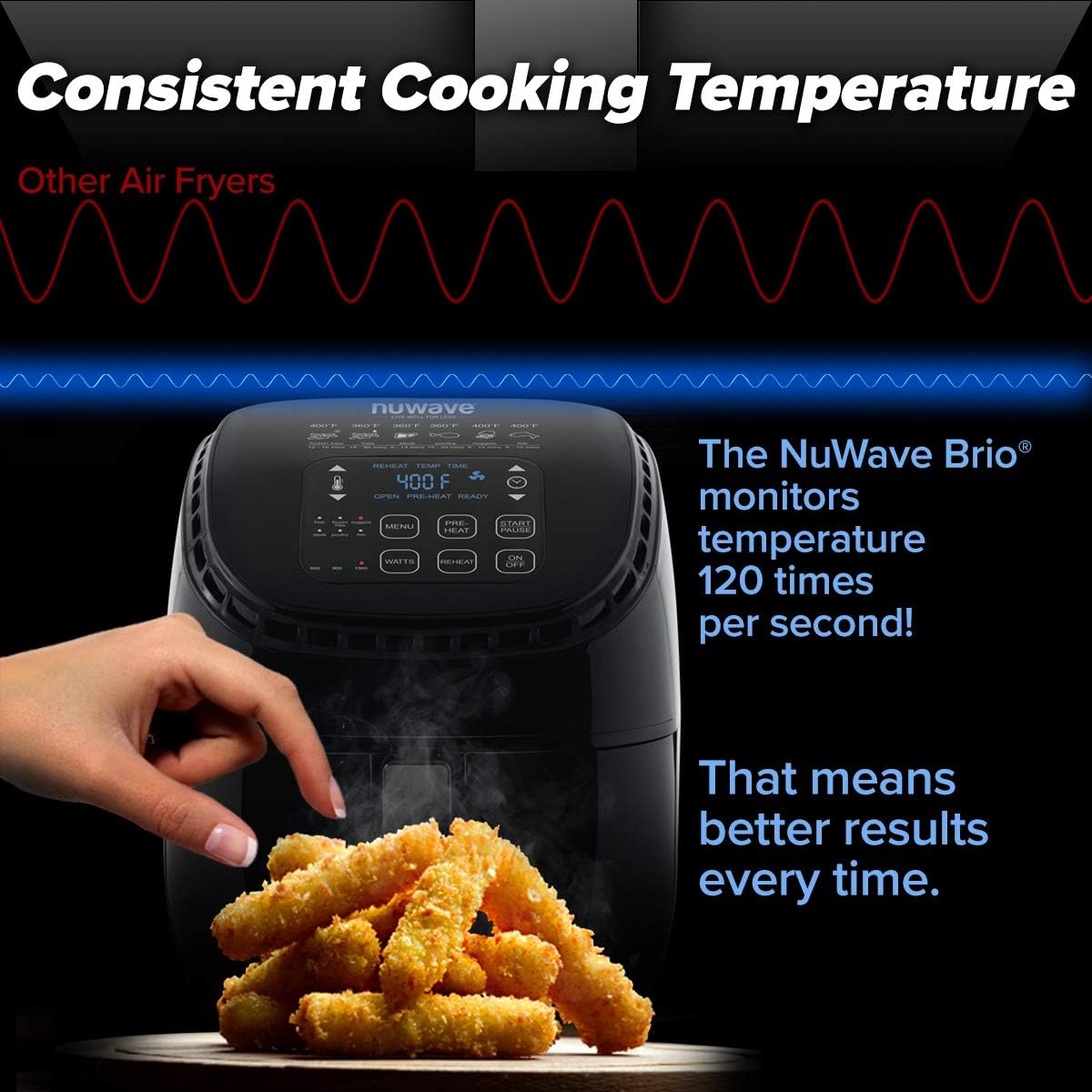
Figure 3: Illustration of the air fryer's consistent cooking temperature feature. The NuWave Brio monitors temperature 120 times per second, ensuring even cooking results.

Figure 4: The control panel of the air fryer highlighting its multiple functions: Grill, Roast, Broil, Air-Fry, Bake, Warm, Reheat, Toast, and Dehydrate.
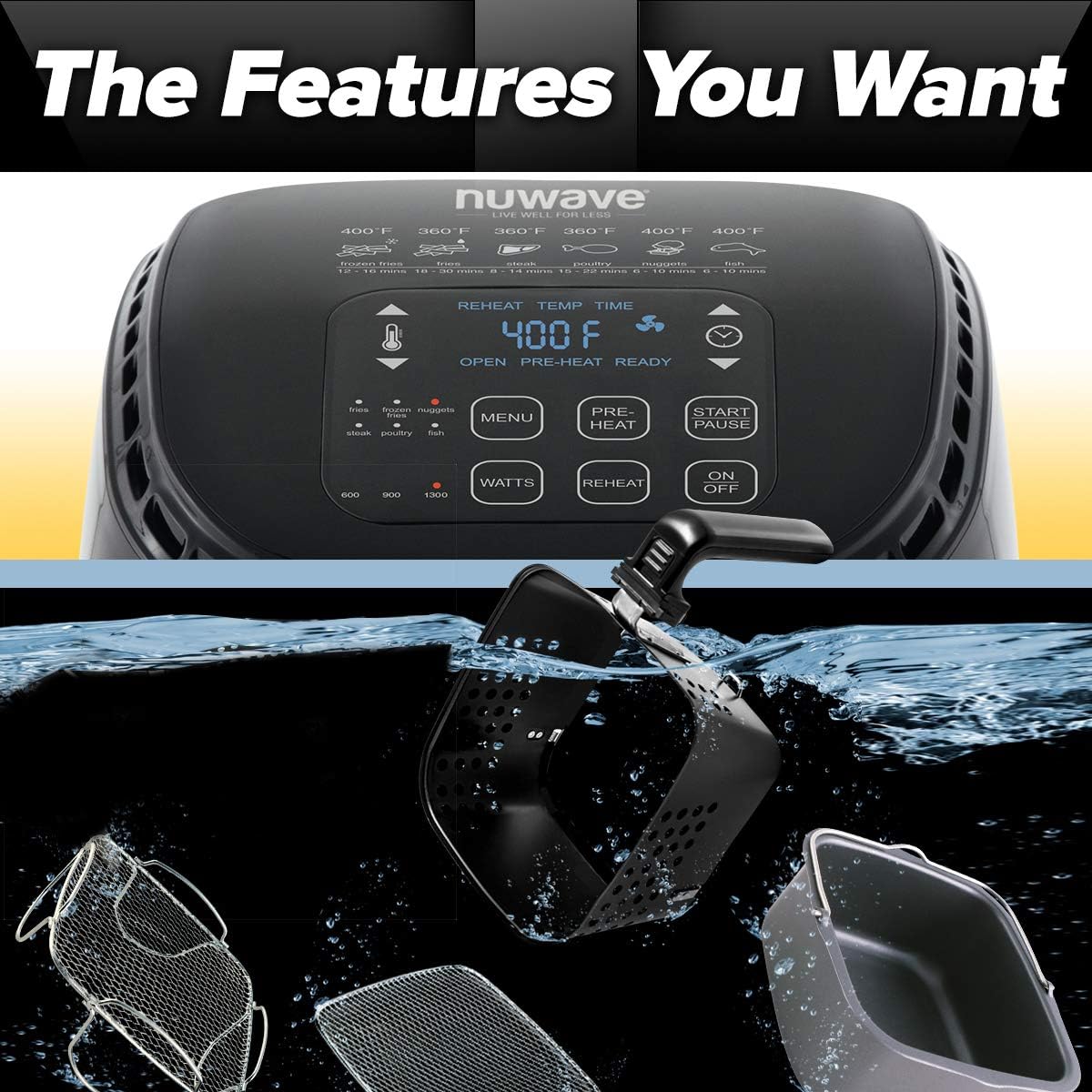
Figure 5: This image demonstrates the removable components of the air fryer, including the basket and various inserts, designed for easy cleaning.

Figure 6: A display of various healthy and fast food options that can be prepared using the air fryer, such as lasagna, onion rings, hot dogs, and chicken wings.
Key Features:
- Digital Touchscreen Controls: Easy one-touch controls for precise temperature settings.
- Advanced Temperature Control: Adjustable temperature range from 100°F to 400°F for versatile use.
- Durable Nonstick Coating: Made with a nonstick surface for easy food release and cleanup.
- Spacious 3-Quart Capacity: Large 2.84-liter interior fits multiple food items at once.
- Compact Size: Weighing just 6.6 pounds, this air fryer is easy to store and move around.
Setup
- Unpacking: Carefully remove all packaging materials and accessories from the box.
- Initial Cleaning: Before first use, wipe the exterior of the air fryer with a damp cloth. Wash the fry basket, cooking rack, and any other removable accessories in warm, soapy water. Rinse thoroughly and dry completely.
- Placement: Place the air fryer on a stable, heat-resistant surface, away from walls or other appliances to allow for proper air circulation. Ensure there is at least 6 inches of space on all sides.
- Power Connection: Plug the power cord into a grounded electrical outlet.
Operating Instructions
The NUWAVE Brio Air Fryer is designed for ease of use with its digital touchscreen controls.
Basic Operation:
- Prepare Food: Place your desired food items into the fry basket. Do not overfill the basket to ensure even cooking.
- Insert Basket: Slide the fry basket firmly back into the air fryer until it clicks into place.
- Power On: Press the ON/OFF button to turn on the appliance.
- Set Temperature and Time:
- Use the temperature control buttons (up/down arrows next to thermometer icon) to set the desired cooking temperature (100°F to 400°F).
- Use the time control buttons (up/down arrows next to clock icon) to set the cooking duration.
- Use Presets (Optional): The air fryer comes with 6 easy presets for common foods. Press the MENU button to cycle through the presets (e.g., Fries, Frozen Nuggets, Fish, Chicken, Steak, Poultry). Selecting a preset will automatically set the recommended temperature and time.
- Preheat (Optional): For best results, especially with certain foods, you can use the PREHEAT function. Press the PREHEAT button after setting temperature and time, then press START/PAUSE. The unit will preheat and alert you when ready.
- Start Cooking: Press the START/PAUSE button to begin the cooking process.
- Shake/Flip Food: For even cooking, especially with larger quantities or certain foods, it is recommended to shake or flip the food halfway through the cooking time. The air fryer may have a reminder function for this.
- Monitor Progress: You can pull out the basket at any time to check on your food. The air fryer will automatically pause and resume when the basket is reinserted.
- Finish Cooking: Once the cooking time is complete, the air fryer will beep. Carefully remove the basket and transfer the cooked food to a serving dish.
Wattage Control:
The NUWAVE Brio allows you to adjust the wattage (900, 1300, 1500 watts) to suit your cooking needs and electrical circuit capacity. Press the WATTS button to cycle through the available wattage settings.
Reheat Function:
Use the dedicated REHEAT button to quickly warm up leftovers, ensuring they are crispy and delicious.
Maintenance and Cleaning
Regular cleaning of your NUWAVE Brio Air Fryer will ensure its longevity and optimal performance.
- Unplug and Cool: Always unplug the air fryer from the power outlet and allow it to cool completely before cleaning.
- Clean Fry Basket and Accessories: The fry basket and other removable accessories feature a durable nonstick coating. They are dishwasher safe for convenient cleaning. Alternatively, wash them in hot, soapy water using a non-abrasive sponge.
- Clean Interior: Wipe the interior of the air fryer with a damp cloth and mild detergent. Avoid using abrasive cleaners or scouring pads.
- Clean Exterior: Wipe the exterior of the air fryer with a soft, damp cloth. Do not immerse the main unit in water.
- Storage: Ensure all parts are clean and dry before storing the air fryer in a cool, dry place.
Troubleshooting
If you encounter any issues with your NUWAVE Brio Air Fryer, refer to the following common problems and solutions:
| Problem | Possible Cause | Solution |
|---|---|---|
| Air fryer does not turn on. | Not plugged in; power outlet issue; main unit malfunction. | Ensure the power cord is securely plugged into a working outlet. Check the circuit breaker. If the issue persists, contact customer support. |
| Food is not cooked evenly. | Basket is overfilled; food not shaken/flipped; incorrect temperature/time. | Do not overfill the basket. Shake or flip food halfway through cooking. Adjust temperature and time as needed for specific recipes. |
| White smoke coming from the appliance. | Grease residue from previous use; high-fat food cooking. | Clean the basket and interior thoroughly after each use. For high-fat foods, drain excess fat from the basket during cooking. |
| "OPEN" light displayed, unit not starting. | Fry basket not fully inserted or locked. | Ensure the fry basket is pushed in completely until it clicks securely into place. |
Specifications
| Feature | Detail |
|---|---|
| Brand | Nuwave |
| Model Name | NUWAVE Brio |
| Capacity | 3-Quart (2.84 Liters) |
| Material | Plastic (Outer Material) |
| Control Method | Touch Control |
| Output Wattage | 1500 Watts (Adjustable: 900, 1300, 1500 Watts) |
| Min Temperature Setting | 100°F (38°C) |
| Max Temperature Setting | 400°F (204°C) |
| Item Weight | 6.6 pounds (3 Kilograms) |
| Product Dimensions | 8.07 x 5.31 x 2.76 inches |
| Nonstick Coating | Yes |
| Dishwasher Safe Parts | Yes (Fry Basket and Accessories) |
| Date First Available | April 22, 2014 |
Warranty and Support
For information regarding product warranty, registration, or technical support, please refer to the official Nuwave website or contact their customer service directly.
Nuwave is committed to providing quality products and support. Additional protection plans may be available for purchase to extend coverage beyond the standard warranty.
Nuwave Customer Service: Please visit www.nuwavebrio.com or refer to the contact information provided in your product packaging.


