Introduction
The 1Mii B06 Plus Bluetooth Receiver is designed to upgrade your traditional wired stereo system or speakers with high-definition wireless audio streaming capabilities. Featuring Bluetooth 5.3 technology, aptX HD, and aptX Adaptive codecs, it delivers superior sound quality and a stable connection. This manual provides detailed instructions for setup, operation, and troubleshooting to ensure you get the best experience from your device.

Image: The 1Mii B06 Plus Bluetooth Receiver, a compact black device with a central illuminated ring.
Package Contents
- 1Mii B06 Plus Bluetooth Receiver
- USB Power Adapter
- 3.5mm Audio Cable
- RCA Audio Cable
- User Manual
Features
- Extended Long Range: Utilizes Class 1 Bluetooth technology, offering a range of up to 164ft (50m) line-of-sight in open air and 50-70ft (20-30m) indoors (without obstacles).
- High-Fidelity Audio: Equipped with a Bluetooth 5.3 chip supporting aptX HD and aptX Adaptive for high-resolution audio streaming.
- 3D Surround Sound: Features a dedicated '3D' button to enable or disable 3D audio, indicated by a green LED.
- Automatic Power On & Reconnect: Powers on automatically when plugged into a power outlet and reconnects to the last paired device.
- Easy Setup: Simple plug-and-play operation with 3.5mm and RCA output options.
- Voice Command Compatibility: Works with voice assistants like Alexa when connected to your speaker via audio cable.

Image: The 1Mii B06 Plus connected to a stereo system, highlighting its high-definition audio capabilities.
Setup
1. Connect to Power
Connect the provided USB power adapter to the DC 5V port on the back of the 1Mii B06 Plus receiver. Plug the adapter into a power outlet. The device will automatically power on.
2. Connect to Your Audio System
Choose one of the following connection methods to link the 1Mii B06 Plus to your home stereo system or speakers:
- Using 3.5mm Audio Cable: Connect one end of the 3.5mm audio cable to the 'Audio Out' 3.5mm port on the receiver and the other end to the AUX input on your stereo system or speakers.
- Using RCA Audio Cable: Connect the red and white plugs of the RCA audio cable to the corresponding 'Audio Out' RCA ports on the receiver. Connect the other end of the RCA cable to the red and white RCA input ports on your stereo system or speakers.

Image: Rear view of the 1Mii B06 Plus, showing the 3.5mm AUX, RCA Audio Out, and DC 5V power input ports.
3. Pair with Your Bluetooth Device
- Turn on the 1Mii B06 Plus. The central LED ring will illuminate, indicating it's ready for pairing.
- Enable Bluetooth on your smartphone, tablet, or other audio device.
- Search for Bluetooth devices and select "B06 Plus" from the list.
- Once paired, the LED ring will remain steadily lit. You are now ready to stream audio.

Image: Visual guide demonstrating the plug, pair, and play steps for the 1Mii B06 Plus.
Operating
Audio Streaming
After successful pairing, you can play music or any audio from your Bluetooth-enabled device. The audio will be transmitted wirelessly to your connected stereo system or speakers.
3D Surround Sound Function
The 1Mii B06 Plus features a 3D surround sound effect. To activate or deactivate this feature:
- Press the '3D' button located on the front of the receiver.
- When 3D audio is active, the green LED will illuminate.
- Press the '3D' button again to turn off the 3D effect.

Image: Close-up of the 1Mii B06 Plus showing the '3D' button and its corresponding LED indicator.
Automatic Reconnection
The receiver is designed to automatically reconnect to the last paired device when it is powered on, provided the Bluetooth device is within range and has its Bluetooth function enabled.
Voice Commands (with Alexa)
To use voice commands with devices like Amazon Echo:
- Connect the 1Mii B06 Plus to your speaker system using the 3.5mm or RCA cable.
- Open the Alexa app on your smartphone or tablet.
- Pair the 1Mii B06 Plus with your Echo device via Bluetooth within the Alexa app settings.
- Once paired, you can control your music and other audio playback using voice commands through your Echo device.
Note: Ensure the audio cable connects the Bluetooth receiver to your speaker, not directly to the Echo device.
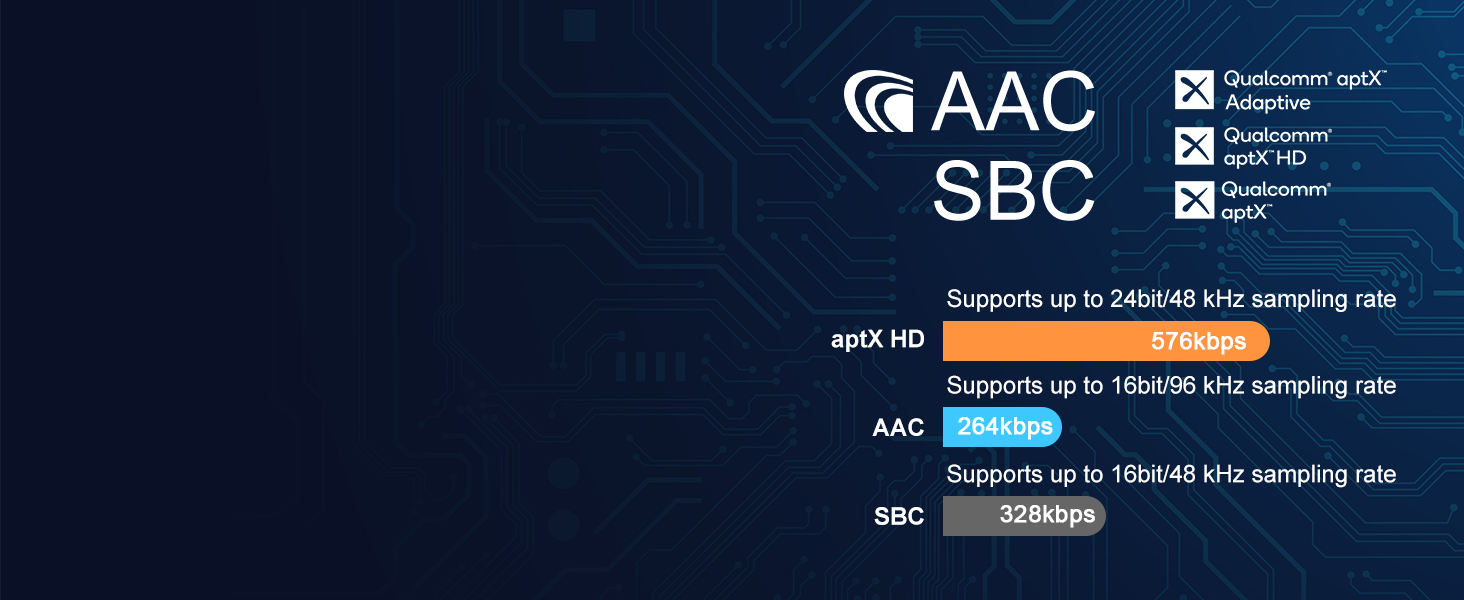
Image: The 1Mii B06 Plus positioned next to an Amazon Echo device, illustrating its compatibility with voice commands.
Maintenance
To ensure the longevity and optimal performance of your 1Mii B06 Plus Bluetooth Receiver, follow these maintenance guidelines:
- Cleaning: Use a soft, dry cloth to clean the surface of the device. Avoid using liquid cleaners, aerosols, or abrasive solvents.
- Storage: Store the device in a cool, dry place away from direct sunlight, extreme temperatures, and high humidity.
- Handling: Handle the device with care. Avoid dropping it or subjecting it to strong impacts.
- Power: Disconnect the power adapter during lightning storms or when unused for long periods.
Troubleshooting
| Problem | Possible Cause | Solution |
|---|---|---|
| No sound output. | Incorrect cable connection; low volume on source/receiver; device not paired. | Ensure all cables (power, audio) are securely connected. Increase volume on both the source device and your stereo system. Verify the B06 Plus is successfully paired with your Bluetooth device. |
| Cannot pair with Bluetooth device. | B06 Plus not in pairing mode; Bluetooth on source device is off; too many devices connected. | Ensure the B06 Plus is powered on and its LED is blinking (pairing mode). Turn off and on Bluetooth on your source device. Disconnect other Bluetooth devices from your source. |
| Short Bluetooth range or intermittent connection. | Obstacles between devices; interference; devices too far apart. | Reduce obstacles (walls, furniture) between the B06 Plus and your Bluetooth device. Move devices closer together. Avoid placing near Wi-Fi routers or other wireless devices that may cause interference. |
| Sound quality is poor. | Low quality audio source; interference; 3D audio setting. | Ensure your audio source is high quality. Check for sources of interference. Try toggling the 3D audio feature off to see if it improves clarity for certain content. |
Specifications
- Model: B06 Plus
- Bluetooth Version: 5.3
- Bluetooth Range: Up to 164ft (50m) line-of-sight in open air; 50-70ft (20-30m) indoors
- Audio Codecs: aptX HD, aptX Adaptive, AAC, SBC
- Audio Output: 3.5mm AUX, RCA
- Power Input: DC 5V
- Product Dimensions: 3.7 x 3.7 x 1.1 inches
- Item Weight: 8.1 ounces
- Special Features: 3D Surround Sound, Auto Re-connection, Voice Command Compatible
Warranty and Support
1Mii products come with a standard manufacturer's warranty. For specific warranty details, please refer to the warranty card included in your product packaging or visit the official 1Mii website.
For technical support, troubleshooting assistance, or any inquiries regarding your 1Mii B06 Plus Bluetooth Receiver, please contact 1Mii customer service through their official channels. You may also find additional resources and FAQs on the 1Mii support page.
A digital version of this user manual is available for download: Download User Manual (PDF)


