
PrimeCables Cab-LPA53-461
PrimeCables Pull-Down Full-Motion TV Wall Mount Instruction Manual
Model: Cab-LPA53-461
1. Introduction
This manual provides detailed instructions for the safe and proper installation and operation of your PrimeCables Pull-Down Full-Motion TV Wall Mount. Designed for 43-70 inch TVs, this mount offers a specialized solution for mounting televisions above fireplaces, allowing for height adjustment, swivel, and tilt to achieve optimal viewing angles.
Please read this manual thoroughly before installation and retain it for future reference.
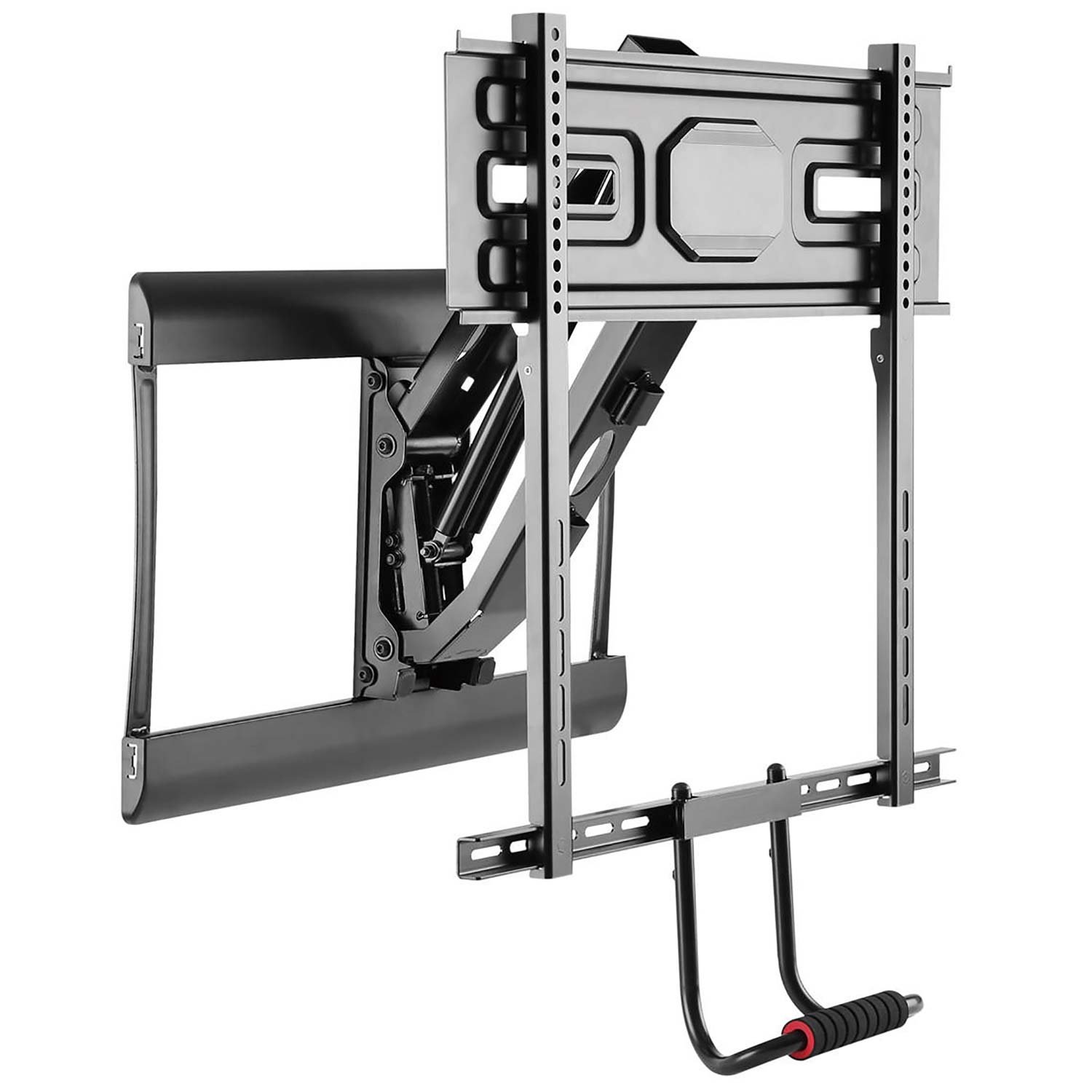
Figure 1: PrimeCables Pull-Down Full-Motion TV Wall Mount.
2. Safety Information
WARNING: Improper installation may result in serious injury or damage. If you do not understand these instructions or have doubts about the safety of the installation, please contact a qualified installer.
- Ensure the mounting surface can safely support the combined weight of the mount and your TV. The mount has a maximum capacity of 77 lbs (35 kg).
- This mount is designed for installation into solid wood studs or concrete/brick walls. Do not install into drywall alone.
- Always use the provided hardware. If any parts are missing or defective, contact PrimeCables customer service.
- Do not exceed the maximum weight capacity.
- Keep children and pets away during installation.
- Wear appropriate safety gear, including eye protection.
3. Product Specifications
| Feature | Specification |
|---|---|
| Model | Cab-LPA53-461 |
| Screen Size Compatibility | 43 - 70 inches |
| Weight Capacity | Min 28.5 lbs (13 kg) - Max 77 lbs (35 kg) |
| VESA Compatibility | 200x200, 300x200, 300x300, 400x200, 400x300, 400x400, 600x400 |
| Tilt Adjustment | -5° to -12° |
| Swivel Adjustment | +/- 30° |
| Height Adjustment (Pull-Down) | Up to 23 inches (5.6" - 19" extension range) |
| Material | Steel, Plastic |
| Color | Black |

Figure 2: Detailed dimensions and adjustable features of the TV wall mount.

Figure 3: Additional technical drawing showing dimensions and specifications.
4. Package Contents
The package includes the full-motion TV wall mount assembly and all necessary hardware for installation. Please verify all components are present and undamaged before proceeding with installation. Refer to the included hardware list in your physical package for exact quantities and types of screws, washers, and anchors.
5. Installation and Setup
Proper installation is critical for the safety and functionality of your TV mount. Follow these steps carefully. It is recommended to have two people for installation.
5.1. Pre-Installation Checks
- Verify Wall Type: Ensure your wall is suitable for mounting. This mount is designed for wood stud, solid concrete, or brick walls.
- Locate Studs: For wood stud installation, use a stud finder to accurately locate the center of the wood studs.
- Check TV Weight and VESA: Confirm your TV's weight and VESA pattern are within the mount's specifications (43-70 inches, 28.5-77 lbs, VESA 200x200 to 600x400).
5.2. Mounting the Wall Plate
- Position the wall plate on your desired location, ensuring it is level. Mark the drilling holes.
- Drill pilot holes according to the recommended drill bit size for your wall type.
- Secure the wall plate to the wall using the appropriate lag bolts and washers. Ensure it is firmly attached.

Figure 4: Wall plate securely mounted to the wall.
5.3. Attaching TV Brackets
- Attach the vertical TV brackets to the back of your television using the correct screws and spacers for your TV's VESA pattern. Ensure they are centered and tightened securely.
- Connect the pull-down handle to the bottom of the TV brackets.

Figure 5: TV with vertical brackets and pull-down handle attached.
5.4. Hanging the TV and Adjustments
- Carefully lift the TV and hook the TV brackets onto the wall plate. Ensure the TV is securely seated.
- Engage the safety locks on the TV brackets to prevent accidental dislodgement.
- Gas Spring Tension Adjustment: Use the provided Allen key to adjust the gas spring tension. Turn clockwise to increase tension (for heavier TVs) or counter-clockwise to decrease tension (for lighter TVs). Adjust until the TV moves smoothly and stays in position when released.
- Route cables through the integrated cable management clips for a tidy appearance.

Figure 6: Gas spring mechanism and cable management clips.
5.5. Installation Video Guide
Video 1: Visual guide for the installation process of the TV wall mount.
6. Operating Instructions
The PrimeCables Pull-Down Full-Motion TV Wall Mount allows for flexible viewing adjustments.
- Pull-Down Function: Gently grasp the pull-down handle and lower the TV to your desired viewing height. The gas spring mechanism will assist in smooth movement.
- Swivel: Push or pull the TV horizontally to achieve a swivel angle of up to +/- 30 degrees.
- Tilt: Adjust the TV vertically to tilt it between -5 and -12 degrees for glare reduction or optimal viewing.
- Retract: To return the TV to its retracted position, gently push it upwards until it locks into place against the wall.
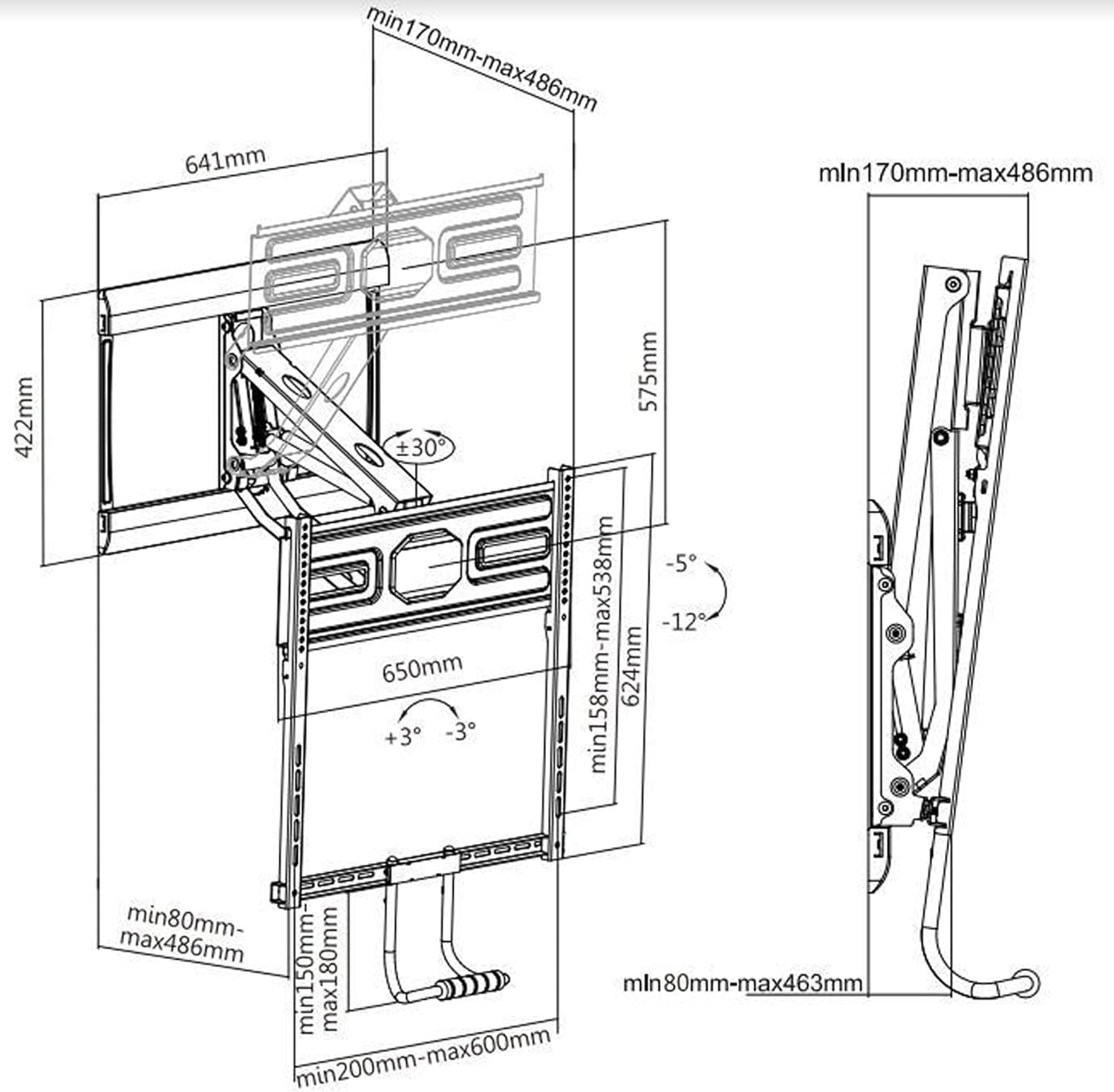
Figure 7: TV in the pulled-down position for comfortable viewing.

Figure 8: TV adjusted for optimal viewing angle, demonstrating swivel and tilt.
6.1. Product Features Overview Video
Video 2: Overview of the mount's full-motion capabilities and features.
7. Maintenance
- Periodically check all screws and connections to ensure they remain tight and secure.
- Clean the mount with a soft, dry cloth. Avoid abrasive cleaners or solvents.
- Inspect the gas spring mechanism for any signs of wear or damage.
8. Troubleshooting
Refer to the table below for common issues and their solutions.

Figure 9: Troubleshooting guide for common operational problems.
| Issue | Cause | Solution |
|---|---|---|
| Hard to pull down | Tension too high | Adjust the KG screw 2-3 turns counterclockwise and retest. |
| TV automatically rebounds | TV is not heavy enough / tension is too low | Make sure the TV is ≥28.5 lbs, and adjust the KG screw clockwise. |
| Bracket shakes | Screws not tightened / not fixed to the keel | Check the tightness of the screws and make sure at least 2 screws are fixed on the keel. |
| Bracket is exposed after installation | TV size is too small (<55 inches) | Recommended for 55+ inch TVs, or accept 1-2 inches of exposed bottom. |
9. Warranty and Customer Support
For warranty information, technical support, or any questions regarding your PrimeCables product, please contact PrimeCables customer service. Refer to your purchase documentation or the official PrimeCables website for contact details.
Manufacturer: PrimeCables
Ask a question about this manual
Ask about setup, troubleshooting, compatibility, parts, safety, or missing instructions. Manuals+ will review the question and use this page’s manual context to help answer it.