
Introduction
This manual provides comprehensive instructions for the safe and effective operation of your Dracast LED Fresnel 1000 Daylight LED Light. Please read this manual thoroughly before use and retain it for future reference. The Dracast Fresnel 1000 Daylight is a professional LED lighting fixture designed for studio and location use, offering a 5600K daylight-balanced output, adjustable beam angle, and DMX control capabilities.
Safety Instructions
- Always ensure the power supply matches the specified voltage (100-240 VAC).
- Do not operate the light in wet or damp conditions.
- Avoid direct eye exposure to the LED light source.
- Ensure proper ventilation around the fixture to prevent overheating.
- Do not attempt to disassemble or modify the unit. Refer all servicing to qualified personnel.
- Securely mount the fixture using appropriate stands and clamps.
- Keep away from children.
Package Contents
Verify that all items are present in the package:
- Dracast Fresnel Studio LED1000 Daylight LED Light
- 4-Way Barndoors
- AC Power Adapter
Product Features
- 7-inch Fresnel Lens
- Adjustable Beam Angle: 15-60 Degrees
- Daylight Balance: 5600K
- Color Rendering Index (CRI): >95
- Yoke with 5/8-inch Receiver for stand mounting
- Equivalent to 1000W Tungsten Halogen output
- Onboard DMX512 control
- Power Options: 100-240 VAC Mains or 24 VDC Battery (battery not included)
- 0-100% Dimming capability
- Silent Passive Heat Sink Cooling System
Setup
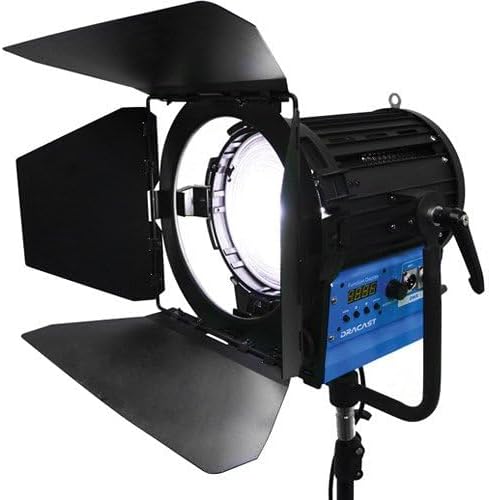
Figure 1: The Dracast LED Fresnel 1000 Daylight LED Light, shown with its four-way barndoors open, mounted on a light stand. The blue control panel with a digital display and DMX ports is visible on the side of the fixture.
- Mounting the Fixture: Attach the light fixture's yoke to a compatible light stand using the 5/8-inch receiver. Ensure the fixture is securely tightened to prevent accidental movement.
- Attaching Barndoors: Slide the included 4-way barndoors onto the front of the Fresnel lens. Secure them in place using the integrated clips or locking mechanism.
- Power Connection:
- AC Power: Connect the AC power adapter to the fixture's power input and then plug it into a standard 100-240 VAC electrical outlet.
- DC Battery Power (Optional): If using a 24 VDC battery (not included), connect it to the appropriate DC input port on the fixture.
Operating Instructions
- Power On/Off: Locate the power switch on the control panel and toggle it to the 'ON' position. The digital display will illuminate.
- Adjusting Brightness (Dimming): Use the dedicated dimming knob or buttons on the control panel to adjust the light output from 0% to 100%. The current brightness level will be shown on the digital display.
- Adjusting Beam Angle (Spot/Flood): Rotate the knob or lever on the side of the fixture to adjust the beam angle between 15 degrees (spot) and 60 degrees (flood). This changes the spread and intensity of the light.
- DMX Control:
- Connect a DMX controller to the fixture's DMX IN port using a standard DMX cable.
- If chaining multiple DMX fixtures, connect the DMX OUT of the first fixture to the DMX IN of the next.
- Set the DMX address on the fixture's control panel according to your DMX system's configuration. Refer to your DMX controller's manual for specific addressing instructions.
- The fixture supports DMX512 protocol for remote control of brightness and other functions.
- Using Barndoors: Adjust the individual leaves of the 4-way barndoors to shape the light beam and control spill.
Maintenance
- Cleaning: Use a soft, dry cloth to clean the exterior of the fixture. For the Fresnel lens, use a lens cleaning solution and a microfiber cloth to avoid scratches. Do not use harsh chemicals or abrasive materials.
- Ventilation: Ensure the passive heat sink fins are free from dust and obstructions to maintain efficient cooling.
- Storage: When not in use, store the light in a dry, dust-free environment, preferably in its original packaging or a protective case.
Troubleshooting
| Problem | Possible Cause | Solution |
|---|---|---|
| Light does not turn on. | No power supply; faulty cable; power switch off. | Check power cable connection; ensure power outlet is functional; verify power switch is 'ON'. |
| Light output is inconsistent or flickers. | Loose power connection; DMX signal issue; faulty dimmer. | Secure power connections; check DMX cable and controller settings; test with local dimming. |
| DMX control not working. | Incorrect DMX address; faulty DMX cable; DMX controller issue. | Verify DMX address setting; check DMX cable connections; test with a different DMX cable or controller. |
| Fixture feels excessively hot. | Obstructed ventilation; prolonged use in high ambient temperatures. | Ensure heat sink fins are clear; operate in a well-ventilated area. The unit uses passive cooling and will generate heat during operation. |
Specifications
| Model | Dracast Fresnel 1000 Daylight |
| Light Source | LED |
| Color Temperature | 5600K (Daylight) |
| CRI | >95 |
| Beam Angle | 15-60 Degrees (Adjustable) |
| Dimming | 0-100% |
| Control | Onboard, DMX512 |
| Power Input | 100-240 VAC, 24 VDC |
| Cooling | Passive Heat Sink (Silent) |
| Mounting | Yoke with 5/8-inch Receiver |
| Item Weight | 28 pounds |
| UPC | 683405283584 |
Warranty Information
The Dracast LED Fresnel 1000 Daylight LED Light comes with a Limited 1-Year Warranty. Please retain your proof of purchase for warranty claims. For detailed terms and conditions, refer to the warranty card included with your product or contact Dracast customer support.
Support
For technical assistance, troubleshooting beyond this manual, or warranty inquiries, please contact Dracast customer support. Contact information can typically be found on the manufacturer's website or on the product packaging.

