
Texecom CDB-0001
Texecom Premier Elite PKK Proximity Key Tag Pack User Manual
Model: CDB-0001
1. Introduction
This manual provides essential information for the proper use and care of your Texecom Premier Elite PKK Proximity Key Tag Pack. These tags are designed to integrate seamlessly with compatible Texecom alarm systems, offering a convenient method for arming and disarming.
The pack includes five individual proximity key tags, each identified by the Texecom Reference: CDB-0001.
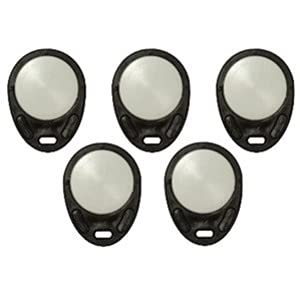
This image displays a pack of five Texecom Premier Elite PKK Proximity Key Tags. Each tag is black with a circular metallic-looking center, designed for use with compatible alarm system keypads.
2. Setup and Programming
The Texecom Premier Elite PKK Proximity Key Tags are compatible with Premier Elite Series and Premier Series alarm systems, specifically for use with LCDP, LCDLP, and DBD remote keypads equipped with proxy readers.
2.1 Adding Tags to Your System
To enable a new proximity key tag, it must be programmed into your Texecom alarm system. The exact procedure for adding new users and fobs can vary depending on your specific alarm panel model and firmware version.
- Consult Your Alarm System Manual: Refer to the user or installer manual for your Texecom Premier Elite or Premier Series alarm panel. Look for sections on 'Adding Users', 'Programming Fobs', or 'Proximity Tag Enrollment'.
- Access Programming Mode: Typically, this involves entering an engineer or master user code on the keypad.
- Follow On-Screen Prompts: The keypad will guide you through the process of presenting the new proximity tag to the reader for enrollment.
- Test Functionality: After enrollment, test the tag by attempting to arm and disarm the system to ensure it has been successfully added.
For visual guidance, some users find it helpful to search for official Texecom programming videos or tutorials specific to their alarm panel model on reputable video platforms.
3. Operating Instructions
Once programmed, using your Texecom Premier Elite PKK Proximity Key Tag is straightforward.
3.1 Arming and Disarming the System
To arm or disarm your alarm system using the proximity key tag:
- Present the Tag: Hold the proximity key tag firmly against the designated proximity reader area on your Texecom LCDP, LCDLP, or DBD remote keypad.
- Wait for Confirmation: The keypad will typically provide an audible beep or visual indication (e.g., a change in LED status or a message on the LCD screen) to confirm that the tag has been read successfully.
- System Response: The alarm system will then arm or disarm according to its current state and programming.
Ensure the tag is held steady against the reader until the system responds to avoid misreads.
4. Maintenance
Texecom Premier Elite PKK Proximity Key Tags are designed for durability and require minimal maintenance.
- Cleaning: If the tag becomes dirty, wipe it gently with a soft, dry cloth. Avoid using abrasive cleaners, solvents, or excessive moisture, as these can damage the tag's surface or internal components.
- Storage: Store tags in a cool, dry place away from direct sunlight and extreme temperatures.
- Physical Damage: Avoid dropping the tags or subjecting them to strong impacts, which could compromise their functionality.
- Magnetic Fields: Keep the tags away from strong magnetic fields, which could potentially interfere with their internal circuitry.
5. Troubleshooting
If you encounter issues with your Texecom Premier Elite PKK Proximity Key Tag, consider the following troubleshooting steps:
- Tag Not Recognized:
- Ensure the tag is held correctly and steadily against the keypad's proximity reader.
- Verify that the tag was successfully programmed into the alarm system. If unsure, attempt to re-program it following the instructions in Section 2.
- Check if the keypad's proximity reader is clean and unobstructed.
- Confirm that the alarm system is powered on and functioning correctly.
- Intermittent Operation:
- This could indicate a weak signal or interference. Try using the tag in a slightly different position relative to the reader.
- Ensure there are no other RFID devices or strong electronic signals nearby that could cause interference.
- System Does Not Respond:
- If the tag is recognized but the system does not arm/disarm, consult your alarm system's manual. There might be system-specific settings or conditions preventing the action (e.g., open zones).
- Contact your alarm system installer or Texecom technical support if the issue persists after reviewing your alarm panel's manual.
6. Specifications
| Feature | Specification |
|---|---|
| Brand | Texecom |
| Model Number | CDB-0001 (also B078GPJW3S) |
| Compatibility | Texecom Premier Elite Series, Premier Series (with LCDP, LCDLP, DBD remote keypads with proxy readers) |
| Colour | Black |
| Shape | Rectangular (with rounded edges) |
| Material Type | Plastic |
| Item Weight | Approximately 10 g per tag |
| Package Dimensions | 10 x 6 x 6 cm (for pack of 5) |
| Number of Tags | 5 |
7. Warranty and Support
For information regarding warranty coverage for your Texecom Premier Elite PKK Proximity Key Tags, please refer to the documentation provided with your original alarm system purchase or contact your authorized Texecom installer or reseller. Warranty terms typically vary by region and purchase date.
For technical support, product inquiries, or further assistance with programming and troubleshooting, please contact Texecom directly through their official website or customer service channels. Ensure you have your alarm system model number and any relevant purchase details available when seeking support.
Ask a question about this manual
Ask about setup, troubleshooting, compatibility, parts, safety, or missing instructions. Manuals+ will review the question and use this page’s manual context to help answer it.