
1. Introduction
This user manual provides essential information for the safe and effective use of your KHOI1971 AC Power Adapter. This adapter is specifically designed to provide power to compatible PROFORM fitness equipment, such as the 4-D Battery XT PFEL03717 Hybrid Trainer XT Elliptical Recumbent Bike, replacing the need for battery power. Please read this manual thoroughly before use and retain it for future reference.
2. Safety Information
To ensure safe operation and prevent damage, please observe the following safety precautions:
- Use the adapter only with compatible devices as specified.
- Do not expose the adapter to water, moisture, or extreme temperatures.
- Avoid dropping or subjecting the adapter to severe impact.
- Do not attempt to open, modify, or repair the adapter. Refer servicing to qualified personnel.
- Ensure the power outlet voltage matches the adapter's input specifications (110V-220V).
- Unplug the adapter from the wall outlet when not in use for extended periods.
- Keep out of reach of children.
3. Package Contents
Verify that all items are present in your package:
- 1 x KHOI1971 AC Power Adapter
4. Setup Instructions
Follow these steps to connect your AC Power Adapter to your PROFORM fitness equipment:
- Identify the Power Port: Locate the DC power input port on your PROFORM 4-D Battery XT PFEL03717 Hybrid Trainer XT Elliptical Recumbent Bike. This port is typically a small, round receptacle.
- Connect the Adapter: Insert the barrel connector end of the KHOI1971 AC Power Adapter into the power input port of your fitness equipment. Ensure a snug and secure connection.
- Plug into Wall Outlet: Insert the two-prong plug of the adapter into a standard 110V-220V AC wall outlet.
- Verify Power: The adapter features an LED light power indicator. Once plugged into a live outlet and connected to the device, this LED should illuminate, indicating that power is being supplied.

Image 1: The KHOI1971 AC Power Adapter, showing the main unit with input/output specifications and the barrel connector.
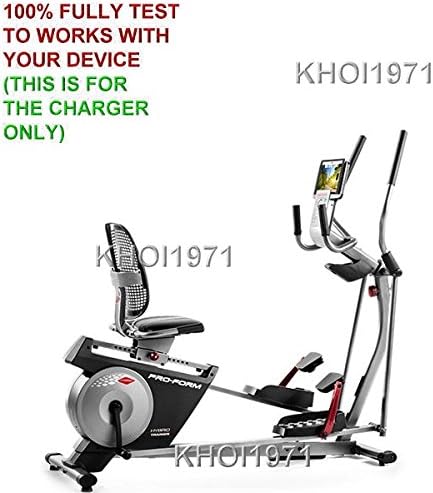
Image 2: The KHOI1971 AC Power Adapter shown in context with a PROFORM Hybrid Trainer XT Elliptical Recumbent Bike, illustrating its intended use.

Image 3: A close-up view of the PROFORM fitness equipment's console, indicating where the power adapter connects to supply power to the unit.
5. Operating Instructions
Once the adapter is correctly connected and powered, your PROFORM fitness equipment should receive power. The adapter features a smart IC chip for auto shut-off, which helps protect your device from overcharging or power fluctuations. The LED indicator provides a visual confirmation of power status.
- Power On: After connecting the adapter, turn on your fitness equipment using its dedicated power button or console controls.
- Power Off: To power off, turn off your fitness equipment first, then unplug the adapter from the wall outlet.
6. Maintenance
Proper maintenance ensures the longevity and performance of your AC Power Adapter:
- Cleaning: Disconnect the adapter from all power sources before cleaning. Use a soft, dry cloth to wipe the exterior. Do not use liquid cleaners or abrasive materials.
- Storage: Store the adapter in a cool, dry place away from direct sunlight and moisture when not in use. Avoid tightly coiling the cable to prevent damage.
- Inspection: Periodically inspect the adapter and cable for any signs of damage, such as frayed wires or cracked casing. Discontinue use if damage is observed.
7. Troubleshooting
If you encounter issues with your AC Power Adapter, refer to the following common problems and solutions:
- No Power to Device:
- Ensure the adapter is securely plugged into both the wall outlet and the fitness equipment.
- Check if the wall outlet is functional by plugging in another device.
- Verify that the LED power indicator on the adapter is illuminated. If not, try a different outlet.
- Confirm that your fitness equipment's power button is in the 'ON' position.
- Adapter Overheating:
- Unplug the adapter immediately. Allow it to cool down.
- Ensure the adapter is used in a well-ventilated area.
- Verify that the adapter is compatible with your device's power requirements.
If problems persist, contact customer support.
8. Specifications
| Feature | Specification |
|---|---|
| Brand | KHOI1971 |
| Model Number | KHOI1971 ® CUSTOM MADE |
| Input Voltage | 110-220 Volts AC |
| Output Voltage | 12 Volts DC |
| Connector Type | Barrel Connector |
| Compatible Devices | PROFORM 4-D Battery XT PFEL03717 Hybrid Trainer XT Elliptical Recumbent Bike |
| Special Features | Smart IC chip for auto shut-off, LED power indicator, Durable |
| Power Source | Wall 110V |
| Color | BLACK |
| Item Weight | 8 ounces |
| Certifications | CE |
| Date First Available | January 5, 2017 |
9. Warranty and Support
For warranty information or technical support, please refer to the manufacturer's official website or contact the vendor directly. Keep your purchase receipt as proof of purchase.
Manufacturer: KHOI1971 ® CUSTOM MADE