
1. Important Safety Information
Please read all instructions carefully before assembly and use. Retain this manual for future reference.
- Assembly Required: This product requires assembly. Always follow the provided instructions to ensure stability and safety.
- Liquid Avoidance: Keep liquids away from the product to prevent damage to the glass and potential hazards.
- Child Supervision: Always supervise children when they are near or using this furniture to prevent accidents.
- Weight Limit: Do not exceed the maximum supported load of 20 kg (44 lbs) on the TV stand. Overloading can cause structural failure and injury.
- Placement: Place the TV stand on a flat, level, and stable surface to prevent tipping.
- Glass Handling: Handle tempered glass components with care. Although durable, impacts to edges or corners can cause breakage.
2. Product Overview
The Vente-unique STILEOS TV Stand is a modern and elegant furniture piece designed to support your television and media equipment. It features a transparent, curved tempered glass structure with a single spacious niche for storage.

Image 2.1: Front view of the Vente-unique STILEOS TV Stand, showcasing its transparent tempered glass design and single storage niche.

Image 2.2: The STILEOS TV Stand integrated into a modern living room setting, demonstrating its aesthetic appeal and functional use.
3. Package Contents
Before beginning assembly, ensure all parts are present and undamaged. If any parts are missing or damaged, do not proceed with assembly and contact customer support.
- Curved Tempered Glass Main Structure (1 piece)
- Tempered Glass Shelf (1 piece)
- Assembly Hardware (screws, washers, etc.)
- Instruction Manual (this document)
4. Setup and Assembly Instructions
Assembly typically requires two people for safety and ease of handling glass components. No special tools are usually required beyond a screwdriver for securing hardware.
- Unpack Components: Carefully remove all parts from the packaging. Place them on a soft, clean surface to prevent scratches.
- Identify Parts: Refer to the included diagram (if provided in physical manual) to identify the main glass structure, the shelf, and all hardware.
- Attach Shelf Supports: Locate the pre-drilled holes or attachment points on the main curved glass structure. Secure the shelf supports (if separate) using the provided hardware. Do not overtighten.
- Install Shelf: Carefully place the tempered glass shelf onto the installed supports. Ensure it is seated securely and evenly.
- Final Tightening: Once all components are in place, gently tighten all screws to ensure stability. Avoid excessive force to prevent cracking the glass.
- Placement: Move the assembled TV stand to its desired location, ensuring it is on a stable and level surface.
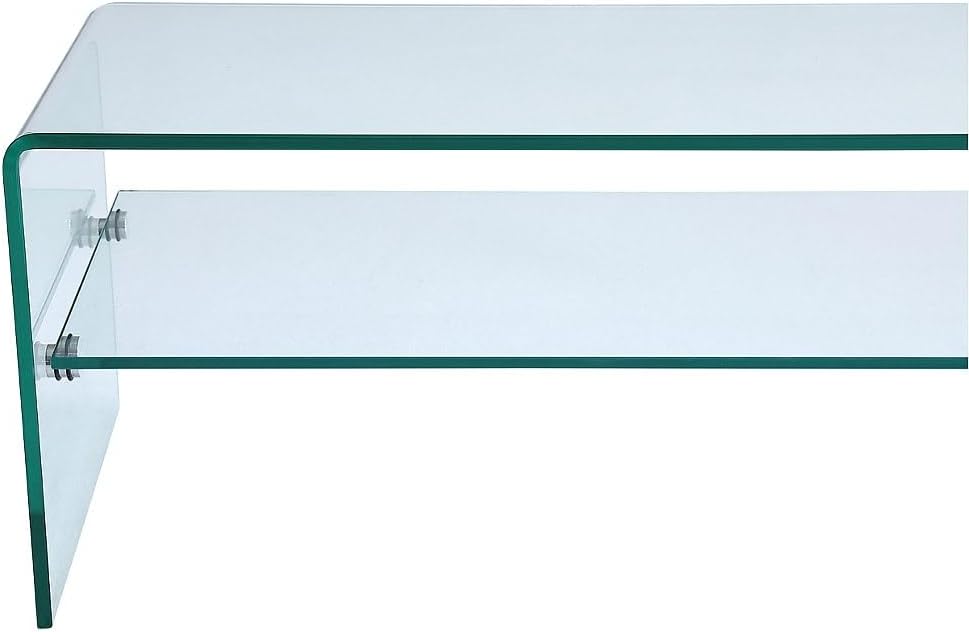
Image 4.1: Detail of the shelf attachment mechanism, showing how the tempered glass shelf is secured to the main structure.
5. Operating Instructions
The Vente-unique STILEOS TV Stand is designed for straightforward use as a media console.
- Placement of Equipment: Place your television centrally on the top surface of the stand. Distribute the weight of other media devices (e.g., soundbars, gaming consoles) evenly across the niche.
- Weight Distribution: Ensure that the total weight of all items placed on the stand does not exceed the maximum load capacity of 20 kg. Uneven weight distribution can affect stability.
- Cable Management: While the stand does not feature integrated cable management, cables can be discreetly routed behind the unit to maintain a tidy appearance.
6. Maintenance
Proper care will ensure the longevity and appearance of your TV stand.
- Cleaning Glass Surfaces: Use a soft, lint-free cloth and a glass cleaner to wipe down the tempered glass surfaces. Avoid abrasive cleaners or materials that could scratch the glass.
- Dusting: Regularly dust the stand with a dry, soft cloth.
- Spills: Immediately wipe up any spills to prevent watermarks or damage.
- Inspection: Periodically check all assembly hardware to ensure it remains tight. Retighten if necessary, but do not overtighten.
7. Troubleshooting
This section addresses common concerns you might encounter.
- Instability: If the TV stand feels wobbly, ensure it is placed on a completely flat and level surface. Check all assembly screws and tighten them if loose.
- Scratches on Glass: To prevent scratches, avoid dragging objects across the glass surface. Use coasters or protective pads under items. Minor scratches may be reduced with specialized glass polishing kits, but deep scratches are permanent.
- Glass Breakage: Tempered glass is designed to break into small, relatively harmless pieces when shattered. If breakage occurs, carefully clean up all fragments and contact customer support for replacement options.
8. Specifications
| Feature | Detail |
|---|---|
| Model | STILEOS |
| Brand | Vente-unique |
| Material | Tempered Glass (12mm thick) |
| Color | Transparent |
| Dimensions (L x W x H) | 140 cm x 40 cm x 40 cm (55.1 x 15.7 x 15.7 inches) |
| Product Weight | 40 kg (88.2 lbs) |
| Maximum Supported Load | 20 kg (44 lbs) |
| Storage Type | 1 Niche |
| Assembly Required | Yes |
9. Warranty Information
Warranty information for the Vente-unique STILEOS TV Stand is not provided within the product details. For specific warranty terms and conditions, please refer to your purchase documentation, receipt, or contact Vente-unique customer service directly. Keep your proof of purchase for any warranty claims.
10. Customer Support
Should you require assistance with assembly, parts, or have any questions regarding your Vente-unique STILEOS TV Stand, please contact Vente-unique customer support.
- Refer to your purchase invoice or the retailer's website for the most current contact information.
- When contacting support, please have your model number (STILEOS) and proof of purchase readily available.