
Introduction
This manual provides instructions for the setup, operation, maintenance, and troubleshooting of your Summer Baby Pixel Extra Video Camera. This camera is designed to expand your existing Summer Baby Pixel monitoring system, allowing you to monitor multiple rooms or children with a single parent unit. It is compatible only with the Summer Baby Pixel monitor system and can expand your system up to a total of four cameras.

Figure 1: Summer Baby Pixel Extra Video Camera. This image shows the compact design of the camera unit.
Package Contents
- Summer Baby Pixel Extra Video Camera
- Power Adapter
- Wall Mount Hardware (if included)
Please ensure all components are present before proceeding with installation.
Setup and Installation
Camera Placement
Position the camera in a location that provides a clear view of the desired monitoring area. Ensure the camera is placed out of reach of children. The camera can be placed on a flat surface or wall-mounted.
Powering the Camera
- Connect the power adapter to the camera's power input port.
- Plug the power adapter into a standard electrical outlet.
- The camera will power on automatically.
Pairing the Extra Camera with Your Parent Unit
To add the extra camera to your existing Summer Baby Pixel monitoring system, follow these steps:
- Ensure your parent unit is powered on and within range of the new camera.
- Access the camera management menu on your parent unit (refer to your main Summer Baby Pixel monitor manual for specific menu navigation).
- Select the option to "Add Camera" or "Pair Camera".
- Follow the on-screen prompts on your parent unit. This typically involves pressing a pairing button on the camera unit (often located on the back or bottom) within a specified timeframe.
- Once successfully paired, the camera's video feed will appear on your parent unit.
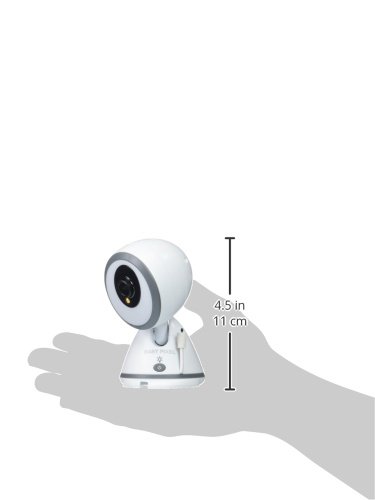
Figure 2: Camera dimensions. The camera measures approximately 4.5 inches (11 cm) in height.
Operating Instructions
This extra camera integrates seamlessly with your Summer Baby Pixel parent unit, offering enhanced monitoring capabilities.
Key Features
- Multi-Camera Monitoring: Expand your system to monitor up to 4 cameras from a single parent unit.
- Remote Control: Control camera functions such as pan, tilt, and zoom directly from your parent unit. The camera mimics your movement for a better view.
- 3-Level Zoom: Digitally zoom in on your child for a closer look.
- Moonlite Night Vision Boost: Provides a clearer, temporary, in-color view in low-light conditions.
- SleepZone Virtual Boundary: Set a virtual boundary box on your parent unit. The system will alert you if your child exits this defined safe space.
- Voice-Activated Video On/Off (VOX): The parent unit screen can automatically activate when sound is detected from the camera, conserving battery life.
- Temperature Display: The parent unit displays the nursery temperature detected by the camera.
- Wireless Range: Enjoy a wireless range of up to 1,000 feet (300 meters) in open spaces.

Figure 3: Example of the Summer Baby Pixel Monitor System. This image illustrates the parent unit and camera working together.
Maintenance
To ensure optimal performance and longevity of your camera, follow these maintenance guidelines:
- Cleaning: Use a soft, dry cloth to clean the camera lens and body. Do not use abrasive cleaners or solvents.
- Power: Always use the provided power adapter. Disconnect the power adapter from the outlet when not in use for extended periods.
- Environment: Keep the camera in a dry environment, away from direct sunlight, heat sources, and moisture. The camera has an IP65 waterproof rating, but it is not designed for submersion.
Troubleshooting
If you encounter issues with your Summer Baby Pixel Extra Video Camera, refer to the following common problems and solutions:
| Problem | Possible Cause / Solution |
|---|---|
| No video feed from the camera. |
|
| Poor video quality or signal interference. |
|
| Parent unit screen turns on frequently due to sound (VOX). |
|
| Camera pan/tilt/zoom not responding. |
|
| Inaccurate temperature reading. |
|
Specifications
- Model Number: 29970
- Connectivity: Wireless (Wi-Fi)
- Power Source: Corded Electric
- Video Capture Resolution: 720p
- Night Vision: Night Color
- Control Method: Remote (via parent unit)
- Installation Type: Wall mount
- Waterproof Rating: IP65
- Item Dimensions: 3 x 3 x 4.75 inches
- Item Weight: 16 ounces
- Number of Channels: Supports up to 4 cameras
Warranty Information
This Summer Baby Pixel Extra Video Camera is covered by a 1-year manufacturer's warranty from the date of purchase. Please retain your proof of purchase for warranty claims. The warranty covers defects in materials and workmanship under normal use. It does not cover damage caused by misuse, accidents, unauthorized repairs, or normal wear and tear.
Customer Support
For further assistance, technical support, or warranty inquiries, please contact Summer Infant customer service. Refer to the contact information provided in your original Summer Baby Pixel monitor system manual or visit the official Summer Infant website.
Brand: Summer Infant


