1. Introduction
Thank you for choosing the NPET K80 TKL Tenkeyless Gaming Keyboard. This manual provides detailed instructions for setting up, operating, and maintaining your new mechanical keyboard. Designed for optimal gaming and typing performance, the K80 features a compact layout, responsive red mechanical switches, and customizable RGB backlighting.
2. Package Contents
Please verify that all items are present in your package:
- NPET K80 TKL Tenkeyless Gaming Keyboard
- User Manual (this document)
- Keycap Puller
3. Product Overview
The NPET K80 is an 89-key tenkeyless mechanical keyboard engineered for durability and performance. Its compact design saves desk space while providing a full range of essential keys.

Figure 3.1: Overview of the NPET K80 TKL Gaming Keyboard, showcasing its compact 89-key layout and RGB backlighting.
3.1 Key Features
- 89-Key TKL Design: Ultra-portable compact layout, freeing up desk space for mouse movement.
- Linear & Quiet Red Mechanical Switches: Guaranteed for 50 million key presses, offering smooth, linear travel without a tactile bump for fast actuation and quiet operation.
- Anti-Ghosting & N-Key Rollover: All 89 mechanical keys are conflict-free, ensuring every keystroke is registered accurately during intense gaming sessions.
- 21 RGB Backlight Modes: Customizable lighting with 5 brightness levels and adjustable breathing speed. Includes 3 customizable Chroma RGB modes, 2 gaming modes (RTS/FPS), and 1 office mode.
- Durable Construction: Built with metal alloy and ABS material, featuring plate-mounted mechanical keys and switches for enhanced longevity.
- Ergonomic Design: Features anti-slip feet, foldable stands, and a stepped keycap layout for comfortable use during extended periods.

Figure 3.2: The compact 89-key layout, including integrated number keys, designed to optimize desk space.
The 89-key layout provides essential functionality in a smaller footprint, making it ideal for gaming setups where desk space is at a premium.

Figure 3.3: Close-up view of the high-precision red mechanical key switches, known for their linear and quiet operation.
The red mechanical switches provide a smooth, consistent keystroke without a tactile bump, making them ideal for rapid key presses in gaming and comfortable typing in office environments.

Figure 3.4: Illustration of the ergonomic design, including stepped keycap layout, foldable stand, and anti-slip feet for improved comfort.
The keyboard's ergonomic design, including adjustable feet and a stepped keycap profile, is intended to reduce hand fatigue during prolonged use.

Figure 3.5: View highlighting the robust metal and ABS construction of the keyboard, ensuring durability.
Constructed from a combination of metal alloy and high-quality ABS plastic, the K80 keyboard is built to withstand demanding usage.
4. Setup
The NPET K80 keyboard is designed for simple plug-and-play operation.
- Unpack the keyboard from its packaging.
- Connect the USB cable from the keyboard to an available USB port on your computer.
- Your operating system (Windows, Mac OS, etc.) will automatically detect and install the necessary drivers. No additional software or drivers are required.
- The keyboard is now ready for use.
5. Operating Instructions
This section details the various functions and customization options available on your NPET K80 keyboard.
5.1 RGB Backlight Control
The K80 features 21 distinct RGB lighting modes, adjustable brightness, and breathing speed. All lighting controls are managed directly from the keyboard using the Fn key in combination with other keys.
- Fn + Scroll Lock (Scrlk): Cycle through 21 different RGB backlight modes.
- Fn + Up Arrow (PgUp): Increase backlight brightness (5 levels).
- Fn + Down Arrow (PgDn): Decrease backlight brightness (5 levels).
- Fn + Left Arrow (Home): Decrease breathing/animation speed.
- Fn + Right Arrow (End): Increase breathing/animation speed.
- Fn + PrtSc: Turn full keyboard light on/off.

Figure 5.1: Visual guide to RGB backlight controls, showing key combinations for modes, brightness, and speed adjustments.
The image above illustrates the key combinations for adjusting the RGB lighting effects, including cycling through modes and controlling brightness and speed.
5.2 Multimedia Shortcuts
Access common multimedia functions using the Fn key in combination with the F-keys.
| Key Combination | Function |
|---|---|
| Fn + F1 | My Computer |
| Fn + F2 | Search |
| Fn + F3 | Calculator |
| Fn + F4 | Media Player |
| Fn + F5 | Previous Track |
| Fn + F6 | Next Track |
| Fn + F7 | Play/Pause |
| Fn + F8 | Stop |
| Fn + F9 | Mute |
| Fn + F10 | Volume Down |
| Fn + F11 | Volume Up |
| Fn + F12 |
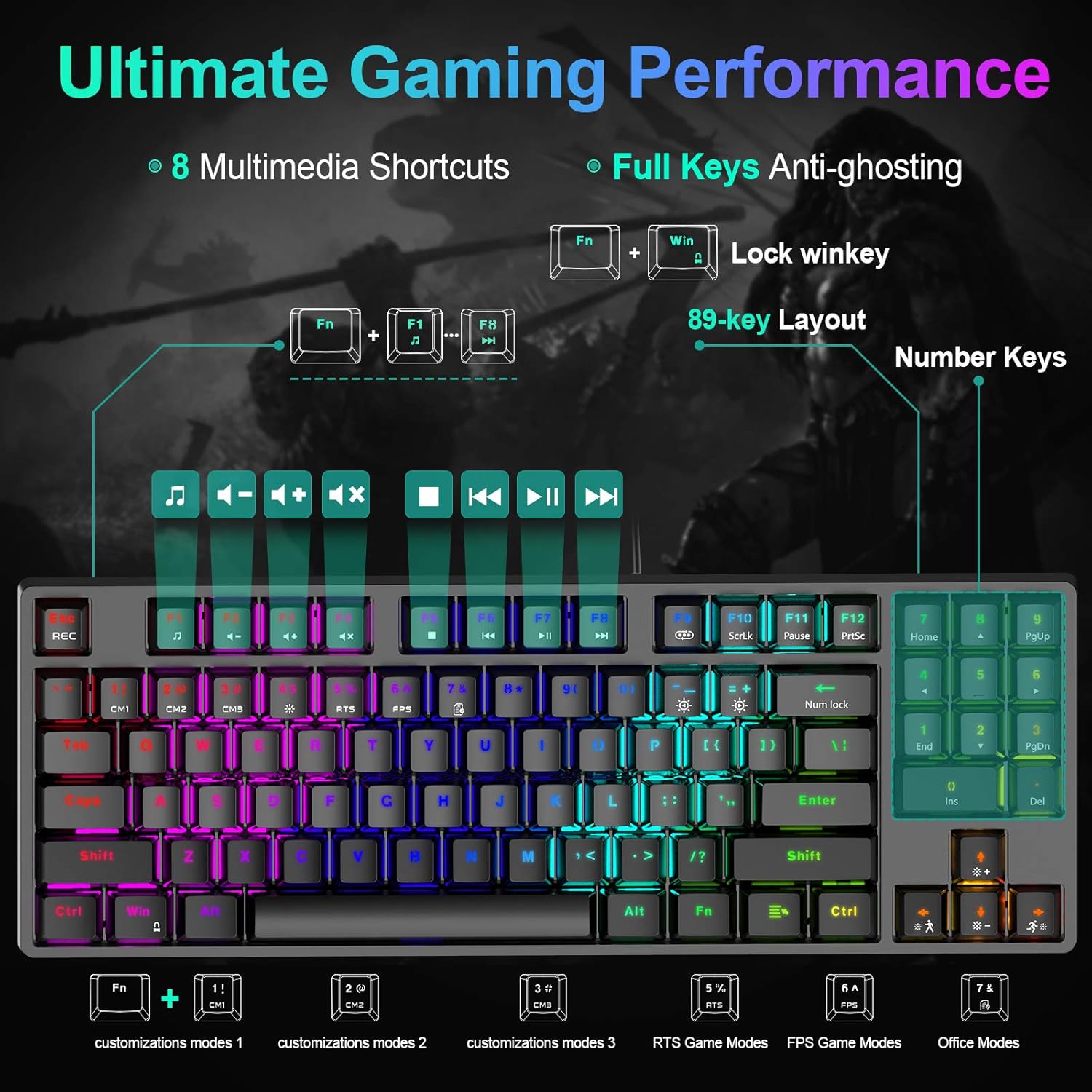
Figure 5.2: Diagram illustrating the multimedia shortcuts and dedicated gaming/office modes accessible via Fn key combinations.
This image provides a visual reference for the multimedia functions and the various customizable modes available on the keyboard.
5.3 Gaming and Office Modes
The keyboard offers specialized modes for gaming and office use, along with customizable lighting profiles.
- Fn + 1! (Customization Mode 1): Activates a customizable RGB lighting profile.
- Fn + 2@ (Customization Mode 2): Activates a second customizable RGB lighting profile.
- Fn + 3# (Customization Mode 3): Activates a third customizable RGB lighting profile.
- Fn + 4$ (RTS Game Mode): Optimizes lighting for Real-Time Strategy games.
- Fn + 5% (FPS Game Mode): Optimizes lighting for First-Person Shooter games.
- Fn + 6^ (Office Mode): Provides a suitable lighting profile for office work.
- Fn + Win Key: Locks/unlocks the Windows key to prevent accidental presses during gaming.
6. Maintenance
Proper maintenance ensures the longevity and performance of your keyboard.
- Cleaning: Use a soft, dry cloth to wipe the surface of the keyboard. For deeper cleaning, you may use a keycap puller (included) to remove keycaps and clean dust or debris with compressed air or a small brush. Ensure the keyboard is disconnected from your computer before cleaning.
- Avoid Liquids: Do not expose the keyboard to liquids. In case of accidental spills, immediately disconnect the keyboard and allow it to dry completely before reconnecting.
- Storage: Store the keyboard in a cool, dry place away from direct sunlight and extreme temperatures.

Figure 6.1: Illustration of the precision-engineered keycaps, designed for clear backlighting and durability against wear.
The keycaps are designed for durability, but regular cleaning helps maintain their appearance and functionality.
7. Troubleshooting
If you encounter issues with your NPET K80 keyboard, please refer to the following solutions:
| Problem | Possible Solution |
|---|---|
| Keyboard is not responding. |
|
| Backlight is not working or is dim. |
|
| Certain keys are not responding. |
|
| Windows key is disabled. |
|
8. Specifications
| Feature | Detail |
|---|---|
| Model Number | K80 |
| Keyboard Type | 80% TKL Mechanical Gaming Keyboard |
| Switch Type | Linear & Quiet Red Mechanical Switches |
| Key Count | 89 Keys |
| Backlight | RGB (21 modes, 5 brightness levels, adjustable speed) |
| Connectivity | USB Wired |
| Material | Metal Alloy, ABS |
| Dimensions (L x W x H) | 14.09 x 5.11 x 1.57 inches (35.8 x 13 x 4 cm) |
| Item Weight | 1.32 pounds (0.6 kg) |
| Keystroke Lifespan | 50 Million |
| Compatible OS | Windows 10, 8, 7, XP, VISTA, Mac OS |

Figure 8.1: Physical dimensions of the NPET K80 keyboard, showing its compact size.
The compact dimensions of the K80 make it suitable for various desk setups and portability.
9. Warranty and Support
NPET products are designed for reliability and performance. For warranty information and technical support, please refer to the official NPET website or contact their customer service directly. Keep your purchase receipt as proof of purchase for warranty claims.
For further assistance, please visit: NPET Official Store on Amazon


