
1. Introduction
This manual provides comprehensive instructions for the assembly, operation, and maintenance of your Zinus Tresa Metal Desk with Storage and Monitor Stand, Large. Designed for home office or den use, this desk features a durable metal frame, an espresso wood-like finish tabletop, a movable monitor stand, a hanging hook, a side storage tray, and a built-in cable organizer. Please read all instructions carefully before assembly and use to ensure proper function and safety.

Figure 1: Zinus Tresa Metal Desk, Large. This image shows the assembled desk with a monitor, lamp, and small plant, highlighting its functional design.
2. Safety Information
Please observe the following safety guidelines to prevent injury or damage to the product:
- Always assemble the desk according to the provided instructions.
- Do not exceed the weight limit of 100 lbs (45 kg).
- Ensure the desk is stable and secure before use.
- Keep the work area clear of obstacles to prevent accidents.
- Do not stand or sit on the desk.
- Keep small parts away from children during assembly.
3. Package Contents
Verify that all components are present before beginning assembly. If any parts are missing or damaged, please contact customer support.

Figure 2: Product Packaging. The desk components are efficiently packed in one compact box for shipping.
Included Components:
- Desk Tabletop (Espresso Finish)
- Desk Legs and Frame (Steel)
- Monitor Stand
- Side Storage Tray
- Hanging Hook
- Cable Management Organizer
- Assembly Hardware (screws, bolts, etc.)
- Assembly Tools (ratchet tool)
- Instruction Manual
4. Assembly Instructions
Assembly is designed to be straightforward and typically takes under 30 minutes with one person. All necessary tools are included.
- Unpack Components: Carefully remove all parts from the packaging and lay them out on a clean, soft surface to prevent scratches. Verify all parts are present against the package contents list.
- Attach Legs to Frame: Securely attach the desk legs to the main frame using the provided hardware. Ensure all connections are tight but do not overtighten.
- Mount Tabletop: Carefully place the tabletop onto the assembled frame. Align the pre-drilled holes and secure the tabletop using the designated screws.
- Install Accessories: Attach the monitor stand, side storage tray, hanging hook, and cable organizer to their respective positions as indicated in the detailed assembly diagram (refer to the included printed manual for specific diagrams).
- Final Check: Once assembled, gently lift and move the desk to its desired location. Ensure all connections are secure and the desk is stable before placing any items on it.
5. Usage
Monitor Stand
The movable monitor stand helps elevate your screen to an ergonomic height, reducing neck and back strain. It can be positioned anywhere on the desk surface to suit your setup.
Side Storage Tray
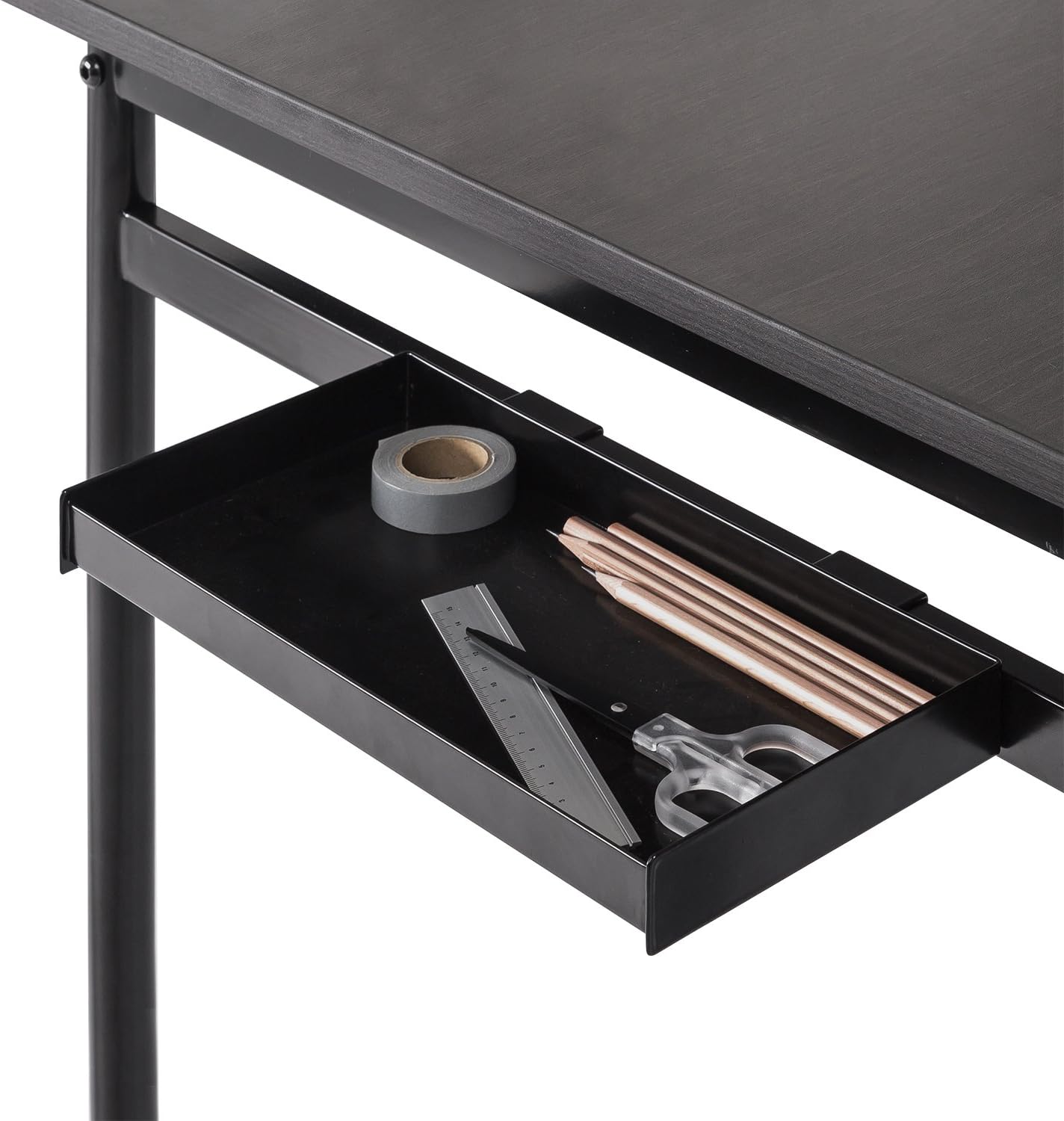
Figure 3: Side Storage Tray. This tray provides convenient access for small office supplies like pens, pencils, and rulers.
The integrated side storage tray is ideal for keeping small office essentials, such as pens, pencils, and other accessories, within easy reach.
Hanging Hook

Figure 4: Hanging Hook. A bag is shown hanging from the hook, demonstrating its use for personal items.
Utilize the hanging hook to keep bags, headphones, or other items off the floor and within easy access, helping to maintain a tidy workspace.
Cable Management Organizer

Figure 5: Cable Management Organizer. This image illustrates how cables can be routed through the organizer to keep them neat and prevent tangling.
The built-in cable organizer helps manage and route power cords and other cables, preventing clutter and ensuring a clean, organized desk surface.
6. Maintenance
To maintain the appearance and longevity of your Zinus Tresa Metal Desk, follow these simple care instructions:
- Cleaning: Wipe the desk surfaces with a damp cloth. Avoid using harsh chemicals or abrasive cleaners, which can damage the finish.
- Inspection: Periodically check all screws and connections to ensure they remain tight. Retighten if necessary.
- Avoid Excessive Moisture: Do not expose the desk to excessive moisture or direct sunlight for prolonged periods.
7. Troubleshooting
If you encounter any issues with your desk, refer to the following common solutions:
- Desk is Wobbly: Ensure all bolts and screws are securely tightened. Check that the desk is on a level surface. If the floor is uneven, consider using furniture pads to stabilize.
- Missing Parts: If any parts were missing upon unboxing, please contact Zinus customer support immediately for assistance.
- Damage During Assembly: If a part was damaged during assembly, cease assembly and contact customer support.
8. Specifications

Figure 6: Desk Dimensions. This image provides a visual representation of the desk's key measurements in centimeters.
| Feature | Detail |
|---|---|
| Brand | Zinus |
| Model Name | Tresa |
| Model Number | OLB-DS-PL55 |
| Product Dimensions (L x W x H) | 55"D x 22.53"W x 32.52"H (approx. 139.7 cm x 57.2 cm x 82.6 cm) |
| Item Weight | 53.73 Pounds (approx. 24.37 kg) |
| Maximum Weight Recommendation | 100 Pounds (approx. 45 kg) |
| Material Type | Engineered Wood, Steel |
| Finish Type | Steel frame, Espresso wood-like tabletop |
| Special Features | Adjustable Monitor Stand, Side Storage Tray, Hanging Hook, Cable Organizer |
| Assembly Required | Yes (Tools included, 1 person recommended) |
| Room Type | Dormitory, Office, Study Room |
9. Warranty & Support
Warranty Information
The Zinus Tresa Metal Desk is covered by a 1-year worry-free warranty from the date of purchase. This warranty covers manufacturing defects in materials and workmanship. Please retain your proof of purchase for warranty claims.
Customer Support
For any questions, missing parts, or warranty claims, please contact Zinus customer support. Refer to the contact information provided in your product packaging or visit the official Zinus website for assistance.


