
1. Product Overview
This Fosa remote control is a direct replacement for the original AKB74915304 TV remote. It is designed to provide full functionality for compatible televisions, offering a comfortable grip and durable ABS shell material for long-lasting use.

Image 1.1: Fosa AKB74915304 Replacement TV Remote Control. This image shows the remote control positioned in front of a television, illustrating its purpose as a replacement unit.
2. Package Contents
The package includes the following item:
- 1 x Fosa AKB74915304 TV Remote Control
3. Specifications
| Color | Black |
| Shell Material | ABS |
| Size (L x W x H) | 16.5 x 4.5 x 2 cm (6.5 x 1.8 x 0.8 inches) |
| Weight | Approximately 66g (0.15 lbs) |
| Remote Control Distance | Up to 10 meters (33 feet) |
| Battery Type | 2 x AAA batteries (not included) |
| Power | 3V |
| Connectivity Technology | Infrared (IR) |
| Controller Type | Button Control |
| Compatible Devices | Televisions compatible with AKB74915304 remote |

Image 3.1: Remote Control Dimensions. This image displays the remote control with its length (16.5 cm), width (4.5 cm), and height (2.0 cm) clearly indicated.
4. Setup
4.1 Battery Installation
- Locate the battery compartment cover on the back of the remote control.
- Slide the cover downwards or press the latch (if present) to open the compartment.
- Insert two (2) AAA batteries, ensuring the positive (+) and negative (-) terminals match the diagrams inside the compartment.
- Replace the battery compartment cover by sliding it back into place until it clicks securely.
Note: Batteries are not included with the remote control. Use new, high-quality AAA alkaline batteries for optimal performance.
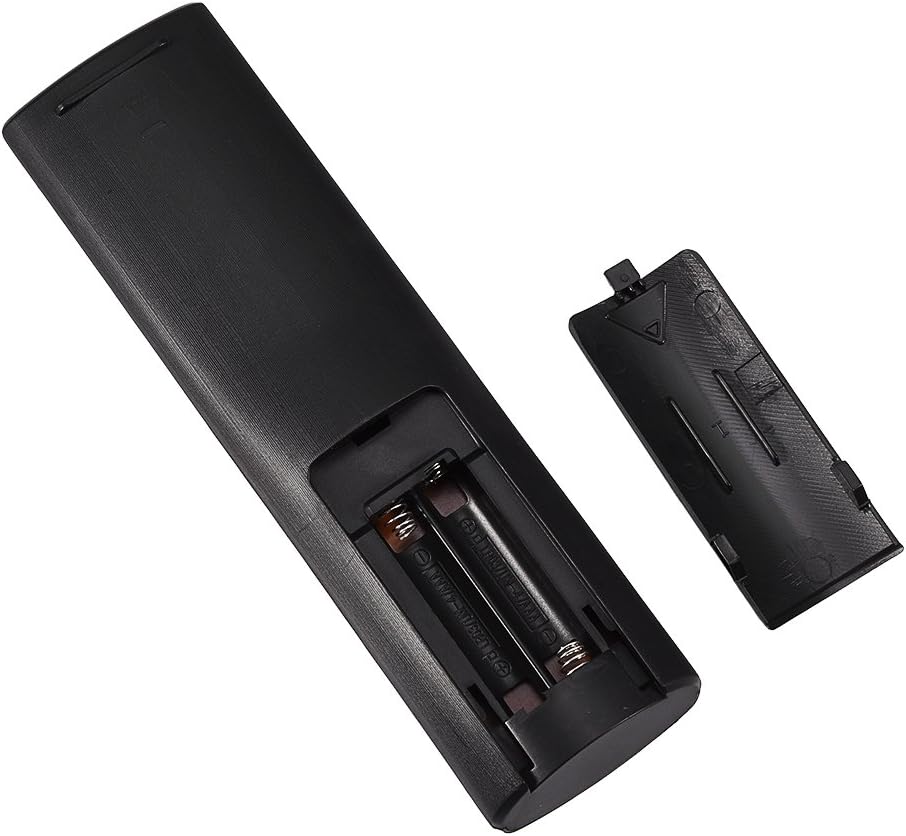
Image 4.1: Battery Compartment. This image shows the remote control with its battery compartment open, revealing the slots for two AAA batteries.
5. Operating Instructions
This remote control operates using infrared (IR) technology. Ensure there is a clear line of sight between the remote control and your television's IR receiver.
5.1 Basic Operation
- Point the remote control directly at your television.
- Press the desired function button (e.g., Power, Volume Up/Down, Channel Up/Down, Number buttons) to control your TV.
- The remote control has a range of up to 10 meters (33 feet). Optimal performance is achieved within this distance and without obstructions.

Image 5.1: Remote Control in Use. This image depicts a hand holding the remote control, pointing it towards a television, demonstrating typical usage.
6. Maintenance and Care
- Cleaning: Wipe the remote control with a soft, dry cloth. Do not use liquid cleaners or abrasive materials.
- Battery Replacement: Replace batteries when the remote control's response becomes sluggish or stops working. Always replace both batteries at the same time.
- Storage: If the remote control will not be used for an extended period, remove the batteries to prevent leakage.
- Avoid Damage: Do not drop the remote control or expose it to extreme temperatures, humidity, or direct sunlight.
7. Troubleshooting
- Problem: Remote control is not responding.
- Check if the batteries are inserted correctly with the correct polarity (+/-).
- Replace old batteries with new AAA batteries.
- Ensure there are no obstructions between the remote control and the TV's IR receiver.
- Confirm the remote control is pointed directly at the TV.
- Problem: Remote control range is shorter than expected.
- Ensure batteries are fresh. Low battery power can reduce range.
- Remove any objects that might be blocking the signal path.
- Bright light sources (e.g., direct sunlight, certain types of lighting) can interfere with IR signals. Try operating in different lighting conditions.
8. Warranty and Support
This product is typically covered by a standard return policy. For specific warranty details, returns, or technical support, please refer to the retailer's policy where the product was purchased or contact the manufacturer directly. The product generally includes a 30-day return period from the date of purchase.
