
B-Air BA-VP-20-BL
B-Air VP Series 1/5 HP Low Profile Air Mover (Model BA-VP-20-BL) User Manual
This manual provides instructions for the safe and effective operation and maintenance of the B-Air VP Series 1/5 HP Low Profile Air Mover, model BA-VP-20-BL.
1. Important Safety Instructions
Read all instructions carefully before using the B-Air VP Series Air Mover. Failure to follow these instructions may result in electric shock, fire, or serious injury.
- Always connect the air mover to a properly grounded outlet.
- Do not operate the air mover with a damaged cord or plug. If the cord or plug is damaged, contact qualified service personnel.
- Keep children and pets away from the air mover during operation.
- Do not use the air mover in standing water or excessively wet conditions where electrical components could be submerged.
- Ensure the air intake and exhaust are clear of obstructions to prevent overheating.
- Unplug the unit before performing any maintenance or cleaning.
- Do not use the air mover to ventilate flammable or explosive materials or vapors.
- This appliance has a polarized plug (one blade is wider than the other). To reduce the risk of electric shock, this plug is intended to fit in a polarized outlet only one way. If the plug does not fit fully in the outlet, reverse the plug. If it still does not fit, contact a qualified electrician. Do not attempt to defeat this safety feature.
2. Product Features
The B-Air VP Series Air Mover is designed for efficient air circulation and drying in various environments. Key features include:
- Compact and Low Profile Design: Allows for use in confined spaces such as crawl spaces, closets, and cabinets.
- Powerful 1/5 HP Motor: Provides strong airflow for effective drying.
- Three Speed Settings: Adjustable airflow for different drying needs.
- Built-in Auxiliary Outlet: Allows for daisy-chaining multiple units or connecting other equipment (115 VAC).
- Integrated Circuit Breaker: Provides overload protection for safety.
- Durable Construction: Features a powder-coated finish for longevity.
- Convenient Carry Handle: For easy transport.

Image 1: Front view of the B-Air VP Series Air Mover, highlighting the control panel with the power switch, auxiliary outlets, and circuit breaker, along with the integrated carry handle.
3. Setup
- Unpacking: Carefully remove the air mover from its packaging. Inspect the unit for any signs of damage during shipping.
- Placement: Position the air mover on a stable, level surface in the area requiring drying or air circulation. Ensure the intake and exhaust vents are unobstructed.
- Power Connection: Plug the air mover's power cord into a standard 115 VAC, 60 Hz, grounded electrical outlet. Ensure the outlet is capable of handling the unit's wattage (264.5 watts).

Image 2: Rear view of the B-Air VP Series Air Mover, illustrating the power cord connection point and the control panel with auxiliary outlets.
4. Operating Instructions
- Power On: Locate the rotary switch on the control panel. Turn the switch from the "OFF" position to your desired speed setting (1, 2, or 3).
- Speed Selection:
- Setting 1: Low speed for gentle air movement or continuous operation.
- Setting 2: Medium speed for general drying tasks.
- Setting 3: High speed for maximum airflow and rapid drying.
- Auxiliary Outlet Usage: The air mover is equipped with two auxiliary 115 VAC outlets. These can be used to power additional air movers (daisy-chaining) or other compatible electrical devices.
- Total Output (Unit OFF): Maximum 12.0 Amps.
- Total Output (Unit ON): Maximum 9.5 Amps.
Caution: Do not exceed the maximum amperage ratings for the auxiliary outlets to prevent tripping the circuit breaker or damaging the unit.
- Circuit Breaker: If the unit or connected devices draw too much current, the integrated circuit breaker will trip, cutting power. To reset, turn the air mover switch to "OFF," unplug any devices from the auxiliary outlets, and press the red reset button on the control panel. Then, restart the unit.
- Power Off: To turn off the air mover, rotate the switch to the "OFF" position. Unplug the unit from the power outlet when not in use.
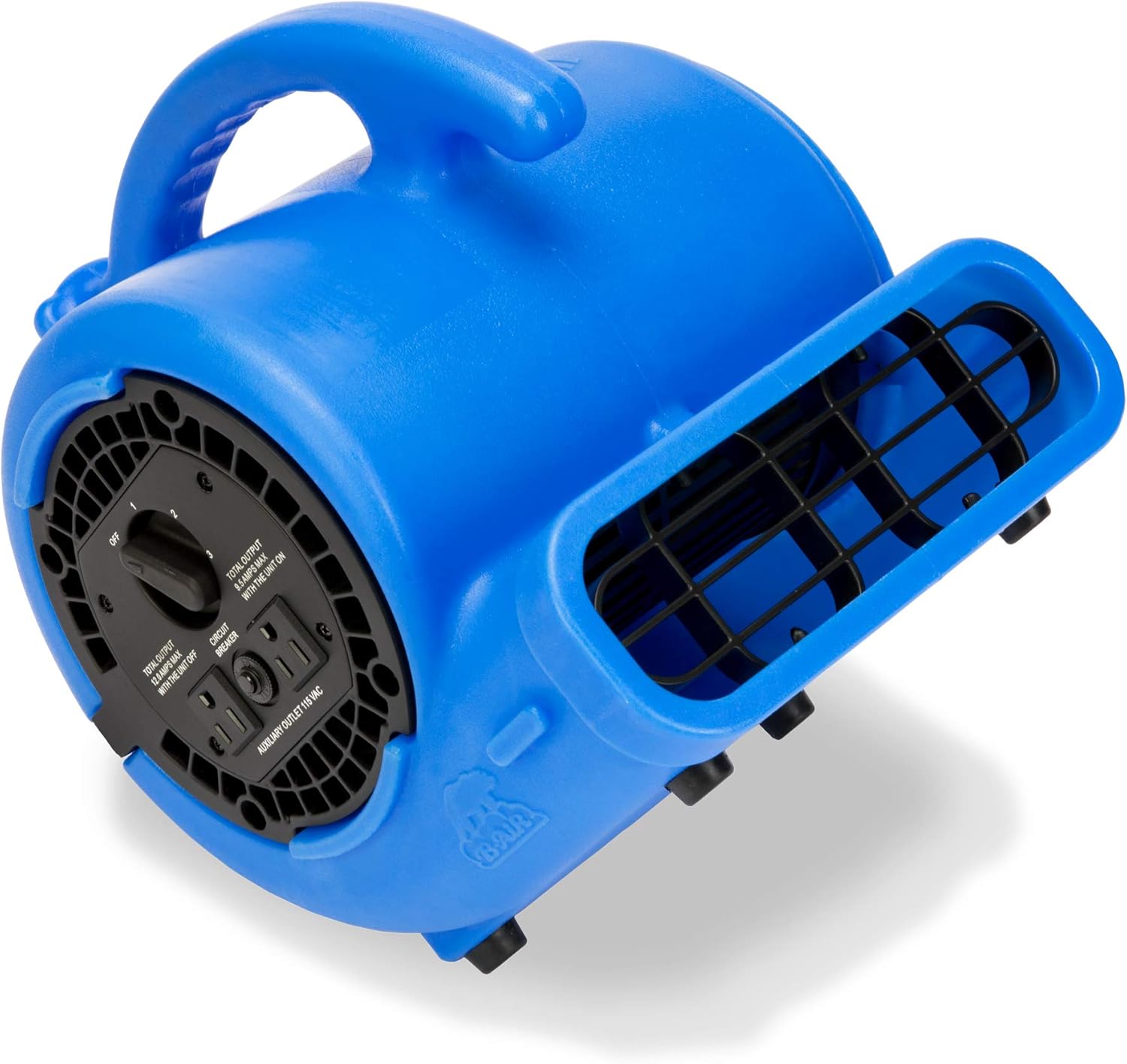
Image 3: Angled view of the B-Air VP Series Air Mover's control panel, clearly showing the three-speed rotary switch, auxiliary outlets, and the circuit breaker reset button.
5. Maintenance
Regular maintenance ensures optimal performance and extends the lifespan of your B-Air VP Series Air Mover.
- Cleaning:
- Before cleaning, ensure the unit is unplugged from the power source.
- Wipe the exterior of the air mover with a damp cloth. Do not use harsh chemicals or abrasive cleaners.
- Periodically check the air intake and exhaust grilles for dust, debris, or obstructions. Clean them gently with a brush or vacuum cleaner.
- Storage:
- Store the air mover in a cool, dry place, away from direct sunlight and extreme temperatures.
- Coil the power cord neatly and secure it to prevent damage.
- Inspection: Regularly inspect the power cord and plug for any signs of damage. If damage is found, do not use the unit and contact customer support.
6. Troubleshooting
If you encounter issues with your B-Air VP Series Air Mover, refer to the following common troubleshooting steps:
| Problem | Possible Cause | Solution |
|---|---|---|
| Unit does not turn on. |
|
|
| Reduced airflow. |
|
|
| Unit suddenly stops during operation. |
|
|
If the problem persists after attempting these solutions, please contact B-Air customer support.
7. Specifications
| Feature | Detail |
|---|---|
| Brand | B-Air |
| Model Name | BA-VP-20-BL |
| Motor Horsepower | 1/5 HP |
| Color | Blue |
| Electric Fan Design | Floor Fan / Air Mover |
| Recommended Uses | Drying, Air Circulation |
| Wattage | 264.5 watts |
| Item Weight | 11 Pounds (approx. 4.99 kg) |
| Product Dimensions (L x W x H) | 11.8 x 11.4 x 13.4 inches (approx. 29.97 x 28.96 x 34.04 cm) |
| Number of Power Levels | 3 |
| Main Power Connector Type | NEMA 5-15 |
| Auxiliary Outlet Output (Unit OFF) | 12.0 Amps Max |
| Auxiliary Outlet Output (Unit ON) | 9.5 Amps Max |
| UPC | 875333001990 |
8. Warranty and Support
For warranty information or technical support, please contact B-Air customer service. Keep your purchase receipt as proof of purchase.
B-Air Customer Service: Refer to the official B-Air website or product packaging for the most current contact information.
This product is tested and certified to look and work like new if refurbished. The refurbishing process includes functionality testing, basic cleaning, inspection, and repackaging. The product ships with all relevant accessories, and may arrive in a generic box.
Related documentsBA-VP-20-BL


Ask a question about this manual
Ask about setup, troubleshooting, compatibility, parts, safety, or missing instructions. Manuals+ will review the question and use this page’s manual context to help answer it.