
1. Introduction
Thank you for choosing the Imusa GAU-80106 5-Quart Bilingual Digital Pressure Cooker. This appliance is designed to simplify your cooking process, offering a faster and healthier way to prepare meals. Pressure cooking reduces cooking time by up to 70%, helping to retain more vitamins and minerals in your food. Its digital display and bilingual preset menus make operation straightforward and convenient.
This manual provides essential information for the safe and efficient use of your new pressure cooker. Please read it thoroughly before first use and keep it for future reference.
2. Important Safety Information
When using electrical appliances, basic safety precautions should always be followed to reduce the risk of fire, electric shock, and injury to persons, including the following:
- Read all instructions carefully before operating the appliance.
- Do not touch hot surfaces. Use handles or knobs.
- To protect against electrical shock, do not immerse cord, plugs, or the main unit in water or other liquid.
- Close supervision is necessary when any appliance is used by or near children.
- Unplug from outlet when not in use and before cleaning. Allow to cool before putting on or taking off parts.
- Do not operate any appliance with a damaged cord or plug, or after the appliance malfunctions or has been damaged in any manner.
- The use of accessory attachments not recommended by the appliance manufacturer may cause injuries.
- Do not use outdoors.
- Do not let cord hang over edge of table or counter, or touch hot surfaces.
- Do not place on or near a hot gas or electric burner, or in a heated oven.
- Extreme caution must be used when moving an appliance containing hot oil or other hot liquids.
- Always attach plug to appliance first, then plug cord into the wall outlet. To disconnect, turn any control to “off,” then remove plug from wall outlet.
- Do not use appliance for other than intended use.
- This appliance cooks under pressure. Improper use may result in scalding injury. Make certain unit is properly closed before operating.
- Never force open the pressure cooker. Make sure internal pressure has completely dropped before opening.
- Do not fill the unit over 2/3 full. When cooking foods that expand during cooking, such as rice or dried vegetables, do not fill the unit over 1/2 full.
- Always check the pressure release device for clogging before use.
3. Components
The Imusa GAU-80106 Digital Pressure Cooker includes the following main components:
- Pressure Cooker Base Unit
- Removable Inner Cooking Pot (Bowl)
- Lid with Pressure Regulator and Cool Touch Handles
- Measuring Cup
- Serving Spoon

Image 3.1: Overview of the Imusa GAU-80106 pressure cooker and its included components.
4. Setup
- Unpacking: Carefully remove all components from the packaging. Retain packaging for storage or shipping if needed.
- Initial Cleaning: Before first use, wash the inner cooking pot, lid, and accessories (measuring cup, spoon) with warm, soapy water. Rinse thoroughly and dry completely. Wipe the exterior of the main unit with a damp cloth. Do not immerse the main unit in water.
- Placement: Place the pressure cooker on a stable, level, heat-resistant surface away from heat sources and flammable materials. Ensure adequate ventilation around the unit.
- Insert Inner Pot: Place the clean, dry inner cooking pot into the pressure cooker base. Ensure it is seated correctly.
5. Operating Instructions
The Imusa GAU-80106 features a user-friendly digital control panel with bilingual preset menus for various dishes.
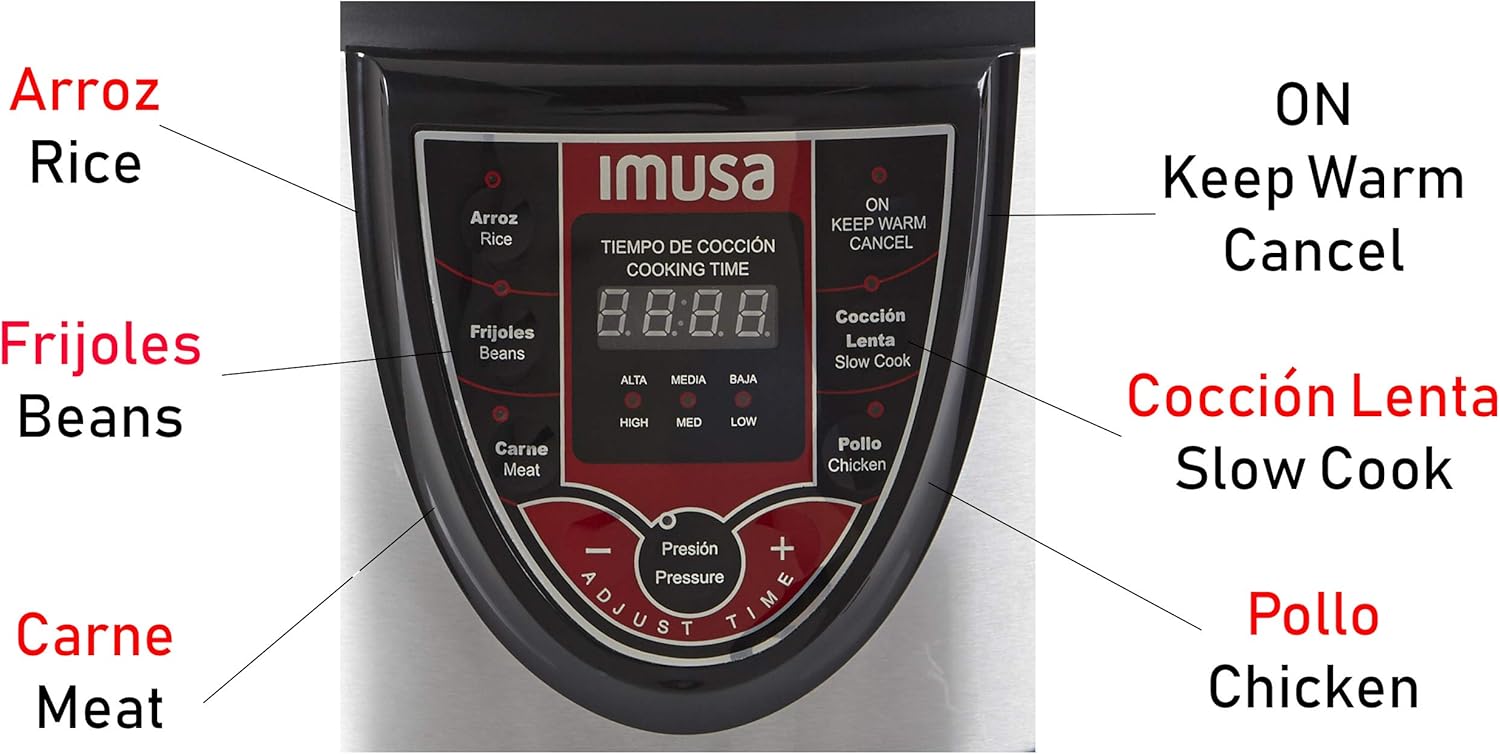
Image 5.1: Digital Control Panel with Bilingual Preset Menus.
5.1 Control Panel Overview
- Digital Display: Shows cooking time and pressure levels.
- Preset Buttons:
- Arroz/Rice
- Frijoles/Beans
- Carne/Meat
- Pollo/Chicken
- Coccion Lenta/Slow Cook
- Adjust Time/Pressure Buttons (+/-): Allows manual adjustment of cooking time and pressure levels.
- ON/Keep Warm/Cancel Button: Starts cooking, activates keep warm function, or cancels current operation.
5.2 Basic Operation Steps
- Add Ingredients: Place your ingredients and the required liquid into the inner cooking pot. Ensure the liquid level is between the MIN and MAX marks, and never exceed the 2/3 full line (or 1/2 full for expanding foods).
- Close the Lid: Place the lid on the pressure cooker and rotate it clockwise until it locks securely. Ensure the pressure regulator is set to the 'Sealing' position (usually indicated by a closed symbol or 'Pressure').
- Select Cooking Function: Plug the power cord into a grounded electrical outlet. The digital display will light up. Press the desired preset button (e.g., Arroz/Rice, Frijoles/Beans). The default cooking time for that function will appear on the display.
- Adjust Time/Pressure (Optional): If you need to adjust the default cooking time or pressure level, use the '+' and '-' buttons.
- Start Cooking: Press the 'ON' button to begin the cooking cycle. The cooker will preheat and build pressure. Once pressure is reached, the countdown timer will begin.
- Pressure Release: Once cooking is complete, the cooker will beep and may automatically switch to 'Keep Warm' mode. To release pressure, carefully turn the pressure regulator to the 'Venting' position (usually indicated by an open symbol or 'Steam Release'). Keep hands and face away from the steam vent.
- Open the Lid: Once all pressure has been released and the float valve has dropped, you can safely open the lid by rotating it counter-clockwise and lifting it away from you to avoid residual steam.
Video 5.2: An overview of the Imusa Digital Pressure Cooker's features and ease of use, demonstrating its stainless steel exterior, nonstick cooking bowl, and bilingual preset menu buttons. This video highlights how the cooker reduces cooking time and is ideal for various dishes like meats, soups, beans, and rice.
6. Maintenance and Cleaning
Proper maintenance ensures the longevity and optimal performance of your pressure cooker.
- Unplug and Cool: Always unplug the pressure cooker from the power outlet and allow it to cool completely before cleaning.
- Inner Cooking Pot: The nonstick inner cooking pot is removable and can be washed with warm, soapy water. Use a soft sponge or cloth to avoid scratching the nonstick surface. Rinse thoroughly and dry completely. The inner pot is not dishwasher safe.
- Lid: Wash the lid, including the sealing gasket and pressure regulator, with warm, soapy water. Ensure all food particles are removed from the pressure release valve and float valve. The sealing gasket should be inspected regularly for cracks or damage and replaced if necessary.
- Exterior Base: Wipe the exterior of the pressure cooker base with a damp cloth. Do not immerse the base in water or any other liquid.
- Storage: Store the pressure cooker in a dry place. You may place the lid upside down on the inner pot to prevent odors and allow air circulation.
7. Troubleshooting
If you encounter issues with your Imusa Digital Pressure Cooker, refer to the following common problems and solutions:
| Problem | Possible Cause | Solution |
|---|---|---|
| Cooker not building pressure | Lid not properly closed or sealed; Pressure regulator in 'Venting' position; Sealing gasket damaged or missing; Insufficient liquid. | Ensure lid is locked correctly; Turn pressure regulator to 'Sealing'; Check and replace gasket if needed; Add more liquid as per recipe. |
| Steam leaking from lid edges | Sealing gasket not properly seated or damaged; Food debris on rim; Lid not closed correctly. | Adjust gasket; Clean lid and rim; Re-close lid securely. |
| Food not cooking properly | Incorrect cooking time or pressure setting; Insufficient liquid; Power interruption. | Adjust time/pressure; Ensure adequate liquid; Check power connection. |
| Cooker not turning on | Power cord not plugged in; Outlet malfunction; Internal fault. | Check power cord and outlet; Try a different outlet. If problem persists, contact customer support. |
8. Specifications
- Model: GAU-80106
- Capacity: 5 Quarts
- Material: Aluminum (Inner Pot), Stainless Steel (Exterior)
- Color: Red
- Wattage: 1000 watts
- Control Method: Touch
- Operation Mode: Automatic
- Special Feature: Keep Warm Setting
- Product Dimensions: 12 x 12.6 x 14.3 inches
- Item Weight: 12 Pounds
- ETL Certified: Yes
9. Warranty and Support
For warranty information and customer support, please refer to the documentation included with your purchase or visit the official Imusa website. Keep your purchase receipt as proof of purchase for any warranty claims.
Manufacturer: IMUSA
Website: www.imusausa.com


