
1. Introduction
This manual provides essential information for the safe and effective use of your RYOBI P197 ONE+ 18V 4.0Ah Lithium-Ion Battery. This battery is designed to power a wide range of RYOBI ONE+ 18V cordless tools, offering extended runtime and consistent performance. It features an integrated 4-stage fuel gauge to monitor charge status.

Figure 1: Front view of the RYOBI P197 ONE+ 18V 4.0Ah Lithium-Ion Battery.
2. Safety Information
WARNING: To reduce the risk of injury, fire, or electric shock, always observe the following safety precautions when using or handling the battery.
- Read and understand the operator's manual for your tool and charger before using this battery.
- Risk of Fire and Burns: Do not open, crush, heat above 40°C (104°F), incinerate, or short circuit the terminals.
- Use only with chargers specifically listed in the operator's manual for your tool or charger model P117.
- Remove the battery from the tool when storing, changing attachments, or making adjustments.
- Do not expose the battery to water or rain.
- Store the battery in a cool, dry place away from direct sunlight and extreme temperatures.
- Keep the battery away from children.
- Dispose of batteries properly according to local regulations. Do not dispose of in household waste.
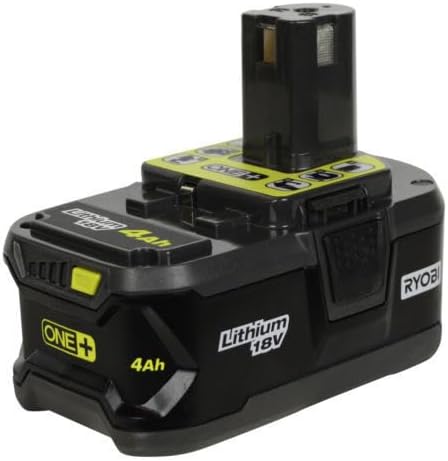
Figure 2: Bottom view of the battery showing the warning label. This label contains critical safety instructions regarding handling, temperature limits, and disposal.
3. Setup
3.1 Initial Charging
Before first use, fully charge the battery. The battery is shipped with a low charge to prevent damage during transport.
- Insert the battery into a compatible RYOBI 18V dual chemistry battery charger. Compatible charger models include P113, P114, P116, P117, P118, P119, P125, and P131 (chargers sold separately).
- Ensure the battery is securely seated in the charger.
- The charger's indicator lights will show the charging status. Refer to your charger's manual for specific light patterns.
- Allow the battery to charge until the charger indicates a full charge.
3.2 Attaching to a Tool
To attach the battery to a compatible RYOBI ONE+ 18V tool:
- Align the battery with the battery port on the tool.
- Slide the battery into the tool until it clicks into place, indicating a secure connection.
- Ensure the battery is firmly attached before operating the tool.

Figure 3: Top view of the battery, illustrating the connection interface for RYOBI ONE+ tools.
4. Operating the Battery
4.1 Fuel Gauge Indicator
The RYOBI P197 battery is equipped with a 4-stage fuel gauge to display the remaining charge. Press the button on the battery to activate the indicator lights.

Figure 4: Side view of the battery, highlighting the 4-stage fuel gauge indicator. Each illuminated bar represents approximately 25% of the battery's charge.
- Four bars illuminated: 75% - 100% charge remaining.
- Three bars illuminated: 50% - 75% charge remaining.
- Two bars illuminated: 25% - 50% charge remaining.
- One bar illuminated: Less than 25% charge remaining; recharge soon.
- No bars illuminated: Battery is depleted or requires charging.
4.2 Tool Compatibility
This 4.0Ah battery is compatible with over 100 RYOBI ONE+ 18V tools. It is particularly well-suited for heavy-duty applications requiring extended runtime, such as:
- Circular Saws (e.g., P508, P507)
- Reciprocating Saws (e.g., P517, P516)
- Impact Wrenches (e.g., P1830, P261, P260)
- SDS Drills (e.g., P222)
- Hammer Drills (e.g., P214, P213)
- Various other saws (e.g., P552, P523, P549, P531, P547)
- Select yard tools (e.g., P1121, P1111, P2603, P3260, P755, P2810, P770, P750, P2660, P2210, P2030, P2080, P2180)
5. Maintenance
5.1 Cleaning
Keep the battery terminals clean and free of debris. Use a clean, dry cloth to wipe the battery exterior. Do not use solvents or harsh chemicals.
5.2 Storage
- Store the battery in a cool, dry location, away from direct sunlight and moisture.
- Avoid storing the battery in areas where temperatures may exceed 40°C (104°F) or drop below -10°C (14°F).
- For long-term storage, it is recommended to store the battery with a partial charge (e.g., 50% charge) rather than fully charged or fully depleted.
- Remove the battery from the tool when not in use for extended periods.
5.3 Disposal
Lithium-ion batteries must be recycled or disposed of properly. Do not dispose of batteries in general household waste or by incineration. Contact your local waste management authority or battery recycling center for information on proper disposal procedures.
6. Troubleshooting
| Problem | Possible Cause | Solution |
|---|---|---|
| Battery not charging. |
|
|
| Battery not powering tool. |
|
|
| Fuel gauge not working after charging. |
|
|
7. Specifications
| Feature | Detail |
|---|---|
| Model Number | P197 |
| Brand | RYOBI |
| Battery Type | Lithium-Ion |
| Voltage | 18 Volts |
| Capacity | 4.0 Ah / 72 Wh |
| Item Weight | 1.65 pounds |
| Product Dimensions | 5 x 5 x 5 inches |
| Compatible Chargers | P113, P114, P116, P117, P118, P119, P125, P131 |
8. Warranty
Specific warranty details for the RYOBI P197 battery are typically provided with the product packaging or can be found on the official RYOBI website. Please retain your proof of purchase for warranty claims. For detailed warranty terms and conditions, refer to the manufacturer's official documentation.
9. Support
For technical assistance, troubleshooting beyond this manual, or to inquire about parts and service, please contact RYOBI customer support. Visit the official RYOBI website for contact information, FAQs, and additional product resources.
Note: Product specifications and features are subject to change without notice.


