
Introduction
This manual provides comprehensive instructions for the setup, operation, maintenance, and troubleshooting of your Sharp EL-6490 32 KB Electronic Organizer. Please read this manual thoroughly before using your device to ensure proper function and longevity.
Setup
Unpacking
Carefully remove all components from the packaging. Ensure that the electronic organizer and any included accessories are present and undamaged. Retain the packaging for future storage or transport.
Battery Installation
- Locate the battery compartment cover on the back of the device.
- Slide or lift the cover to open the compartment.
- Insert the required batteries (e.g., two AAA batteries, not included) according to the polarity indicators (+ and -) inside the compartment.
- Replace the battery compartment cover, ensuring it clicks securely into place.
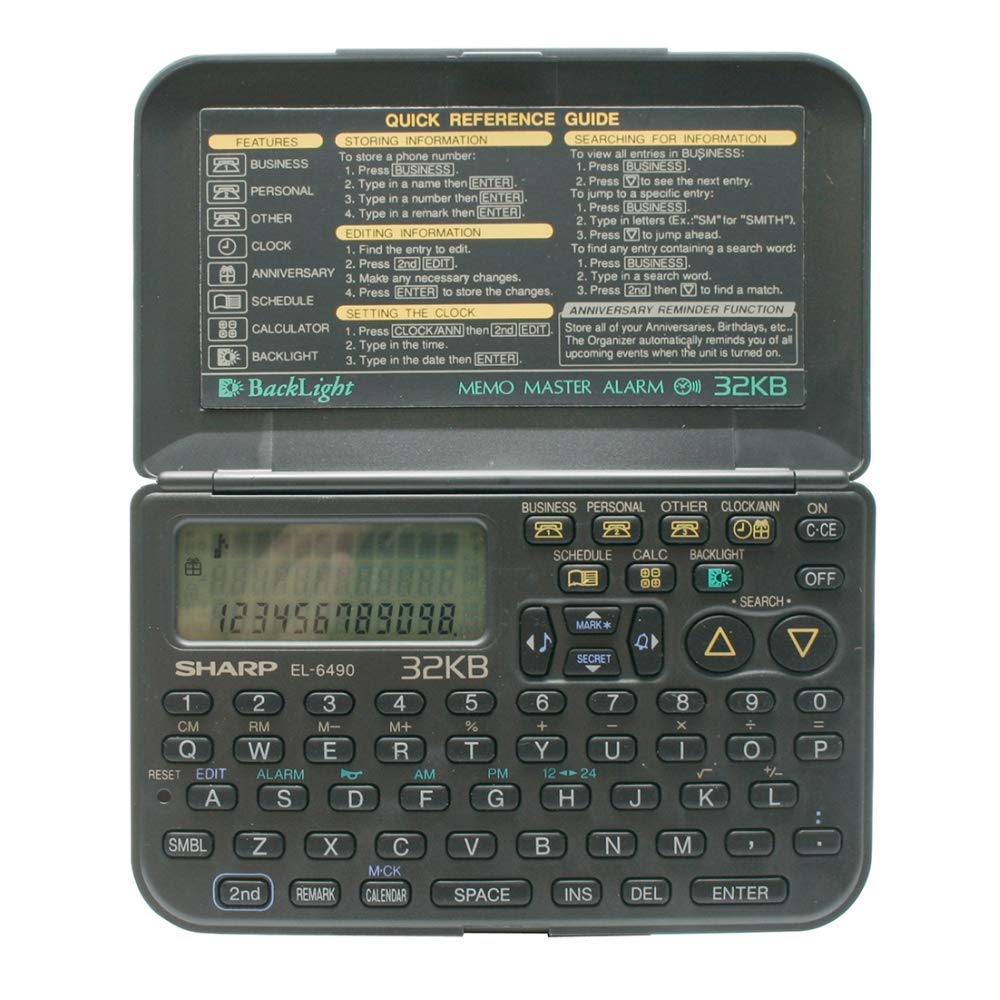
Image: The Sharp EL-6490 Electronic Organizer, showing the rear panel where the battery compartment is typically located.
Initial Power On
Press the ON/OFF button to power on the device. The display should illuminate, and you may be prompted to set the date and time.
Setting Date and Time
- Navigate to the SETTINGS menu using the arrow keys.
- Select DATE & TIME.
- Use the numeric keypad and arrow keys to enter the current date (MM/DD/YYYY) and time (HH:MM).
- Confirm your settings by pressing the ENTER or SET button.
Operating Instructions
Basic Navigation
The EL-6490 features a directional keypad for navigating menus and a QWERTY keyboard for data entry. Use the MENU button to access main functions and the ESC button to return to the previous screen.
Entering Data
To enter text or numbers, select the desired field and type using the QWERTY keyboard. Press SHIFT for uppercase letters and SYM for symbols. Press ENTER to confirm input.
Using the Calendar/Scheduler
- From the main menu, select CALENDAR or SCHEDULE.
- Use the arrow keys to navigate through days, weeks, or months.
- To add an event, select a date and press ADD or NEW. Enter the event details, time, and any notes.
- Save the event by pressing SAVE.
Using the Phone Book
- Select PHONE BOOK from the main menu.
- To add a new entry, press ADD. Enter the name, phone number, and any additional contact information.
- To search for an entry, use the search function or scroll through the list.
Using the Memo Function
- Access MEMO from the main menu.
- Create a new memo by selecting NEW MEMO.
- Type your notes using the keyboard.
- Save the memo for future reference.
Calculator Function
The EL-6490 includes a basic calculator. Select CALCULATOR from the main menu. Use the numeric keys and operation symbols (+, -, *, /) to perform calculations. Press = for the result.
Maintenance
Cleaning
To clean the device, use a soft, dry cloth. For stubborn marks, slightly dampen the cloth with water. Do not use harsh chemicals, abrasive cleaners, or solvents, as these can damage the display or casing.
Battery Replacement
When the battery indicator appears on the display, replace the batteries promptly to avoid data loss. Follow the battery installation steps outlined in the Setup section. It is recommended to replace all batteries at the same time.
Storage
If storing the device for an extended period, remove the batteries to prevent leakage and potential damage. Store in a cool, dry place away from direct sunlight and extreme temperatures.
Troubleshooting
| Problem | Possible Cause | Solution |
|---|---|---|
| Device does not power on. | Dead or incorrectly installed batteries. | Check battery polarity. Replace with fresh batteries. |
| Display is blank or dim. | Low battery power; contrast setting. | Replace batteries. Adjust display contrast in the settings menu. |
| Data is lost or corrupted. | Batteries removed for too long; critical battery level. | Ensure batteries are always present. Replace batteries promptly when low. |
| Keys are unresponsive. | Dust or debris under keys; device malfunction. | Clean the keyboard area. Try removing and reinserting batteries to reset. If problem persists, contact support. |
Specifications
| Feature | Detail |
|---|---|
| Manufacturer | Sharp |
| Model | EL-6490 |
| Memory | 32 KB |
| Product Dimensions | 0.02 x 0.14 x 0.19 cm (0.008 x 0.055 x 0.075 inches) |
| Product Weight | 200 g (approx. 7.05 oz) |
| ASIN | B077YK7M3H |
| Power Source | Batteries (e.g., AAA, not included) |
Warranty and Support
For warranty information and technical support, please refer to the warranty card included with your product or visit the official Sharp website. Keep your purchase receipt as proof of purchase for warranty claims.
Official Sharp Website: global.sharp/products/calculator/support/


