
Introduction and Safety Information
This manual provides detailed instructions for the installation, operation, and maintenance of your Audiopipe APCLE-2004 4-Channel Car Audio MOSFET Amplifier. Please read this manual thoroughly before attempting installation or operation to ensure proper use and to prevent damage to the unit or your vehicle.
Important Safety Precautions:
- Always disconnect the vehicle's battery negative terminal before starting any electrical work.
- Ensure all wiring is properly routed and secured to prevent pinching or damage.
- Use appropriate gauge wiring for power and ground connections as specified in this manual.
- Avoid mounting the amplifier in locations exposed to direct sunlight, excessive heat, moisture, or dust.
- Do not open the amplifier casing. There are no user-serviceable parts inside. Refer all servicing to qualified personnel.
- Protect wiring from sharp edges and moving parts.
- Ensure adequate ventilation around the amplifier to prevent overheating.
Setup and Installation
Proper installation is crucial for optimal performance and longevity of your amplifier. If you are unsure about any part of the installation process, consult a professional car audio installer.
Mounting Location:
Select a mounting location that provides sufficient airflow for cooling and protects the amplifier from moisture and physical damage. Common locations include under seats, in the trunk, or behind rear seats. Ensure the mounting surface is solid and secure.

Figure 1: Top view of the Audiopipe APCLE-2004 amplifier, showing its compact design and the included remote bass knob.
Wiring Connections:
Refer to the diagram below for proper wiring connections. Use high-quality cables and connectors for all connections.
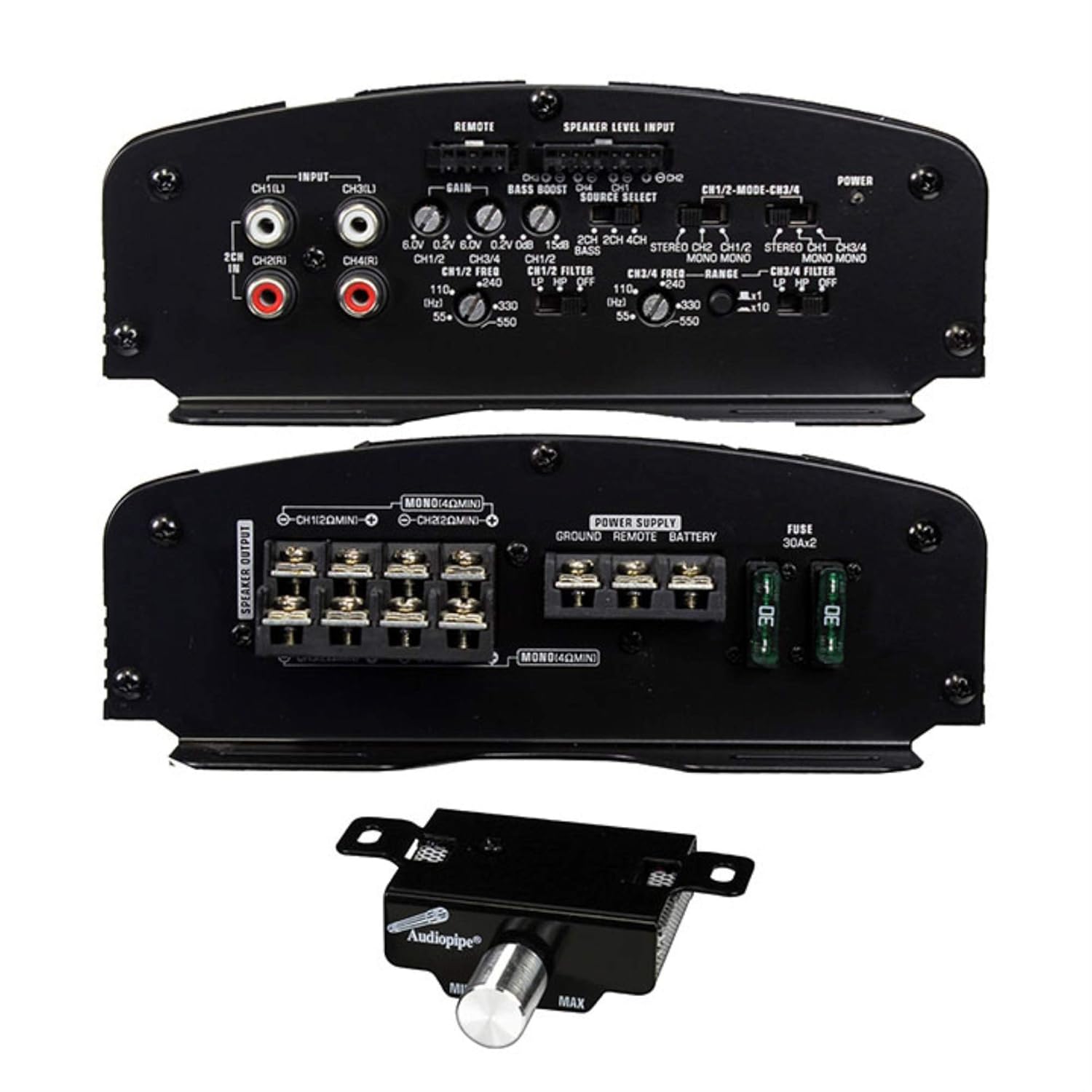
Figure 2: Rear panel of the Audiopipe APCLE-2004 amplifier, detailing power, ground, remote, speaker outputs, and fuse connections.
- Power (BATT+): Connect directly to the positive terminal of the vehicle's battery using a fuse holder within 18 inches of the battery. Use 8-gauge or thicker wire.
- Ground (GND): Connect to a clean, unpainted metal surface of the vehicle chassis. Ensure a good electrical connection. Use 8-gauge or thicker wire, keeping the length as short as possible (under 3 feet).
- Remote (REM): Connect to the remote turn-on lead from your head unit. This wire turns the amplifier on and off with your stereo.
- Speaker Outputs (CH1-CH4): Connect your speakers to the corresponding output terminals. Ensure correct polarity (+ to + and - to -). This amplifier supports 4-channel stereo or 2-channel bridged operation.
- Input (RCA): Connect RCA cables from your head unit's pre-amp outputs to the amplifier's RCA inputs (CH1/2 and CH3/4).
- Speaker Level Input: If your head unit does not have RCA outputs, use the speaker level input. Connect the speaker wires from your head unit directly to the speaker level input terminals.
Operating the Amplifier
Once installed, adjust the amplifier settings for optimal sound performance.

Figure 3: Top panel of the Audiopipe APCLE-2004 amplifier, highlighting the gain, bass boost, and crossover controls.
- Gain Control (INPUT GAIN): Adjust this to match the output voltage of your head unit. Start with the gain at minimum, then slowly increase it until you hear distortion, then back off slightly.
- Bass Boost: Provides an adjustable bass boost at a specific frequency. Use sparingly to avoid distortion.
- Crossover (FILTER):
- HPF (High Pass Filter): Allows frequencies above the set point to pass through. Used for full-range speakers to prevent low bass distortion.
- LPF (Low Pass Filter): Allows frequencies below the set point to pass through. Used for subwoofers.
- FULL: Disables the crossover, allowing all frequencies to pass.
- Source Select: Choose between 2CH, 4CH, or MONO input modes depending on your head unit's output and desired configuration.
- Remote Level Control: The included remote knob allows for convenient adjustment of the bass level from the driver's seat.
Maintenance
The Audiopipe APCLE-2004 amplifier requires minimal maintenance to ensure long-term performance.
- Cleaning: Periodically wipe the amplifier's exterior with a soft, dry cloth. Do not use harsh chemicals or abrasive cleaners.
- Connections: Regularly check all power, ground, remote, and speaker connections to ensure they are secure and free from corrosion. Loose connections can cause performance issues or damage.
- Ventilation: Ensure that the amplifier's cooling fins are not obstructed by debris or other objects to maintain proper heat dissipation.
Troubleshooting
If you experience problems with your amplifier, refer to the following troubleshooting guide before contacting technical support.
| Problem | Possible Cause | Solution |
|---|---|---|
| No Power / Amplifier does not turn on |
|
|
| No Sound Output |
|
|
| Distorted Sound |
|
|
| Amplifier goes into Protection Mode |
|
|
Specifications
| Feature | Specification |
|---|---|
| Model | APCLE2004 |
| Brand | Audiopipe |
| Number of Channels | 4 |
| Maximum Output Power | 2000 Watts |
| Voltage | 12 Volts |
| Material Type | Metal |
| Item Dimensions (L x W x H) | 19.25 x 5 x 3.5 inches |
| Item Weight | 9.39 Pounds |
Warranty and Support
For warranty information and technical support, please refer to the documentation included with your purchase or visit the official Audiopipe website. Keep your proof of purchase for warranty claims.
For further assistance, you may contact Audiopipe customer service directly. Contact details are typically available on the manufacturer's website or in the product packaging.
