
1. Introduction
This instruction manual provides detailed guidance for the installation and proper use of the ICT Billet LS1 Camaro to Truck Water Pump Spacer .7" Adapter Swap Kit, Model 551690-71. This kit is designed to facilitate the conversion of an LS1 Camaro water pump for use with an LS Truck engine, ensuring correct belt alignment with truck accessories. Please read this manual thoroughly before beginning installation.
2. Safety Information
- Always wear appropriate personal protective equipment, including eye protection, during installation.
- Ensure the vehicle's engine is completely off and cool before beginning any work. Disconnect the battery to prevent accidental starting.
- Use proper tools and follow all torque specifications. Overtightening or undertightening fasteners can lead to component failure.
- If you are unsure about any step, consult a qualified automotive professional.
- Keep all components and tools away from children and pets.
3. Package Contents
Verify that all components listed below are present in your kit:
- 2 x Water Pump Spacers (Billet Aluminum)
- 4 x Gaskets
- 1 x Steam Port Plug (1/8")
- Mounting Bolts (Quantity as required for installation)

Figure 3.1: Complete kit contents including two spacers, gaskets, steam port plug, and bolts.
4. Compatibility
This kit is compatible with the following applications:
- 1998-2002 LS1 Camaro water pump conversions to LS Truck engines.
- Designed for use with all LS engines when adapting an LS1 water pump with a forward-facing radiator hose outlet to a truck accessory drive system.
5. Installation Instructions
5.1 Tools Required
- Socket Wrench Set
- Torque Wrench
- Coolant Drain Pan
- Gasket Scraper (if needed for old gasket removal)
- Clean Rags
- New Engine Coolant (as required)
5.2 Preparation
- Park the vehicle on a level surface and engage the parking brake.
- Allow the engine to cool completely.
- Drain the engine coolant into a suitable container. Refer to your vehicle's service manual for the correct procedure.
- Remove the existing water pump from the engine. Carefully clean any old gasket material from the engine block and water pump mounting surfaces. Ensure surfaces are smooth and free of debris.
5.3 Installation Steps
- Place a new gasket onto each water pump spacer. Ensure the gasket aligns correctly with all bolt holes and fluid passages.
- Position the water pump spacers onto the engine block, aligning them with the water pump mounting holes. The spacers are designed to fit specifically on the left and right sides.
- Place the remaining two new gaskets onto the outer side of the water pump spacers.
- Mount the LS1 water pump onto the spacers, aligning all bolt holes.
- Insert the provided longer mounting bolts through the water pump, spacers, and into the engine block. Hand-tighten all bolts initially.
- Using a torque wrench, tighten the water pump mounting bolts to the manufacturer's specified torque. Typically, this is around 11 ft-lbs (15 Nm) in a crisscross pattern, but always refer to your specific water pump or engine manual for precise values.
- Install the 1/8" steam port plug into the designated port on one of the spacers if your setup requires it.
- Reconnect all coolant hoses and any other components that were removed during the water pump removal process.
- Refill the cooling system with the appropriate engine coolant. Bleed any air from the system as per your vehicle's service manual.
- Start the engine and check for any leaks around the water pump and spacer assembly. Monitor coolant levels and engine temperature.
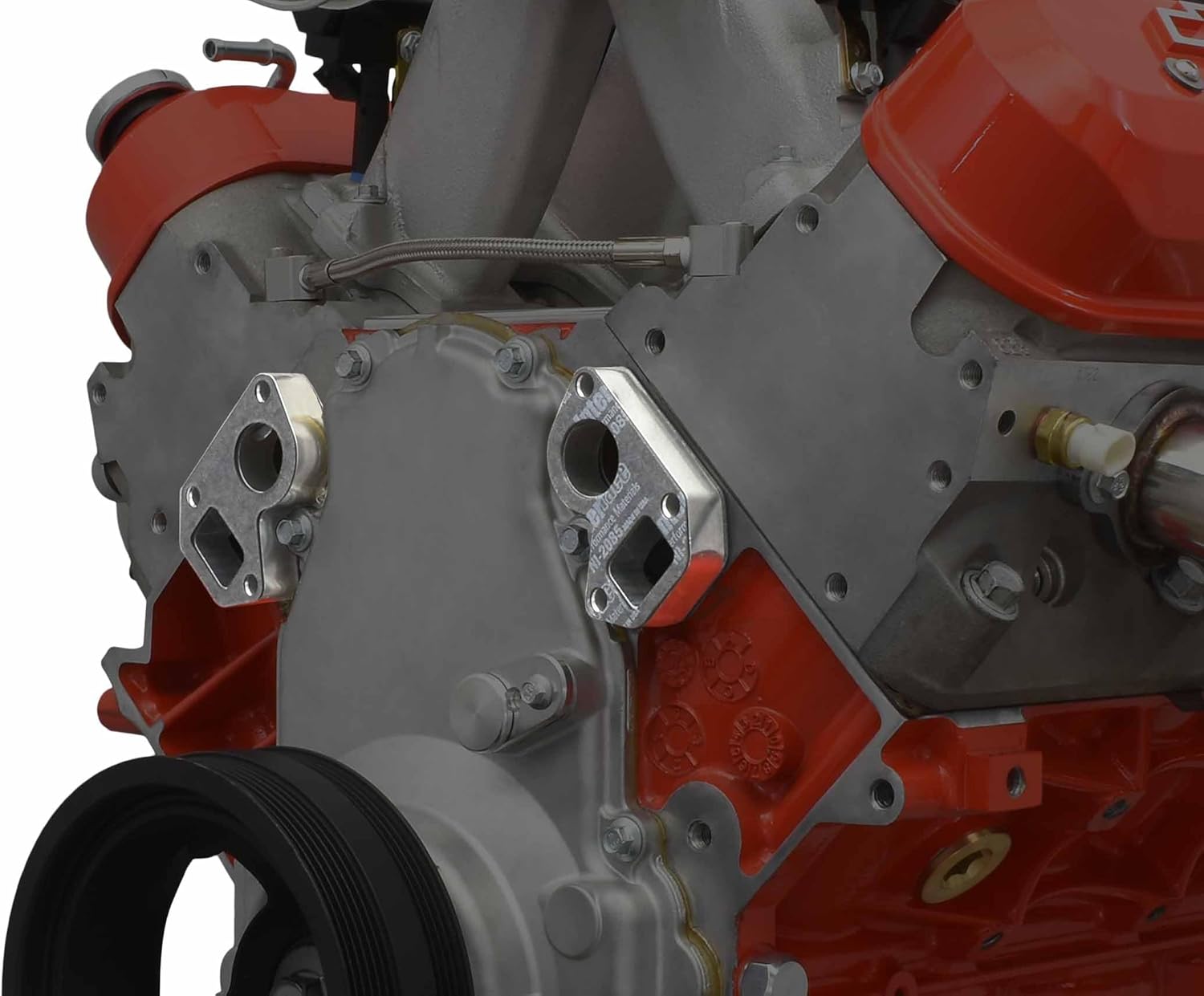
Figure 5.1: Close-up view of the water pump spacer installed on an LS engine block.

Figure 5.2: Detailed view showing the spacer positioned between the water pump and the engine block.

Figure 5.3: An assembled engine showing the integration of the water pump spacers.
6. Operation
Once correctly installed, the ICT Billet Water Pump Spacers allow an LS1 Camaro water pump to function optimally with an LS Truck accessory drive system. The spacers ensure that the water pump pulley aligns correctly with the other pulleys in the truck accessory system, maintaining proper belt tension and preventing premature wear or belt slippage. No specific operational steps are required beyond standard engine operation.
7. Maintenance
The ICT Billet Water Pump Spacers are designed for long-term durability and typically require minimal maintenance. However, periodic checks are recommended:
- Leak Inspection: Regularly inspect the area around the water pump and spacers for any signs of coolant leaks. Address any leaks promptly.
- Bolt Torque: Periodically check the torque of the water pump mounting bolts to ensure they remain at the specified values.
- Accessory Belt: Ensure the accessory belt remains properly tensioned and shows no signs of unusual wear, which could indicate misalignment issues.
8. Troubleshooting
| Issue | Possible Cause | Solution |
|---|---|---|
| Coolant Leak | Improper gasket seating, damaged gasket, loose bolts, cracked component. | Verify gaskets are correctly installed and undamaged. Ensure bolts are torqued to specification. Inspect components for cracks. |
| Belt Misalignment/Squeal | Incorrect spacer installation, incorrect water pump, worn belt/tensioner. | Re-check spacer orientation and water pump type. Inspect belt and tensioner for wear. Ensure all pulleys are aligned. |
| Engine Overheating | Air in cooling system, low coolant, faulty water pump, other cooling system issues. | Bleed cooling system thoroughly. Check coolant level. Inspect water pump function. This kit does not directly cause overheating if installed correctly. |
9. Specifications
- Model Number: 551690-71
- Material: Aerospace Grade Billet Aluminum
- Spacer Thickness: 0.7 inches
- Product Dimensions: Approximately 9.3 x 3.9 x 1.8 inches
- Item Weight: Approximately 1.44 ounces
- Manufacturer: ICT Billet
10. Warranty and Support
For warranty information, technical support, or any questions regarding your ICT Billet product, please contact ICT Billet directly through their official website or authorized distributors. Keep your purchase receipt for warranty claims.
Visit the ICT Billet Store for more products and information.

