
1. Introduction
This manual provides essential instructions for the proper installation, operation, and maintenance of your TurboChef Conveyor Belt, Model 102660. This stainless steel conveyor belt is designed for use with compatible TurboChef equipment. Please read this manual thoroughly before installation and operation to ensure safe and efficient use.
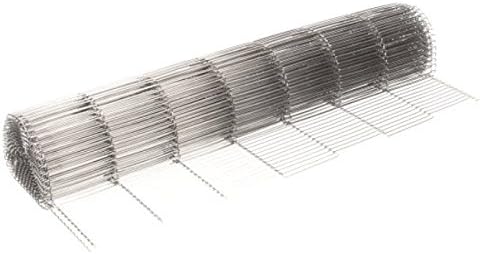
Figure 1: The TurboChef Conveyor Belt, Model 102660, shown rolled. This belt is constructed from durable stainless steel and measures approximately 20 inches by 95 inches when unrolled, designed for specific TurboChef oven applications.
2. Setup and Installation
Proper installation is crucial for the conveyor belt's performance and longevity. Always ensure the equipment is powered off and disconnected from the power source before beginning installation.
- Safety First: Disconnect the TurboChef oven from its power supply. Allow the oven to cool completely if it has been in operation.
- Access the Conveyor System: Refer to your specific TurboChef oven's service manual for instructions on how to safely access the conveyor belt area. This may involve removing panels or covers.
- Remove Old Belt (if applicable): If replacing an existing belt, carefully remove the old belt, noting its path and tensioning mechanism.
- Install New Belt: Unroll the new TurboChef Conveyor Belt (Model 102660). Carefully thread the belt around the drive and idler rollers according to the oven's design. Ensure the belt is correctly aligned and not twisted.
- Tensioning: Adjust the belt tensioning mechanism as per your oven's service manual. The belt should be taut enough to prevent slipping but not so tight as to cause excessive strain on the motor or rollers.
- Alignment Check: Manually rotate the conveyor system to ensure the belt tracks centrally and does not rub against the oven walls or other components. Make minor adjustments to tension or roller alignment if necessary.
- Reassemble: Replace all removed panels and covers, ensuring they are securely fastened.
Note: If you are unsure about any step of the installation process, consult a qualified service technician.
3. Operation
Once installed, the conveyor belt operates as an integral part of your TurboChef oven. No specific user operation is required for the belt itself beyond ensuring proper installation and maintenance.
- Initial Run: After installation, power on the oven and run the conveyor system at a slow speed for a few minutes to confirm smooth operation and proper tracking.
- Load Distribution: Distribute food items evenly across the belt surface to prevent uneven wear or strain on the conveyor mechanism.
- Avoid Overloading: Do not exceed the oven's recommended maximum load capacity, as this can stress the belt and drive system.
4. Maintenance
Regular maintenance extends the life of your conveyor belt and ensures optimal performance of your TurboChef oven.
- Daily Cleaning: After each use, or at the end of the operating day, allow the oven to cool. Carefully remove any food debris or residue from the belt surface using a soft brush or cloth. For stubborn residue, a mild, food-safe cleaning solution can be used, followed by thorough rinsing and drying. Ensure no cleaning agents are left on the belt.
- Weekly Inspection:
- Inspect the belt for any signs of wear, such as stretched sections, broken wires, or fraying.
- Check the tension of the belt. Adjust if it appears too loose or too tight.
- Verify that the belt is tracking correctly and not rubbing against any oven components.
- Examine rollers and bearings for smooth operation and signs of damage.
- Deep Cleaning: Periodically, a more thorough cleaning may be required. Consult your TurboChef oven's cleaning instructions for specific procedures. Always ensure the belt is completely dry before operating the oven.
- Replacement: Replace the conveyor belt if significant wear, damage, or stretching is observed. Using a damaged belt can lead to operational issues and potential damage to the oven.
5. Troubleshooting
This section addresses common issues related to the conveyor belt. For oven-specific problems, refer to your TurboChef oven's user manual.
| Problem | Possible Cause | Solution |
|---|---|---|
| Belt slips or stops intermittently | Insufficient belt tension, worn drive rollers, excessive load, debris on rollers. | Adjust belt tension. Inspect and clean drive rollers. Reduce load. Remove debris. |
| Belt tracks unevenly or rubs sides | Improper belt alignment, uneven tension, damaged rollers. | Adjust belt alignment and tension. Inspect rollers for damage and replace if necessary. |
| Unusual noise from conveyor system | Worn bearings, debris in system, belt rubbing, motor issue. | Inspect bearings and clean system. Check belt alignment. If noise persists, contact service. |
| Belt shows signs of damage (e.g., broken wires) | Normal wear and tear, impact damage, chemical exposure. | Replace the conveyor belt immediately to prevent further damage to the oven or product. |
Warning: Do not attempt repairs beyond basic cleaning and tension adjustments if you are not a qualified technician. Contact TurboChef customer support or a certified service provider for complex issues.
6. Specifications
- Brand: TurboChef
- Model Number: 102660
- Material: Stainless Steel
- Dimensions (Approximate): 20 inches (width) x 95 inches (length)
- Product Dimensions (Packaged): 20.65 x 4.2 x 3.5 inches
- Color: Silver
- ASIN: B077XP5SJ9
- Date First Available: December 4, 2017
7. Customer Support
For technical assistance, replacement parts, or service inquiries regarding your TurboChef Conveyor Belt or compatible TurboChef equipment, please contact TurboChef customer support directly. Refer to your TurboChef oven's main manual or the official TurboChef website for contact information.
Online Resources: www.turbochef.com