
GOWE VFD007E23A
GOWE Delta AC Motor Drive Inverter VFD007E23A User Manual
Model: VFD007E23A
Product Overview
The GOWE Delta AC Motor Drive Inverter VFD007E23A is a Sensorless Vector AC Micro Drive from the VFD-E series. This low horsepower, constant torque, IP20 rated drive features a modular design with flexible extension cards and a built-in PLC function. It allows for the writing and execution of simple Ladder Logic programs, meeting a wide range of application requirements.

Image: The GOWE Delta AC Motor Drive Inverter VFD007E23A, showcasing its compact design and control panel.
Key Features
- Sensorless Vector AC Micro Drive: Provides precise motor control without the need for an encoder.
- Modular & Compact Design: Facilitates easy integration and space-saving installation.
- Built-in PLC Function: Enables the execution of simple Ladder Logic programs for enhanced automation.
- Built-in EMI Filter: Reduces electromagnetic interference (230V 1 phase / 460V 3 phase models).
- Flexible Extension Cards: Supports various optional Fieldbus Modules including DeviceNet, Profibus, LonWorks, and CANopen.
- RFI-switch for Mains: Allows for easy adjustment of radio frequency interference.
- Easy DC BUS Sharing: Simplifies multi-drive system configurations.
- Complete Protection: Incorporates comprehensive safety features to protect the drive and connected equipment.
- Output Frequency Range: Operates within a frequency range of 0.1 to 600Hz.
Setup and Installation
1. Unpacking and Inspection
Carefully remove the drive from its packaging. Inspect the unit for any signs of physical damage that may have occurred during transit. Verify that all components listed in the packing list are present.
2. Mounting
Mount the VFD-E series drive vertically on a flat, stable surface. Ensure adequate ventilation space around the unit to prevent overheating. Refer to the product dimensions for proper clearance requirements.
3. Wiring
Connect the power supply, motor, and control signals according to the wiring diagram provided in the full product manual. Ensure all connections are secure and properly insulated. Pay close attention to phase sequence for three-phase systems.
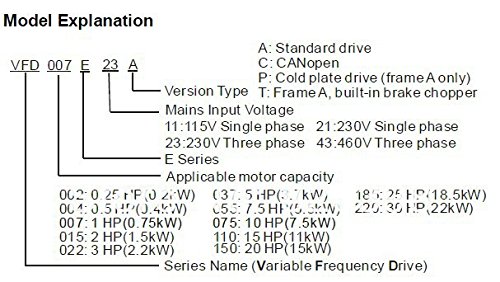
Image: Diagram explaining the model nomenclature for the VFD-E series, detailing version type, mains input voltage, and applicable motor capacity.
4. Initial Power-Up
Before applying full power, perform a continuity check on all wiring. Once verified, apply power and observe the drive's display for any error codes or abnormal behavior. Refer to the troubleshooting section if issues arise.
Operation Guide
Basic Control Panel Functions
The VFD-E series features a user-friendly control panel for setting parameters and monitoring operation. Common functions include:
- RUN/STOP: Initiates or halts motor operation.
- FREQ/DATA: Displays current output frequency or parameter values.
- UP/DOWN Arrows: Adjusts frequency settings or navigates through parameters.
- ENTER: Confirms parameter changes.
Parameter Settings
The drive's performance can be customized by adjusting various parameters. Key parameters typically include motor rated voltage, motor rated current, acceleration/deceleration times, and maximum/minimum output frequencies. Consult the detailed programming manual for a complete list and explanation of all parameters.
Starting and Stopping the Motor
To start the motor, ensure all safety precautions are in place, then press the RUN button on the control panel or activate the corresponding external control signal. To stop, press the STOP button or deactivate the external control signal. The motor will decelerate according to the set deceleration time.
Maintenance
Regular maintenance ensures optimal performance and extends the lifespan of your AC motor drive. Always disconnect power before performing any maintenance.
1. Cleaning
Periodically clean the drive's exterior and ventilation openings to prevent dust accumulation, which can impede airflow and lead to overheating. Use a soft, dry cloth. Do not use liquid cleaners or solvents.
2. Inspection
Regularly inspect all wiring connections for tightness and signs of wear or corrosion. Check cooling fans for proper operation and ensure they are free from obstructions. Monitor the drive's operating temperature.
3. Environmental Conditions
Ensure the operating environment remains within the specified temperature and humidity ranges. Protect the drive from excessive dust, moisture, and corrosive gases.
Troubleshooting
This section provides general guidance for common issues. For detailed error codes and specific solutions, refer to the comprehensive troubleshooting guide in the full product manual.
No Power Display
- Check Power Supply: Verify that the input power supply is connected and within the specified voltage range.
- Check Fuses/Circuit Breakers: Ensure that any external fuses or circuit breakers protecting the drive are not tripped or blown.
Motor Not Running
- Check Run Command: Confirm that the run command (from control panel or external terminal) is active.
- Check Frequency Setting: Ensure the output frequency is set above 0Hz.
- Check Motor Connections: Verify that the motor wiring is correct and secure.
- Check for Fault Codes: Look for any fault codes displayed on the drive's panel and consult the manual for their meaning.
Overcurrent/Overload Fault
- Check Motor Load: Reduce the mechanical load on the motor if it exceeds the drive's capacity.
- Check Acceleration/Deceleration Times: Increase acceleration/deceleration times to reduce current spikes.
- Verify Motor Parameters: Ensure that the motor parameters programmed into the drive match the actual motor specifications.
Technical Specifications
| Specification | Value |
|---|---|
| Model | VFD007E23A |
| Brand | GOWE |
| Output Voltage | 220 Volts |
| Output Frequency | 0.1 ~ 600Hz |
| Horsepower (HP) | 1 HP |
| Phase | 3 Phase |
| Power (Watts) | 700W |
| Manufacturer | Gowegroup |
| ASIN | B077WY2RS4 |
| UPC | 827674206237 |
| First Available Date | December 3, 2017 |
Warranty and Support
For specific warranty terms and conditions, please refer to the documentation included with your purchase or contact the manufacturer directly. Generally, products are covered against defects in materials and workmanship for a specified period from the date of purchase.
Return Policy
This product typically comes with a 30-day return policy from the date of receipt. Please check with your retailer for their specific return procedures and conditions.
Customer Support
Should you encounter any issues or require technical assistance, please contact GOWE customer support. Have your product model number (VFD007E23A) and purchase details ready for faster service.
You can often find support contact information on the manufacturer's official website or within the product packaging.
Ask a question about this manual
Ask about setup, troubleshooting, compatibility, parts, safety, or missing instructions. Manuals+ will review the question and use this page’s manual context to help answer it.