
1. Introduction
This manual provides essential instructions for setting up, operating, and maintaining your WEARFIT Fitness Tracker Watch, model WF_M8_PR. Please read this manual thoroughly before using the device to ensure proper function and longevity.
2. Package Contents
Verify that all items are present in your package:
- 1 x WEARFIT Smart Bracelet (WF_M8_PR)
- 1 x USB Charging Clip
- 1 x User Manual (this document)
3. Setup Guide
3.1 Initial Charging
Upon receiving your WEARFIT Fitness Tracker, it may have low battery. For optimal performance, fully charge the device before first use. Charging typically takes 1.5 hours.
- Connect the USB charging clip to the charging contacts on the back of the smart bracelet.
- Plug the USB end of the charging clip into a standard USB power adapter (not included) or a computer's USB port.
- The device display will indicate charging status.
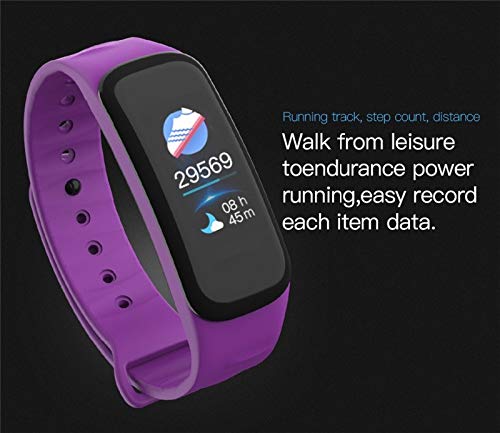
Image: Rear view of the smart bracelet, highlighting the charging contacts and the optical sensor for health monitoring.
3.2 App Installation and Pairing
The WEARFIT Fitness Tracker requires the "Wearfit App" for full functionality and data synchronization with your smartphone.
- Ensure your smartphone meets the compatibility requirements: Android 4.4 or above, or iOS 8 or above, with Bluetooth 4.0.
- Download the "Wearfit App" from your smartphone's app store (Google Play Store for Android, Apple App Store for iOS).
- Enable Bluetooth on your smartphone.
- Open the "Wearfit App" and follow the on-screen instructions to create an account or log in.
- Within the app, navigate to the device management or pairing section.
- Select your WEARFIT device from the list of available Bluetooth devices to initiate pairing.
- Confirm the pairing request on both your smartphone and the fitness tracker if prompted.

Image: Screenshots illustrating the Wearfit App interface, displaying health readings, user information, and device management options.

Image: Various smartphone screens showcasing the Wearfit App's health data visualization, including heart rate and activity logs.
4. Operating Instructions
The WEARFIT Fitness Tracker offers a range of features to monitor your health and activity. Navigate through the functions using the touch-sensitive area on the display.
4.1 Basic Functions
- Time and Date Display: The main screen shows current time, date, and battery level.
- Pedometer: Tracks your steps, distance covered, and calories burned throughout the day.
- Sleep Monitor: Automatically monitors your sleep quality and duration.
- Heart Rate Monitor: Measures your heart rate.
- Blood Oxygen Monitor: Measures your blood oxygen levels.
- Blood Pressure Monitor: Measures your blood pressure.
- Message and Call Reminders: Vibrates and displays notifications for incoming calls, SMS, and app alerts (e.g., WhatsApp, Facebook, Twitter) when connected to your smartphone.
- Sedentary Reminder: Alerts you when you have been inactive for too long.
- Alarm Clock: Set alarms through the app to vibrate on your wrist.
- Camera Remote Control: Use the tracker to remotely trigger your smartphone's camera.
- Find Your Smart Band: Use the app to locate your band by making it vibrate.

Image: The fitness tracker screen showing a step count of 29569 and an activity duration of 8 hours and 45 minutes, indicating daily activity tracking.
4.2 Health Monitoring
The device automatically measures heart rate, blood oxygen, and blood pressure at regular intervals. You can view detailed data and trends in the Wearfit App. The sleep monitor tracks your sleep patterns, providing insights into your rest quality.
4.3 Notifications
Once paired with your smartphone, the tracker will vibrate and display notifications for calls, messages, and various app alerts. Ensure the Wearfit App has the necessary permissions on your phone to receive these notifications.
5. Maintenance and Care
5.1 Cleaning
Regularly clean your fitness tracker to ensure hygiene and proper sensor function.
- Wipe the device and strap with a soft, damp cloth.
- Avoid using harsh chemicals or abrasive cleaners.
- Ensure the charging contacts are clean and dry before charging.
5.2 Water Resistance
The WEARFIT Fitness Tracker has an International IP67 waterproof rating. This means it is resistant to splashes and can be worn during hand washing. It is not suitable for swimming, showering, or diving.
Image: The fitness tracker shown with water splashing around it, indicating its IP67 waterproof level suitable for hand washing.
5.3 Storage
When not in use for extended periods, store the device in a cool, dry place. Charge it periodically to prevent deep discharge of the Lithium Polymer battery.
6. Troubleshooting
6.1 Device Not Turning On / Not Responding
- Ensure the device is fully charged. Connect it to the charging clip and a power source for at least 30 minutes.
- If the device is charged but unresponsive, try restarting it by pressing and holding the touch button (if available) or by connecting/disconnecting it from the charger.
6.2 Unable to Pair with Smartphone
- Make sure Bluetooth is enabled on your smartphone.
- Ensure the fitness tracker is sufficiently charged.
- Check that the "Wearfit App" is installed and running on your phone.
- Bring the fitness tracker close to your smartphone during the pairing process.
- Try restarting both your smartphone and the fitness tracker.
- If previously paired, try "forgetting" the device in your phone's Bluetooth settings and then re-pairing through the app.
6.3 Inaccurate Readings
- Ensure the fitness tracker is worn snugly on your wrist, about one finger's width from your wrist bone.
- Clean the optical sensor on the back of the device.
- Environmental factors and movement can affect readings. For best results, remain still during measurements.
6.4 Notifications Not Appearing
- Verify that the fitness tracker is successfully paired and connected to your smartphone via Bluetooth.
- Check the notification settings within the "Wearfit App" to ensure desired app notifications are enabled.
- Ensure your smartphone's operating system grants the "Wearfit App" necessary permissions for notifications.
- Make sure your phone is not in "Do Not Disturb" mode.
7. Specifications
| Model Number | WF_M8_PR |
| Brand | WEARFIT |
| Connectivity | Bluetooth 4.0 |
| Operating System Compatibility | Android 4.4 or Above, iOS 8 or Above |
| Water Resistance | IP67 (Splash-proof, suitable for hand washing) |
| Battery Type | Lithium Polymer |
| Item Weight | 25 g |
| Key Functions | Heart Rate, Blood Oxygen, Blood Pressure, Sleep Monitor, Pedometer, Distance, Calories, Call/Message Reminder, Camera Remote, Sedentary Reminder |
8. Warranty and Support
For warranty information and customer support, please refer to the documentation provided at the time of purchase or visit the official WEARFIT website. Keep your purchase receipt as proof of purchase.
If you encounter issues not covered in this manual, please contact WEARFIT customer service for assistance.


