
1. Introduction
This manual provides detailed instructions for the setup, operation, and maintenance of your ELEPHAS ELE-PRO-S1 Mini Projector. Please read this manual thoroughly before using the projector to ensure proper functionality and to maximize your viewing experience. The ELE-PRO-S1 is a compact and portable DLP projector designed for various entertainment purposes, including home cinema, outdoor movie nights, and gaming.
2. Package Contents
Upon unpacking, please verify that all items listed below are present and in good condition:
- ELEPHAS ELE-PRO-S1 Mini Projector
- Tripod
- Power Adapter (DCM)
- USB Cable
- 3.5mm AV Cable
- HDMI Cable
- User Manual (this document)
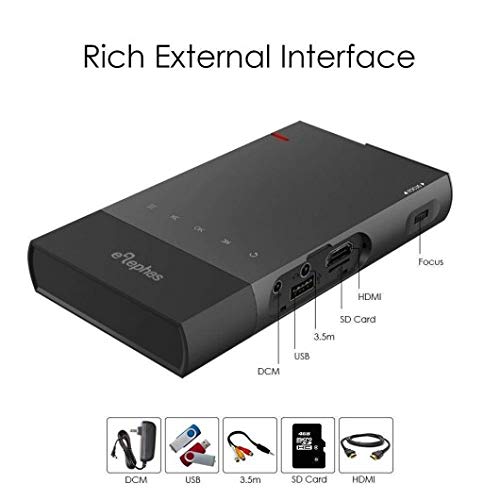
Figure 2.1: The ELEPHAS ELE-PRO-S1 Mini Projector shown with its various ports and included accessories such as the power adapter, USB cable, 3.5mm AV cable, SD card, and HDMI cable.
3. Product Overview
3.1. Projector Components

Figure 3.1: A top-down view of the ELEPHAS ELE-PRO-S1 Mini Projector, highlighting its sleek, compact design and control buttons.
The ELEPHAS ELE-PRO-S1 is designed for portability and ease of use. Key components include:
- Projection Lens: Located at the front, responsible for displaying the image.
- Control Panel: Buttons on the top surface for basic navigation and selection.
- Focus Wheel: Typically located on the side, used to adjust image clarity.
- Input Ports: HDMI, USB, Micro SD Card slot, and AV input for connecting various devices.
- Power Port: For connecting the power adapter.
- Speaker: Built-in for audio output.
3.2. Connectivity Ports
Figure 3.2: A detailed side view of the projector, illustrating the various input ports including HDMI, USB, SD Card slot, 3.5mm audio jack, and the DC power input, along with the focus wheel.
The projector offers multiple connectivity options:
- HDMI: For connecting laptops, DVD players, gaming consoles (PS3, PS4, Xbox One), and other HDMI-enabled devices.
- USB: For playing media directly from USB drives.
- Micro SD Card: For playing media directly from Micro SD cards.
- AV: For connecting older devices using the included 3.5mm AV cable.
4. Setup
4.1. Powering On/Off
- Charging: Connect the power adapter to the projector's DC input port and then to a power outlet. The projector has a built-in 5200mAh battery, allowing for portable use.
- Power On: Press and hold the power button on the projector's control panel until the indicator light illuminates and the projector starts.
- Power Off: Press and hold the power button again until the projector shuts down. Disconnect the power adapter if not charging.
4.2. Placement and Focus Adjustment
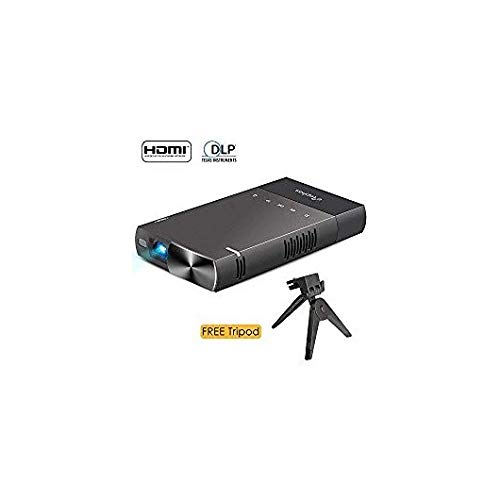
Figure 4.1: The ELEPHAS ELE-PRO-S1 Mini Projector positioned on its included tripod, ready for projection. This image also shows the HDMI and DLP logos, indicating supported technologies.
- Positioning: Place the projector on a stable, flat surface or mount it on the included tripod. Ensure the projection path is clear of obstructions. The ideal projection distance ranges from 0.5 to 3 meters (1.6 to 10 feet) for a screen size of 15 to 130 inches. For optimal clarity, a distance of 5 feet is recommended for an 80-inch screen.
- Focus Adjustment: Turn the focus wheel located on the side of the projector until the projected image appears sharp and clear.
4.3. Connecting Devices
The ELE-PRO-S1 supports various input sources:
- HDMI Connection: Connect an HDMI cable from your device (laptop, game console, DVD player) to the projector's HDMI port.
- USB/Micro SD Card: Insert a USB drive or Micro SD card into the respective port. The projector will typically detect the media automatically or allow selection via the input source menu.
- AV Connection: Use the provided 3.5mm AV cable to connect to devices with AV output.
4.4. Screen Mirroring (Smartphones)
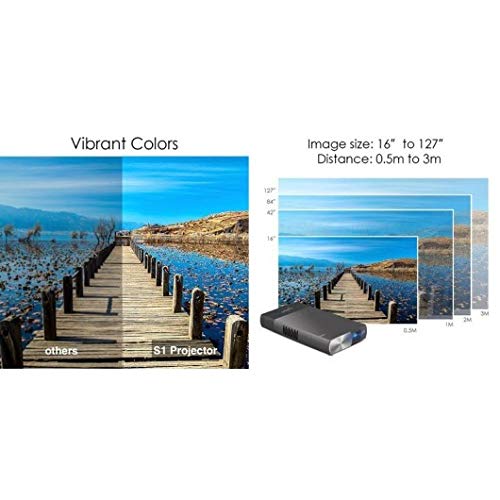
Figure 4.2: An illustration demonstrating how to connect a smartphone directly to the projector using a USB cable for screen mirroring, allowing content from the phone to be displayed on a larger screen.
The projector supports AirPlay, DLNA, and Miracast technologies for screen mirroring.
- iOS Devices (iPhone/iPad): Connect directly via a Lightning cable. No additional adapters are required. Supports iOS 9 or above.
- Android Devices: An EZcast APP is required. Connect via a USB cable. Supports Android 5.0 or above. Note that not all Android devices are supported.
5. Operating Instructions
5.1. Basic Navigation
Use the control buttons on the projector's top panel to navigate through menus and select options. The buttons typically include directional arrows, an OK/Enter button, and a Back/Menu button.
5.2. Selecting Input Source
After powering on, access the input source menu to select your desired connection (HDMI, USB, Micro SD, AV, or Screen Mirroring). This is usually done by pressing a dedicated "Source" or "Input" button, or navigating through the main menu.
5.3. Adjusting Settings
The projector's menu allows for various adjustments:
- Picture Settings: Adjust brightness, contrast, color, and aspect ratio (e.g., 16:10).
- Sound Settings: Control volume and audio output options.
- System Settings: Language, time, and other general projector settings.
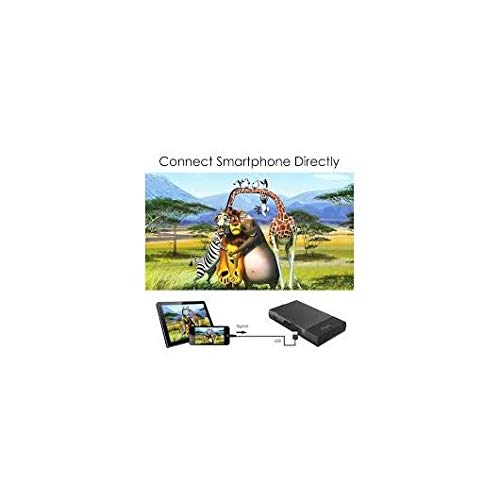
Figure 5.1: An image illustrating the vibrant color reproduction of the S1 Projector compared to other projectors, alongside a diagram showing various projection distances (0.5m to 3m) and corresponding image sizes (16" to 127").
6. Maintenance
6.1. Cleaning
- Lens: Use a soft, lint-free cloth specifically designed for optical lenses. Do not use abrasive cleaners or excessive force.
- Casing: Wipe the projector's exterior with a soft, dry cloth. For stubborn marks, a slightly damp cloth can be used, followed by a dry wipe. Ensure no liquid enters the device.
- Ventilation: Keep the ventilation openings clear of dust and debris to prevent overheating.
6.2. Storage
When not in use, store the projector in a cool, dry place, away from direct sunlight and extreme temperatures. Use the original packaging or a protective case to prevent dust accumulation and physical damage.
7. Troubleshooting
This section addresses common issues you might encounter with your ELEPHAS ELE-PRO-S1 Mini Projector.
| Problem | Possible Cause | Solution |
|---|---|---|
| No image displayed |
|
|
| Image is blurry |
|
|
| No sound |
|
|
| Screen mirroring not working |
|
|
| Projector overheats or shuts down |
|
|
If the problem persists after attempting these solutions, please contact customer support.
8. Specifications
| Brand | ELEPHAS |
| Model | ELE-PRO-S1 |
| Imaging Technology | DLP |
| Native Resolution | 800 x 480P (Supports up to 1080P) |
| Brightness | 100 ANSI Lumens |
| Projection Size / Distance | 15 ~ 130 inches / 0.5 ~ 3 meters (1.6 ~ 10 ft) |
| Aspect Ratio | 16:10 |
| Lamp Life | > 20,000 hours |
| Battery | 5200mAh Lithium Ion (2 batteries included) |
| Battery Life | More than 2 hours of movie playback |
| Inputs | HDMI, USB, Micro SD Card, AV |
| Compatible Devices | Laptop, DVD Player, PS3, PS4, Xbox One, Smartphones (iOS 9+, Android 5.0+) |
| Special Features | Lightweight, Portable, Multi-screen sharing (AirPlay, DLNA, Miracast) |
| Product Dimensions | 14.7 x 8 x 2 cm |
| Item Weight | 269 g (0.6 lbs) |
9. Warranty and Support
9.1. Warranty Information
The ELEPHAS ELE-PRO-S1 Mini Projector comes with an 18-month warranty from the date of purchase. This warranty covers manufacturing defects and malfunctions under normal use. It does not cover damage caused by misuse, accidents, unauthorized modifications, or natural disasters. Please retain your proof of purchase for warranty claims.
9.2. Customer Support
For technical assistance, warranty claims, or any questions regarding your ELEPHAS ELE-PRO-S1 Mini Projector, please contact ELEPHAS customer support. Refer to the product packaging or the official ELEPHAS website for the most current contact information.