
Equate LEPKTSN112
Equate Humidifier Filter Replacement Manual
Model: LEPKTSN112
Brand: Equate
Introduction
This manual provides essential instructions for the proper installation, maintenance, and general use of your Equate Replacement Humidifier Filter. Adhering to these guidelines will ensure optimal performance and longevity of your humidifier.
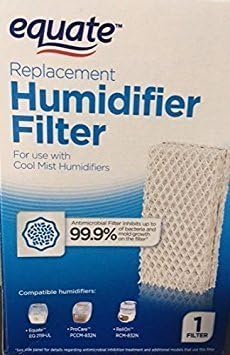
Image: Packaging for the Equate Replacement Humidifier Filter, showing the filter and compatible models.
Product Features
- Honeycomb Pad Design: Engineered for efficient humidification and optimal moisture output.
- Hydrophilic Fabric: Multi-layer mesh paper designed for superior water absorption and evaporation.
- Upgraded Aluminum Foil: Integrated for enhanced structural stability and durability, preventing premature collapse.
- High-Density Filtration: Effectively captures impurities from water, contributing to cleaner mist.
Video: Demonstrates the unboxing and key features of the WF813 humidifier filter, including its honeycomb design and aluminum foil reinforcement.
Compatibility
This Equate Replacement Humidifier Filter (Model LEPKTSN112) is compatible with various cool mist humidifiers, including but not limited to:
- Equate EQ2119-UL
- ProCare PCCM-832N, PCWF813, PCCM-840
- ReliOn RCM-832, RCM-832N, WF813
- Robitussin DH-832
- Duracraft DH-830
- SS SH100, SH200
- Other models: D13-C, HC-832, AC813
Installation Instructions
- Prepare the Humidifier: Ensure your humidifier is turned off and unplugged from the power outlet.
- Remove Water Tank: Carefully lift and remove the water tank from the humidifier base. Empty any remaining water.
- Access Filter Compartment: Open the filter compartment cover, usually located within the humidifier base.
- Remove Old Filter: Gently pull out the old, used humidifier filter. Dispose of it according to local regulations.
- Insert New Filter: Unpack the new Equate replacement filter. Insert it into the filter compartment, ensuring it is seated correctly and securely. The honeycomb structure should face upwards or as indicated by your humidifier's specific design.
- Reassemble: Close the filter compartment cover. Refill the water tank with fresh, clean water and place it back onto the humidifier base.
- Power On: Plug in the humidifier and turn it on. The new filter will begin to absorb water and release mist.
Video: Demonstrates the water absorption capability of the humidifier filter, showing how quickly it wicks water upwards.
Maintenance
Regular maintenance of your humidifier filter is crucial for optimal performance and air quality.
- Filter Replacement: It is recommended to replace the humidifier filter every 2-3 months, or more frequently depending on water hardness and usage. Signs of needing replacement include reduced mist output, hardened filter material, or discoloration.
- Cleaning: Do not attempt to wash or clean the filter with detergents, as this can damage the material and reduce its effectiveness.
- Storage: If the humidifier will not be used for an extended period, remove the filter, allow it to dry completely, and store it in a cool, dry place.
Troubleshooting
| Issue | Possible Cause | Solution |
|---|---|---|
| Low Mist Output | Clogged or old filter; insufficient water. | Replace filter; ensure water tank is full. |
| Unpleasant Odor | Mineral buildup or bacterial growth on filter/in tank. | Replace filter; clean humidifier tank thoroughly. |
| White Dust Around Humidifier | High mineral content in water. | Use distilled or demineralized water; replace filter regularly. |
Specifications
| Feature | Detail |
|---|---|
| Brand | Equate |
| Model Name | LEPKTSN112 |
| Included Components | Replacement Humidifier Filter |
| Item Weight | 1.44 ounces |
| Package Dimensions | 6.3 x 4.13 x 2.01 inches |
| UPC | 681131172981 |
Warranty and Support
For specific warranty information or product support, please refer to the documentation provided with your humidifier or contact the manufacturer directly. Keep your purchase receipt for warranty claims.
Ask a question about this manual
Ask about setup, troubleshooting, compatibility, parts, safety, or missing instructions. Manuals+ will review the question and use this page’s manual context to help answer it.