
1. Introduction
Thank you for purchasing the AcuRite 02027AIM Color Weather Station. This device provides comprehensive environmental information to help you plan your day. Featuring self-calibrating technology, it delivers a personalized 12 to 24-hour weather forecast based on data measured by a sensor in your yard, ensuring accuracy for your specific location.
The vibrant, backlit LCD screen displays indoor and outdoor temperature and humidity, moon phase, barometric pressure with a weather trend indicator, time, and date. The Intelli-Time clock automatically adjusts for Daylight Saving Time. This manual will guide you through the setup, operation, and maintenance of your weather station.

Figure 1: AcuRite 02027AIM Color Weather Station Display
The AcuRite 02027AIM Color Weather Station display unit showing outdoor and indoor temperature, humidity, forecast, time, and moon phase.
Video 1: AcuRite Color Weather Station Overview
Official product video demonstrating the features and benefits of the AcuRite Color Weather Station, including its self-calibrating forecast, indoor and outdoor temperature/humidity display, moon phase, and Intelli-Time clock.
2. What's in the Box
Your AcuRite 02027AIM Color Weather Station package includes:
- Color Weather Station Display Unit
- Wireless Temperature and Humidity Sensor
- Power Adapter for Display Unit
- Instruction Manual (this document)
3. Setup
3.1. Wireless Sensor Setup
- Remove the battery compartment cover on the back of the sensor.
- Insert 2 x AA alkaline or lithium batteries (not included) into the battery compartment. Lithium batteries are recommended for temperatures below -4°F (-20°C).
- Replace the battery compartment cover.
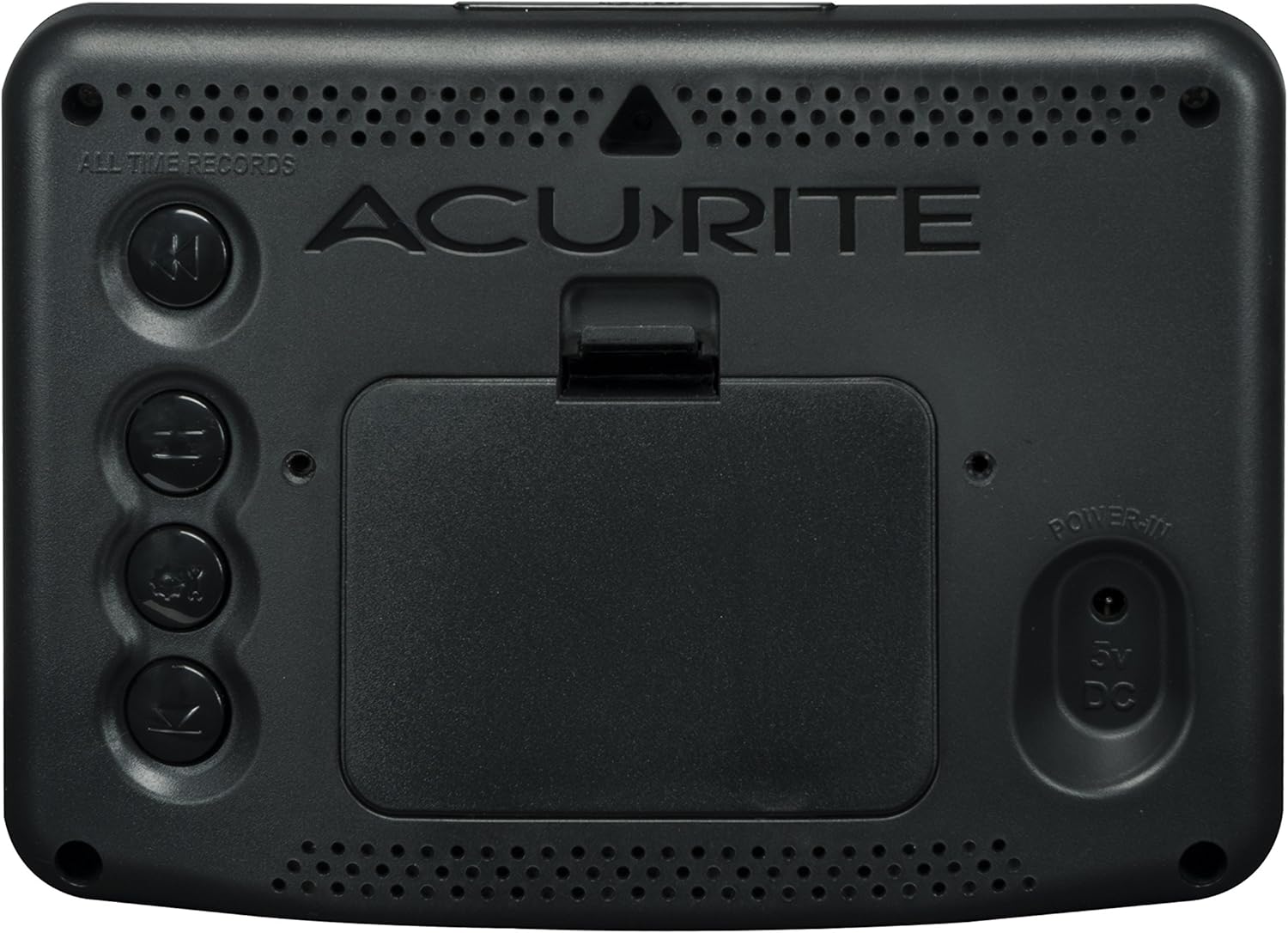
Figure 2: Wireless Outdoor Sensor
The compact AcuRite outdoor temperature and humidity sensor hanging from a tree branch, demonstrating its weather-resistant design.
3.2. Display Unit Setup
- Plug the included power adapter into the "POWER IN" port on the back of the display unit and then into a standard electrical outlet.
- Optional: For backup power during outages, remove the battery compartment cover on the back of the display unit and insert 3 x AA alkaline batteries (not included). Replace the cover.
- The display will power on and begin searching for the wireless sensor signal. This may take a few minutes.

Figure 3: Display Unit Rear with Power Adapter
Rear view of the AcuRite 02027AIM Color Weather Station display, illustrating the power adapter connection and the optional battery compartment for backup power.

Figure 4: Display Unit Rear Panel
Rear view of the AcuRite 02027AIM Color Weather Station display, showing the battery compartment, power input, and wall-mount keyhole.
3.3. Placement Guidelines
For optimal performance, consider the following placement recommendations:
- Wireless Sensor:
- Place the sensor outdoors, within 330 feet (100 meters) of the display unit.
- Choose a location that is out of direct sunlight and direct precipitation to ensure accurate readings and prolong sensor life.
- Mount the sensor at least 5 feet (1.5 meters) off the ground for better air circulation.
- Display Unit:
- Place the display unit indoors, away from direct sunlight or heat sources that could affect indoor temperature readings.
- Ensure it is within range of the wireless sensor.
- The display can be placed on a tabletop or mounted on a wall using the integrated keyhole.

Figure 5: Display Unit on Shelf
The AcuRite 02027AIM Color Weather Station display unit placed on a wooden shelf in a living room setting.
4. Operation
4.1. Display Features
The color LCD screen provides a wealth of information at a glance:
- Outdoor Temperature & Humidity: Current readings, daily high/low records.
- Indoor Temperature & Humidity: Current readings, daily high/low records.
- Weather Forecast: 12 to 24-hour forecast based on self-calibrating technology.
- Barometric Pressure: Current pressure with trend indicator.
- Moon Phase: Displays the current phase of the moon.
- Time & Date: Intelli-Time clock with automatic DST adjustment.

Figure 6: Close-up of Display Screen
Close-up view of the AcuRite 02027AIM Color Weather Station's vibrant color LCD screen, clearly showing all weather data and time.
4.2. Understanding the Forecast
The AcuRite weather station uses a unique self-calibrating forecasting system. This system analyzes changes in pressure and temperature over a period of 14 days to generate a personalized forecast for your exact location. The forecast icons represent various weather conditions such as sunny, partly cloudy, cloudy, rainy, stormy, and snowy.
4.3. Time and Date Settings
The Intelli-Time clock is pre-programmed with the correct time and date. It automatically updates for Daylight Saving Time. No manual adjustment is typically required. If adjustments are needed, refer to the buttons on the side or back of the display unit (specific button functions may vary, consult the quick setup guide for detailed button operations).
4.4. Backlight Settings
The display features an adjustable backlight for optimal viewing in various lighting conditions. Typically, a button labeled "LIGHT" or similar on the top or side of the display allows you to cycle through different brightness levels or turn the backlight off.
5. Maintenance
5.1. Battery Replacement
- Wireless Sensor: Replace batteries approximately every 12-24 months, or when the low battery indicator appears on the display. Use 2 x AA batteries.
- Display Unit (Backup): If using backup batteries, replace them annually or when the low battery indicator appears. Use 3 x AA batteries.
Always use fresh batteries and ensure they are inserted with the correct polarity (+/-).
5.2. Cleaning
Clean the display unit and sensor with a soft, damp cloth. Do not use abrasive cleaners or solvents, as these may damage the plastic parts and electronic components.
6. Troubleshooting
| Problem | Possible Solution |
|---|---|
| No outdoor sensor signal |
|
| Inaccurate temperature/humidity |
|
| Display not working |
|
7. Specifications
| Feature | Detail |
|---|---|
| Model Number | 02027AIM |
| Indoor Temperature Range | 32°F to 122°F (0°C to 50°C) |
| Outdoor Temperature Range | -40°F to 158°F (-40°C to 70°C) |
| Humidity Range | 1% to 99% RH |
| Wireless Range | Up to 330 feet (100 meters) |
| Power Source (Display) | 5V Power Adapter (included), 3 x AA batteries (optional backup) |
| Power Source (Sensor) | 2 x AA batteries (not included) |
| Connectivity Technology | 433 MHz Wireless |
| Display Type | Color LCD |
| Item Weight | 1.3 pounds |

Figure 7: Display Unit Dimensions
Image showing the dimensions of the AcuRite 02027AIM Color Weather Station display unit, with measurements for height, width, and depth.
8. Warranty and Support
The AcuRite 02027AIM Color Weather Station comes with a one-year limited warranty from the date of purchase. For detailed warranty information, product registration, or technical support, please visit the official AcuRite website or contact their customer service department.
You can find more information and support at the AcuRite Store on Amazon.


