Introduction
This manual provides essential instructions for setting up, operating, and maintaining your LG V30 US998 smartphone. The LG V30 US998 is a high-performance device featuring a 6.0" OLED FullVision Display, advanced camera capabilities, and an enhanced audio experience. It is designed for compatibility with various GSM and CDMA networks, including AT&T, T-Mobile, Verizon, and Sprint. The device also boasts IP68 dust and water resistance and has passed MIL-STD-810G durability tests, ensuring robust performance in diverse conditions.
Package Contents
Verify that all items are present in the product packaging:
- LG V30 US998 Device
- USB Cable
- Quick Start Guide (QSG)
- Product Safety and Warranty Information (PSWI)
- SIM-card drawer opener
Device Overview
Familiarize yourself with the physical components of your LG V30 US998 smartphone.
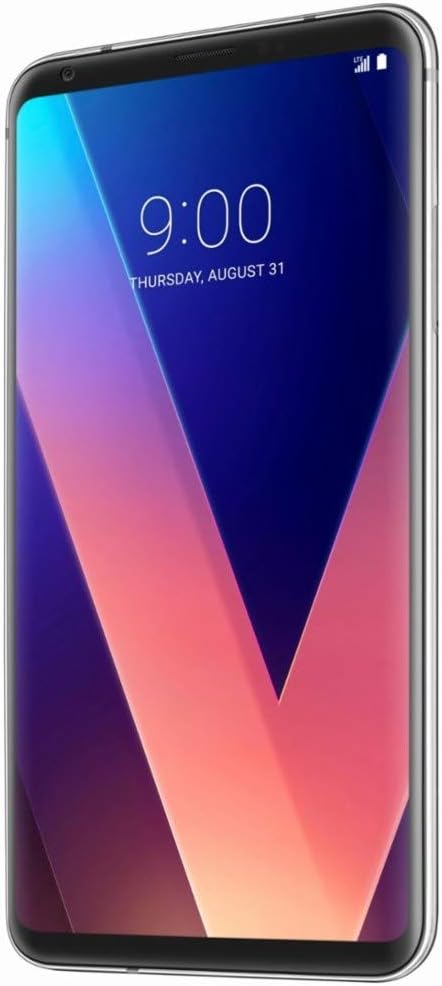
Image: Front view of the LG V30 US998 smartphone, showcasing its 6.0-inch OLED FullVision Display with minimal bezels. The screen displays a digital clock and date.

Image: Front view of the LG V30 US998 smartphone displaying its home screen with various application icons and a weather widget. The top status bar shows network, battery, and time information.
The device features a 6.0-inch OLED FullVision Display on the front. The rear of the phone houses the dual camera system, consisting of a 16 MP standard-angle lens and a 13 MP wide-angle lens, along with a fingerprint sensor. The front camera is a 5 MP wide-angle lens. Physical buttons for power and volume are located on the sides.
Setup
1. Inserting the SIM/SD Card
- Locate the SIM/SD card tray on the side of the device.
- Insert the provided SIM-card drawer opener into the small hole next to the tray to eject it.
- Place your Nano-SIM card and/or microSD card (if applicable) into the tray with the gold contacts facing down.
- Carefully reinsert the tray into the device until it clicks into place.
2. Powering On Your Device
- Press and hold the Power/Lock button (typically on the right side) until the LG logo appears on the screen.
- Follow the on-screen prompts to complete the initial setup, including selecting your language, connecting to a Wi-Fi network, and setting up your Google account.
3. Charging the Battery
- Connect the USB cable to the charging port on your device and the other end to a power adapter.
- Plug the power adapter into a wall outlet. The device supports fast charging and wireless charging.
Operating Instructions
1. Basic Navigation
- Touchscreen Gestures: Tap to select, swipe to scroll, pinch to zoom.
- Home Screen: Access apps, widgets, and notifications.
- Navigation Bar: Use the Back, Home, and Recent Apps buttons at the bottom of the screen.
2. Camera Usage
- Open the Camera app from the home screen or lock screen.
- Switch between the 16 MP standard-angle and 13 MP wide-angle rear cameras for different perspectives.
- Utilize the 5 MP wide-angle front camera for selfies.
- Explore various modes for photos and premium video capture, including manual controls and color-grading presets.
3. Audio Experience
- The LG V30 US998 features a Hi-Fi Quad DAC for enhanced audio playback through the 3.5 mm audio jack.
- Record high-quality audio with advanced microphone capabilities.
4. Connectivity
- Wi-Fi: Connect to wireless networks via Settings > Network & internet > Wi-Fi.
- Bluetooth: Pair with other Bluetooth devices via Settings > Connected devices > Bluetooth.
- Cellular: The device supports GSM and CDMA networks. Ensure your SIM card is properly installed for cellular service.
- GPS: Location services are available for navigation and location-based applications.
Maintenance
1. Cleaning Your Device
- Use a soft, lint-free cloth to gently wipe the screen and body of the phone.
- Avoid using harsh chemicals or abrasive materials.
2. Software Updates
- Regularly check for and install software updates to ensure optimal performance and security.
- Navigate to Settings > System > Update center > Software update.
3. Water and Dust Resistance (IP68)
- The LG V30 US998 is rated IP68, meaning it is dust-tight and protected against immersion in water up to 1.5 meters for 30 minutes.
- This resistance is not permanent and may decrease over time with normal wear. Avoid intentional submersion or exposure to high-pressure water.
- Ensure all ports are dry before charging.
Troubleshooting
If you encounter issues with your device, try the following common solutions:
- Device Not Responding: Press and hold the Power/Lock button for approximately 10 seconds to force a restart.
- Network Issues: Check if your SIM card is properly inserted. Try toggling Airplane Mode on and off. Verify your carrier's network coverage in your area.
- Battery Draining Quickly: Reduce screen brightness, close unused apps, and disable unnecessary features like Bluetooth or GPS when not in use.
- App Malfunctions: Clear the app's cache and data (Settings > Apps & notifications > App info > [App Name] > Storage > Clear cache/Clear data) or uninstall and reinstall the app.
- Storage Full: Delete unnecessary files, photos, or videos. Move media to a microSD card if installed.
Specifications
| Feature | Detail |
|---|---|
| Model Name | LG V30 US998 |
| Operating System | Android |
| Display | 6.0 Inches OLED FullVision Display, 1440 x 2880 Resolution, 60 Hz Refresh Rate |
| Processor | Snapdragon CPU, 2.45 GHz CPU Speed |
| RAM | 4 GB |
| Internal Storage | 64 GB (expandable via microSD) |
| Rear Cameras | 16 MP Standard-Angle, 13 MP Wide-Angle |
| Front Camera | 5 MP Wide-Angle |
| Battery Capacity | 3300 mAh |
| Phone Talk Time | 14 Hours |
| Charging Time | Approximately 2 Hours |
| Connectivity | Wi-Fi, Cellular (GSM & CDMA), Bluetooth, GPS |
| Special Features | Wireless Charging, IP68 Dust and Water Resistance, 3.5 mm Audio Jack |
| Dimensions | 5.97 x 2.97 x 0.3 inches |
| Item Weight | 14.1 ounces (0.88 Pounds) |
| Color | Silver |
Warranty and Support
LG offers a limited warranty for your device. For extended coverage, you may be eligible for the LG Second Year Promise.
- LG Second Year Promise: Register your device to potentially receive a free second year of limited warranty coverage. Terms and conditions apply.
- For details and registration, visit: LGV30Promise.com
- For further assistance, refer to the Quick Start Guide (QSG) or the Product Safety and Warranty Information (PSWI) included in your package.