
Hyper Tough IC400JS
Hyper Tough IC400JS 3.5Amp Jig Saw User Manual
Model: IC400JS
Introduction
Thank you for choosing the Hyper Tough IC400JS 3.5Amp Jig Saw. This manual provides important information regarding the safe operation, maintenance, and troubleshooting of your new tool. Please read this manual thoroughly before operating the jig saw to ensure proper use and to prevent injury.
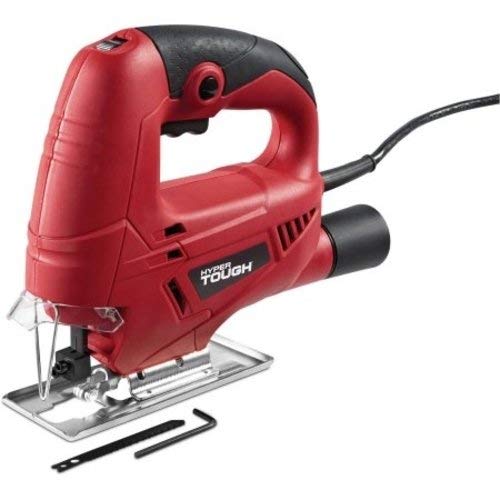
Image: Hyper Tough IC400JS 3.5Amp Jig Saw, showcasing its red and black body, handle, base plate, and included accessories like a saw blade and hex key.
Safety Information
Always follow basic safety precautions when using power tools to reduce the risk of fire, electric shock, and personal injury.
- Read all instructions: Familiarize yourself with the tool's operation and safety guidelines.
- Wear eye protection: Always wear safety goggles or safety glasses with side shields.
- Wear hearing protection: Use earplugs or earmuffs during operation.
- Secure workpiece: Always clamp or otherwise secure the workpiece to prevent movement during cutting.
- Keep work area clean: Cluttered areas invite accidents.
- Avoid dangerous environments: Do not use power tools in damp or wet locations, or expose them to rain.
- Stay alert: Do not operate tools when tired or under the influence of drugs, alcohol, or medication.
- Disconnect power: Always disconnect the tool from the power source before making any adjustments, changing accessories, or storing the tool.
- Use the right tool: Do not force a small tool or attachment to do the job of a heavy-duty tool.
- Maintain tools with care: Keep cutting tools sharp and clean for better and safer performance.
Components Overview
Familiarize yourself with the main components of your Hyper Tough IC400JS Jig Saw:
- Handle: Ergonomically designed for comfortable grip and control.
- Trigger Switch: Activates the motor.
- Lock-on Button: Allows continuous operation without holding the trigger, reducing fatigue during long cuts.
- Variable Speed Dial: Adjusts the cutting speed to match the material.
- Blade Clamp: Secures the jig saw blade.
- Base Plate (Shoe): Provides stability and guides the saw along the workpiece.
- Vacuum Adapter: Allows connection to a vacuum cleaner for dust collection.
- Power Cord: Connects the tool to an electrical outlet.
Setup
Blade Installation
- Ensure the jig saw is unplugged from the power source.
- Locate the blade clamp mechanism.
- Insert the shank of the appropriate jig saw blade into the blade clamp, ensuring it is fully seated and securely fastened. Refer to the tool's specific instructions for blade insertion and tightening.
- Verify the blade is firmly held and cannot be easily pulled out.
Connecting Vacuum Adapter
For a cleaner work area, attach a vacuum cleaner (not included) to the jig saw's vacuum adapter port. This helps to collect sawdust and debris during operation.
Operating Instructions
Powering On/Off
- To start the jig saw, depress the trigger switch.
- To stop the jig saw, release the trigger switch.
- For continuous operation, depress the trigger switch and then press the lock-on button. To release the lock, depress the trigger switch again.
Adjusting Cutting Speed
The variable speed dial allows you to match the cutting speed to the material being cut. Rotate the dial to increase or decrease the speed. Lower speeds are generally suitable for harder materials like metal, while higher speeds are for softer materials like wood.
Making a Cut
- Ensure the workpiece is securely clamped.
- Place the front edge of the base plate flat on the workpiece, ensuring the blade is clear of the material.
- Start the jig saw and allow it to reach full speed before beginning the cut.
- Slowly guide the saw along the cutting line, applying steady, even pressure. Do not force the tool.
- Maintain firm contact between the base plate and the workpiece throughout the cut.
- Once the cut is complete, release the trigger switch and allow the blade to stop completely before lifting the tool from the workpiece.
Maintenance
- Cleaning: Regularly clean the ventilation openings of the tool to prevent overheating. Use a soft brush or compressed air. Do not use water or chemical cleaners.
- Blade Care: Replace dull or damaged blades promptly. A sharp blade ensures efficient cutting and reduces strain on the tool.
- Cord Inspection: Periodically inspect the power cord for damage. If damaged, have it repaired by a qualified service technician.
- Storage: Store the jig saw in a dry, secure place out of reach of children.
Troubleshooting
| Problem | Possible Cause | Solution |
|---|---|---|
| Tool does not start. | No power supply; faulty cord/plug; trigger switch issue. | Check power outlet and cord. Ensure plug is fully inserted. If problem persists, seek professional service. |
| Blade not cutting efficiently or binding. | Dull or incorrect blade; forcing the tool; improper speed setting. | Replace with a sharp, appropriate blade. Do not force the tool. Adjust variable speed dial. |
| Excessive vibration. | Loose blade; damaged blade; worn internal components. | Ensure blade is securely fastened. Replace damaged blade. If vibration continues, professional inspection is recommended. |
| Overheating. | Blocked ventilation; continuous heavy use. | Clean ventilation slots. Allow tool to cool down during prolonged use. |
Specifications
| Brand | Hyper Tough |
| Model Number | IC400JS |
| Power Source | Corded Electric |
| Voltage | 120 Volts (DC) |
| Wattage | 420 Watts |
| Blade Material | High Speed Steel |
| Surface Recommendation | Wood and Metal |
| Special Features | Lock-on button, Vacuum adapter |
| Product Dimensions | 21.08 x 19.05 x 7.11 cm; 1.77 kg |
| Colour | Red |
Warranty and Support
For warranty information or technical support, please refer to the documentation included with your purchase or contact Hyper Tough customer service. Keep your proof of purchase for warranty claims.
This product is tested and certified to look and work like new. The refurbishing process includes functionality testing, basic cleaning, inspection, and repackaging. The product ships with all relevant accessories, and may arrive in a generic box.
Ask a question about this manual
Ask about setup, troubleshooting, compatibility, parts, safety, or missing instructions. Manuals+ will review the question and use this page’s manual context to help answer it.