
ClassicFlame 26II342FGT
ClassicFlame 26" 3D SpectraFire Plus Infrared Fireplace Insert User Manual
Model: 26II342FGT
Introduction
Thank you for purchasing the ClassicFlame 26" 3D SpectraFire Plus Infrared Electric Fireplace Insert. This manual provides important information for the safe operation, installation, maintenance, and troubleshooting of your new fireplace insert. Please read this manual thoroughly before attempting to assemble, operate, or install the product. Retain this manual for future reference.
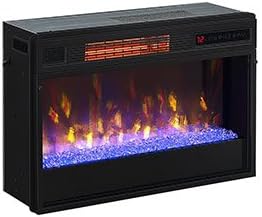
Figure 1: ClassicFlame 26" 3D SpectraFire Plus Infrared Fireplace Insert, showcasing its modern design and vibrant flame effects.
Important Safety Information
Always read and understand all instructions before using this appliance. For your safety, always follow these basic precautions:
- Do not operate any fireplace with a damaged cord or plug, or if the heater has malfunctioned, been dropped, or damaged in any manner.
- Do not use outdoors. This fireplace is intended for indoor use only.
- Avoid placing the fireplace near loose draperies, bedding, or other combustible materials.
- Always unplug the fireplace when not in use.
- Do not run cord under carpeting. Do not cover cord with throw rugs, runners, or similar coverings. Arrange cord away from traffic area and where it will not be tripped over.
- To prevent a possible electrical shock, do not immerse the fireplace or cord in water or other liquids.
- This appliance is hot when in use. To avoid burns, do not let bare skin touch hot surfaces.
- The fireplace is equipped with a Safer Sensor technology that alerts if the heater is obstructed and automatically shuts the unit down to prevent overheating.
Product Features
The ClassicFlame 26" 3D SpectraFire Plus Infrared Fireplace Insert offers a range of advanced features for an enhanced user experience:
- Infrared Quartz Heating: Capable of producing supplemental heat for areas up to 1,000 Sq. Ft., providing efficient warmth.
- 3D SpectraFire Plus Flame Technology: Features 5 flame color options, 5 brightness levels, and 5 speed settings for customizable visual effects.
- Contemporary Glass Ember Bed: A modern, glass ember bed enhances the flickering flame effect.
- Safer Sensor Technology: Automatically shuts down the unit if the heater is obstructed, ensuring safety.
- Multi-Function Remote Control: Allows convenient operation of flames, heater/thermostat, and on/off timer.
- Dimensions: Measures 27" W x 17.7" H x 9.5" D, designed for easy insertion into compatible fireplace openings.
Setup and Installation
This fireplace insert is designed for easy installation into existing fireplace openings or custom mantels. Ensure the opening dimensions are compatible with the insert's measurements (27" W x 17.7" H x 9.5" D).
- Unpacking: Carefully remove the fireplace insert from its packaging. Retain all packaging materials for future transport or storage.
- Placement: Position the insert in the desired opening. Ensure there is adequate clearance around the unit for proper ventilation and to prevent obstruction of air inlets/outlets.
- Power Connection: Plug the power cord into a grounded 120V AC outlet. Ensure the outlet is easily accessible. Do not use extension cords or power strips.
- Remote Control Batteries: Insert two AAA batteries (not included) into the remote control, observing polarity.
Note: For permanent installations, consult a qualified electrician to ensure proper wiring and compliance with local electrical codes.
Operating Instructions
The fireplace insert can be operated using the control panel on the unit or the included multi-function remote control.
Control Panel Functions:
- Power Button: Turns the unit on or off.
- Flame Button: Cycles through flame color options (5 settings).
- Brightness Button: Adjusts flame brightness levels (5 settings).
- Speed Button: Changes flame speed settings (5 settings).
- Heater Button: Activates or deactivates the heating function.
- Temperature Up/Down: Adjusts the thermostat setting.
- Timer Button: Sets the automatic shut-off timer.
Remote Control Functions:
The remote control duplicates all functions available on the control panel, offering convenient operation from a distance. Point the remote directly at the fireplace insert's receiver for optimal performance.
To activate the heating function, press the Heater button. Use the Temperature Up/Down buttons to set your desired room temperature. The unit will cycle on and off to maintain the set temperature. The flame effect can be operated independently of the heating function.
Maintenance
Regular maintenance ensures the longevity and optimal performance of your fireplace insert.
- Cleaning: Always unplug the unit before cleaning. Use a soft, damp cloth to wipe down the exterior surfaces. Do not use abrasive cleaners or solvents.
- Glass Panel: Clean the glass panel with a soft cloth and a non-abrasive glass cleaner.
- Air Inlets/Outlets: Periodically check and clean the air inlets and outlets to ensure they are free from dust and debris, which can impede airflow and heating efficiency.
- Light Bulbs: The flame effect uses LED technology, which typically does not require replacement. If issues arise, contact customer support.
Troubleshooting
If you experience issues with your fireplace insert, refer to the following common problems and solutions:
| Problem | Possible Cause | Solution |
|---|---|---|
| Unit does not turn on. | No power, power cord not fully plugged in, circuit breaker tripped. | Ensure unit is plugged into a working outlet. Check household circuit breaker. |
| Heater does not produce heat. | Heater function not activated, thermostat set too low, air inlets/outlets obstructed, Safer Sensor activated. | Press the Heater button. Increase thermostat setting. Clear any obstructions. Allow unit to cool if Safer Sensor was activated. |
| Flame effect is not working. | Flame effect not activated, LED lights malfunction. | Ensure the unit is powered on and the flame effect is activated. If problem persists, contact customer support. |
| Remote control not working. | Dead batteries, remote not pointed at receiver, obstruction. | Replace batteries. Ensure clear line of sight to the unit's receiver. |
| Unusual noise from the unit. | Fan motor noise, debris in fan. | Some fan noise is normal during heating operation. If noise is excessive or unusual, unplug the unit and contact customer support. |
Specifications
| Attribute | Detail |
|---|---|
| Brand | ClassicFlame |
| Model Name | 26II342FGT |
| Power Source | Corded Electric |
| Product Dimensions (D x W x H) | 9.5"D x 27"W x 17.7"H |
| Material | Metal |
| Finish Type | Black |
| Installation Type | Insert |
| Heat Output | 5200 British Thermal Units |
| Special Feature | LED Flame, Safer Sensor Technology |
| Heating Coverage | Up to 1000 Sq. Ft. |
| Included Components | Remote Control |
| Item Weight | 33 Pounds |
| UPC | 680196992558 |

Figure 2: Product dimensions for the ClassicFlame 26" Fireplace Insert, showing width, height, and depth.
Warranty and Support
This ClassicFlame fireplace insert comes with a Limited Warranty. Please refer to the warranty card included with your product for specific terms and conditions, including coverage duration and limitations.
For technical assistance, replacement parts, or warranty claims, please contact ClassicFlame Customer Support:
- Website: www.classicflame.com (Note: This is a placeholder URL as no specific support URL was provided in the input.)
- Phone: 1-800-XXX-XXXX (Note: This is a placeholder number as no specific support number was provided in the input.)
- Email: support@classicflame.com (Note: This is a placeholder email as no specific support email was provided in the input.)
Please have your model number (26II342FGT) and purchase date available when contacting support.
Related documents26II342FGT


Ask a question about this manual
Ask about setup, troubleshooting, compatibility, parts, safety, or missing instructions. Manuals+ will review the question and use this page’s manual context to help answer it.