
Redmi Y2
Redmi Y2 Smartphone
User Manual
Product Overview
The Redmi Y2 is a feature-rich smartphone designed for everyday use. It combines a sleek design with robust performance, making it suitable for communication, entertainment, and productivity. This manual provides essential information for setting up, operating, maintaining, and troubleshooting your device.

Figure 1: Rear view of the Redmi Y2 smartphone, highlighting the dual camera module and fingerprint sensor.
1. Setup
Follow these steps to set up your new Redmi Y2 smartphone.
1.1 Unboxing and Initial Inspection
Carefully remove all components from the packaging. Ensure the following items are present:
- Redmi Y2 Smartphone
- Charger
- SIM ejector Pin
- User guide
- Clear soft case
- Warranty card
Video 1: An overview of the Redmi Y2 smartphone, including its design, display, camera, and accessories found in the box.
1.2 Inserting SIM Cards and MicroSD Card
The Redmi Y2 supports dual Nano-SIM cards and a dedicated MicroSD card for expandable storage. Locate the SIM tray on the left side of the device.
- Insert the SIM ejector pin into the small hole on the SIM tray to open it.
- Carefully pull out the SIM tray.
- Place your Nano-SIM cards into the designated slots.
- If desired, insert a MicroSD card into its dedicated slot.
- Gently push the tray back into the device until it clicks into place.

Figure 2: Left side of the Redmi Y2, illustrating the SIM card tray location.
1.3 Powering On and Initial Configuration
To power on your device, press and hold the power button located on the right side until the Redmi logo appears. Follow the on-screen instructions to complete the initial setup, including language selection, Wi-Fi connection, and Google account setup.

Figure 3: Right side of the Redmi Y2, showing the power and volume buttons.
1.4 Device Ports and Buttons
Familiarize yourself with the physical layout of your Redmi Y2:
- Top: 3.5mm headphone jack, secondary microphone, and IR blaster.
- Bottom: Micro-USB charging port, primary microphone, and speaker grilles.

Figure 4: Top view of the Redmi Y2, highlighting the headphone jack and IR blaster.

Figure 5: Bottom view of the Redmi Y2, showing the Micro-USB port and speaker grilles.
2. Operating Your Redmi Y2
2.1 Display and User Interface
The Redmi Y2 features a 5.99-inch HD+ display with an 18:9 aspect ratio, providing an immersive viewing experience for media and gaming. The device runs on Android 8.1 Oreo with MIUI 9.5 (or later) overlay, offering a customized and user-friendly interface.
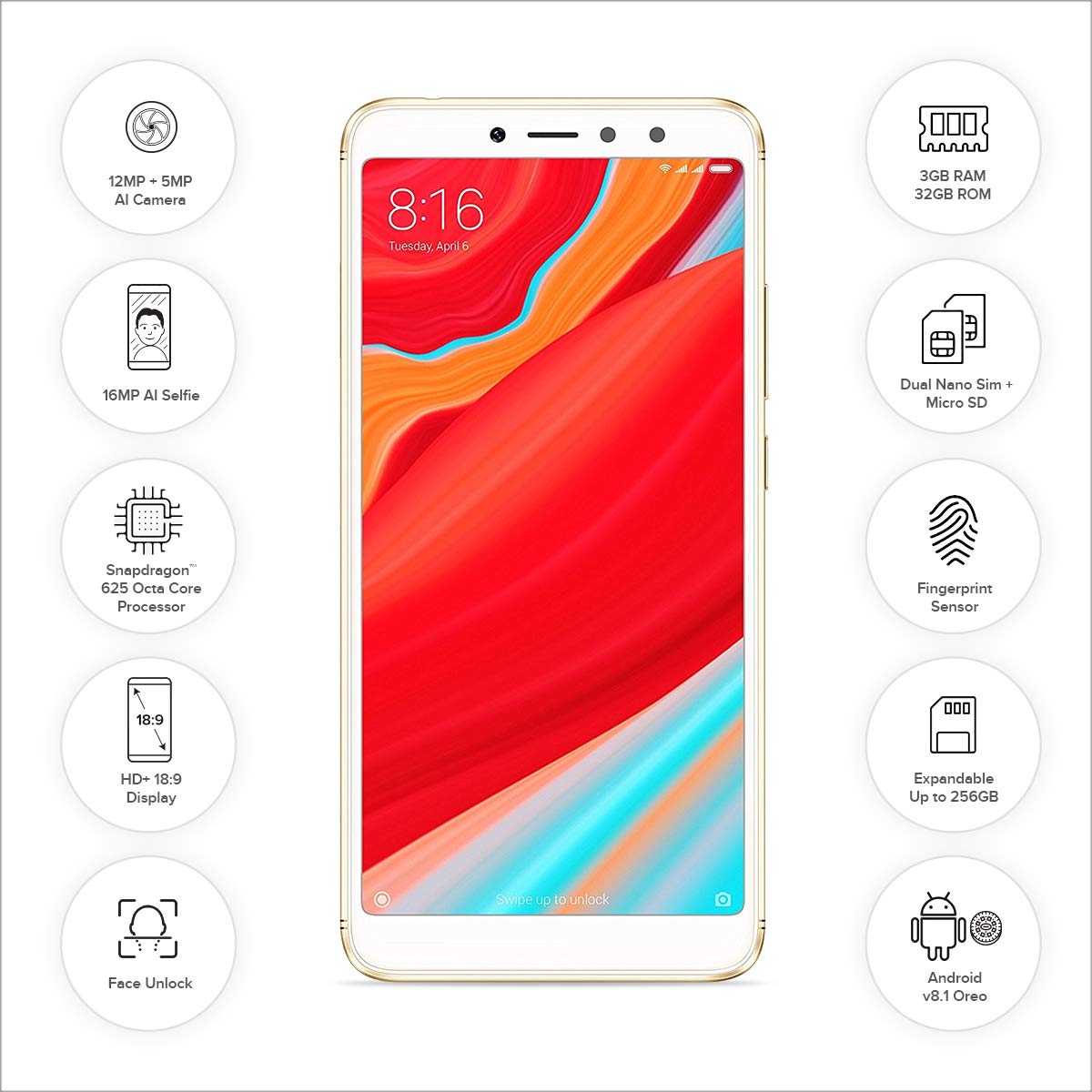
Figure 6: Front view of the Redmi Y2, showcasing its 5.99-inch display and key features.
2.2 Camera Features
The Redmi Y2 is equipped with a dual rear camera setup (12MP + 5MP) for capturing photos with depth-of-field effects. The front-facing camera is a 16MP sensor, ideal for high-quality selfies, even in low-light conditions thanks to its soft-tone selfie light.
2.3 Security Features
For enhanced security, the Redmi Y2 includes a rear-mounted fingerprint sensor and face unlock functionality. These features allow for quick and secure access to your device.
2.4 Navigation Gestures
The device offers optional gesture navigation, allowing you to replace traditional navigation buttons with intuitive swipes. Swipe up from the bottom to go home, swipe up and pause for recent apps, and swipe from the left or right edge to go back.
3. Maintenance
3.1 Battery Care
The Redmi Y2 is powered by a 3080 mAh Lithium Polymer battery. To maximize battery life and ensure longevity:
- Avoid extreme temperatures.
- Use the provided charger for optimal charging.
- Avoid completely draining the battery frequently.
- Manage background app usage to conserve power.
3.2 Storage Management
The device comes with 32GB or 64GB of internal storage, expandable up to 256GB via a MicroSD card. Regularly manage your storage by:
- Deleting unnecessary files and apps.
- Moving large media files to the MicroSD card.
- Clearing cached data from apps.
4. Troubleshooting
If you encounter issues with your Redmi Y2, refer to the following common solutions:
4.1 Device Not Responding
- Restart: Press and hold the power button for about 10-15 seconds until the device restarts.
- Charge: Connect the device to its charger and wait a few minutes before attempting to power it on again.
4.2 Battery Draining Quickly
- Check Apps: Identify and close power-intensive applications running in the background.
- Screen Brightness: Reduce screen brightness or enable adaptive brightness.
- Network Usage: Turn off Wi-Fi, Bluetooth, or GPS when not in use.
- Software Update: Ensure your device's software is up to date, as updates often include battery optimizations.
4.3 Camera Issues
- Clear Cache: Go to Settings > Apps > Camera > Storage and clear cache/data.
- Restart: Restart the device.
- Check Permissions: Ensure the camera app has all necessary permissions.
5. Specifications
Below are the detailed specifications for the Redmi Y2 smartphone:
| Operating System | Android 8.1 (Oreo) |
| RAM | 3 GB |
| Internal Storage | 32 GB (expandable up to 256 GB via MicroSD) |
| Processor | Qualcomm Snapdragon 625 Octa-Core, 1.3 GHz |
| Display | 5.99-inch IPS LCD, 1440 x 720 resolution (HD+) |
| Rear Camera | 12 MP + 5 MP Dual AI Camera |
| Front Camera | 16 MP with Selfie Light |
| Battery | 3080 mAh Lithium Polymer |
| Dimensions | 16.1 x 0.8 x 7.7 cm |
| Weight | 168 g |
| Connectivity | Bluetooth, Wi-Fi, GLONASS GPS, Dual SIM (4G VoLTE) |
| Special Features | Dual SIM, Fingerprint Sensor, Face Unlock, IR Blaster |
6. Warranty and Support
Your Redmi Y2 smartphone comes with a 1-year manufacturer's warranty from the date of purchase. This warranty covers manufacturing defects and issues arising from normal use.
For technical support, service requests, or further assistance, please visit the official Redmi support website or contact their customer service. Refer to the warranty card included in your product packaging for specific terms and conditions.
Manufacturer: Xiaomi
Related documentsY2


Ask a question about this manual
Ask about setup, troubleshooting, compatibility, parts, safety, or missing instructions. Manuals+ will review the question and use this page’s manual context to help answer it.