
Introduction
This manual provides detailed instructions for the installation, operation, and maintenance of the Dinosaur Electronics FAN50PLUS Universal Igniter Board with Fan Control. This board is designed to replace existing igniter boards in various RV furnace models, offering reliable ignition and fan control for your heating system.
Product Features
- Universal Compatibility: Designed for broad compatibility with various RV furnace models.
- Integrated Fan Control: Manages furnace fan operation for efficient heating.
- Microcontrolled Design: Ensures precise and reliable performance.
- Compact Dimensions: Measures approximately 3.35 inches by 4.25 inches.
- Durable Construction: Built with quality components for longevity.
Compatibility and Adaptation
The FAN50PLUS board is compatible with a wide range of Atwood Dometic Hydro Flame furnaces. It serves as a replacement for various part numbers, including 31501, 33488, 33727, and 30575.
An adapter board (part number 33727) is included to ensure compatibility with pre-2004 furnaces that utilize Atwood edge connectors (style board 37875). It is also compatible with Fenwal 35-535911-113 and NBK 11455.
Always verify your furnace model and year before ordering to ensure correct fitment and functionality.
Setup and Installation
Safety First: Before beginning any installation, ensure that all power to the furnace and RV is disconnected. Failure to do so can result in electrical shock or damage to the unit.
- Access the Furnace: Locate and open the access panel for your RV furnace.
- Disconnect Wiring: Carefully disconnect all wiring from the existing igniter board. Note the position of each wire for correct re-connection. Taking photos can be helpful.
- Remove Old Board: Unmount and remove the old igniter board.
- Install New Board: Mount the Dinosaur Electronics FAN50PLUS board in the same location. Ensure it is securely fastened.
- Connect Wiring: Reconnect all wires to the new board, ensuring each connection is firm and correctly seated. Pay close attention to the interface connections.
- Verify Connections: Double-check all connections for proper seating and absence of dirt or debris in the card slots, which can cause poor contact. Ensure no cards are incorrectly inserted.
- Restore Power: Once all connections are verified, restore power to the furnace and RV.
- Test Operation: Initiate the furnace to confirm proper ignition and fan operation.
For visual guidance, refer to the installation videos below.

Image: Dinosaur Electronics FAN50PLUS Universal Igniter Board with Fan Control. This shows the top view of the circuit board with various components and connectors.
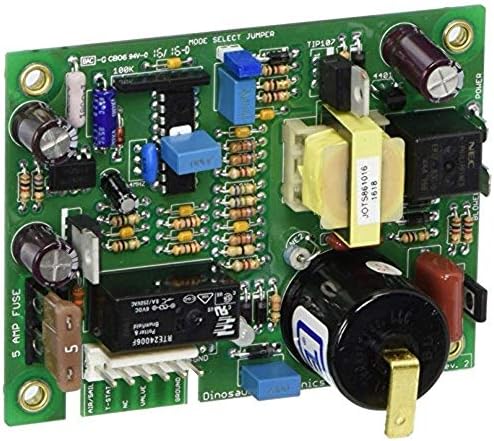
Image: Rear view of the Dinosaur Electronics FAN50PLUS Universal Igniter Board. This image displays the solder points and traces on the underside of the circuit board.
Installation Videos
Video: Installation of a furnace ignition circuit board. This video demonstrates the process of replacing a furnace board, highlighting its fit and reliable operation after installation.
Video: FHRHRY RV Gas Furnace Ignition Circuit Control Board. This video provides an overview of the circuit board, detailing its features and compatibility with various Atwood Dometic Hydro Flame furnace models.
Video: 521099 Furnace Ignition Circuit Board with Fan Control. This video showcases the features and design of the 12V DC furnace ignition circuit board.
Video: Furnace Control Board Installation and Review. This video offers an installation guide and review of the furnace control board, emphasizing its ease of installation and improved performance.
Operating Instructions
The FAN50PLUS board operates by controlling the direct spark ignition (DSI) system and the furnace fan. When the thermostat calls for heat, the board initiates the ignition sequence. Once a flame is established, the board monitors the flame and controls the fan to distribute heat. A red LED indicator on the board typically illuminates when the furnace has successfully ignited and is operating without faults.
Some models may include an upgraded feature that shuts off the fan after approximately 10 minutes if the fuel supply is interrupted, preventing cold air circulation.
Maintenance
Regular maintenance helps ensure the longevity and optimal performance of your igniter board and furnace system:
- Periodic Inspection: Annually inspect the board and its connections for any signs of wear, corrosion, or loose wiring.
- Clean Connections: Ensure all electrical connections are clean and free of dirt or debris. Poor contact can lead to intermittent operation.
- Environmental Protection: Protect the furnace area from water ingress to prevent damage to the circuit board.
Troubleshooting
If your furnace is not operating correctly after installing the FAN50PLUS board, consider the following troubleshooting steps:
- No Ignition:
- Verify all wiring connections are secure and correctly inserted.
- Check the gas supply to the furnace.
- Inspect the spark electrode for proper gap and cleanliness.
- Ensure the red LED on the board is indicating normal operation (flame on).
- Fan Issues:
- Confirm fan wiring is correctly connected to the board.
- Check for any obstructions in the fan assembly.
- Intermittent Operation:
- Inspect for loose connections or dirty card slots that might cause poor contact.
- Ensure the board is securely mounted and not vibrating excessively.
- General Checks:
- Confirm the correct voltage (12V DC) is supplied to the board.
- If an adapter board is used, ensure it is properly connected.
If problems persist after performing these checks, it is recommended to consult a qualified technician or contact Dinosaur Electronics technical support.
Specifications
| Attribute | Value |
|---|---|
| Brand | Dinosaur Electronics |
| Model | FAN50PLUS |
| Voltage | 12 Volts DC |
| Product Dimensions (L x W x H) | 6.9" x 0.7" x 2" |
| Material | Copper |
| Operating Temperature | 40 Degrees Fahrenheit (Minimum operating temperature, consult manufacturer for full range) |
| Item Weight | 0.4 Pounds |
Warranty and Support
The Dinosaur Electronics FAN50PLUS Universal Igniter Board comes with a 1-year warranty from the date of purchase. This warranty covers defects in materials and workmanship under normal use.
For technical assistance, troubleshooting guidance beyond this manual, or warranty claims, please contact Dinosaur Electronics directly. Their technical support team can provide expert assistance for your specific situation.