
Universal EBK360 Soft-Clean
Soft-Clean Electric Powerhead User Manual
Model: EBK360 Soft-Clean | Brand: Universal
1. Introduction
The Wessel Werk EBK360 Soft Clean is a durable electric powerhead specifically designed for Ultra Soft carpet types, such as Mohawk's SmartStrand Silk and Caress by Shaw. This powerhead incorporates air channels on its front to facilitate smooth movement across carpet surfaces by allowing air to flow between the nozzle and the carpet. It features a double swivel neck for enhanced steering and flexibility, complemented by four soft, rubber wheels for improved maneuverability. The side-mounted and enclosed belt system protects against potential damage during operation. Its Double-V-shaped Chevron bristles on the roller brush efficiently guide debris towards the central vacuum's suction, ensuring consistent contact with the cleaning surface. An integrated LED headlight enhances visibility in low-light conditions. The powerhead also includes large edge cleaning channels, enabling thorough cleaning near baseboards and furniture. A wide intake opening minimizes clogging, and a 5-position height adjustment allows users to customize the powerhead's height according to the depth of the cleaning surface, ensuring an effective and convenient cleaning experience.
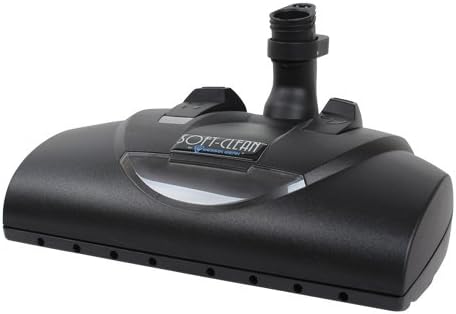
Figure 1: Front view of the EBK360 Soft-Clean Electric Powerhead, showing its sleek design and nozzle.
2. Key Features
- Durable Electric Powerhead: Specifically designed for ultra-soft carpets.
- Double Swivel Neck: Provides easy steering and enhanced flexibility for maneuverability.
- LED Headlight: Illuminates the cleaning path for improved visibility in dimly lit areas.
- Large Edge Cleaning Channels: Allows for effective cleaning close to baseboards and furniture.
- Air Channels: Located on the front to facilitate easy pushing across soft carpets.
- Enclosed Side-Mounted Belt: Protects the belt from potential damage during use.
- Double-V-shaped Chevron Bristles: Guides debris efficiently to the central vacuum's suction.
- 5-Position Height Adjustment: Allows customization for various carpet depths and cleaning surfaces.
3. Setup Instructions
Follow these steps to properly set up your Soft-Clean Electric Powerhead for first use:
- Unpack: Carefully remove the powerhead from its packaging. Inspect for any visible damage.
- Attach to Wand: Align the powerhead's neck with the end of your vacuum cleaner's wand. Push firmly until it clicks securely into place. Ensure the electrical connection is made if your wand has integrated wiring.
- Connect Power: If your vacuum system requires a separate power cord for the powerhead, connect it according to your vacuum cleaner's instructions.
- Adjust Height: Locate the height adjustment mechanism (refer to Figure 3 for typical location). Select the appropriate height setting for your carpet type. For ultra-soft carpets, a higher setting may be necessary to allow for easier movement.

Figure 2: Bottom view of the EBK360 Soft-Clean Electric Powerhead, highlighting the brush roll and rubber wheels.
4. Operating Instructions
To ensure optimal performance and longevity of your Soft-Clean Electric Powerhead, follow these operating guidelines:
- Power On: Turn on your vacuum cleaner. The powerhead's brush roll should begin to spin, and the LED headlight should illuminate.
- Select Height: Before vacuuming, ensure the height adjustment is set correctly for the carpet pile. For very soft or thick carpets, use a higher setting to prevent the powerhead from sinking too deeply and becoming difficult to push.
- Vacuuming Technique: Move the powerhead in slow, overlapping passes. The double swivel neck allows for easy maneuvering around furniture and obstacles.
- Edge Cleaning: Utilize the large edge cleaning channels by guiding the powerhead close to baseboards and furniture legs to pick up debris in these areas.
- Low Light Operation: The LED headlight will assist in cleaning under furniture or in dimly lit rooms.
- Power Off: When finished, turn off your vacuum cleaner.
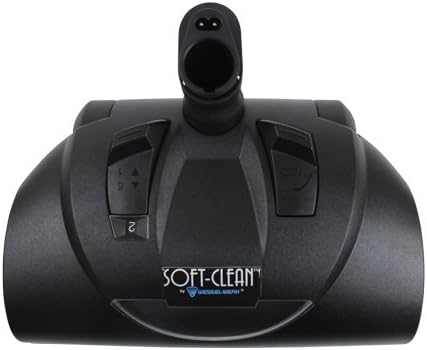
Figure 3: Top view of the EBK360 Soft-Clean Electric Powerhead, indicating the location of controls and height adjustment.
5. Maintenance
Regular maintenance ensures the longevity and efficiency of your powerhead:
- Brush Roll Cleaning: Periodically inspect the brush roll (refer to Figure 2) for tangled hair, threads, or debris. Use scissors to carefully cut and remove any obstructions.
- Wheel Cleaning: Check the four rubber wheels for any accumulated debris that might hinder smooth movement. Clean as necessary.
- Belt Inspection: While the belt is enclosed, if you notice a decrease in brush roll performance, consult a qualified technician for belt inspection or replacement. Do not attempt to open the enclosed belt housing yourself.
- General Cleaning: Wipe the exterior of the powerhead with a damp cloth. Do not use harsh chemicals or abrasive cleaners.
- Storage: Store the powerhead in a clean, dry place when not in use.
6. Troubleshooting
Refer to the table below for common issues and their potential solutions:
| Problem | Possible Cause | Solution |
|---|---|---|
| Brush roll not spinning | Obstruction in brush roll; Powerhead not properly connected; Electrical issue. | Remove debris from brush roll; Ensure secure connection to wand; Check vacuum's power supply. |
| Powerhead difficult to push | Height setting too low for carpet type; Wheels obstructed. | Adjust height setting to a higher position; Clean debris from wheels. |
| Poor suction | Vacuum bag/canister full; Hose/wand clogged; Powerhead intake clogged. | Empty/replace vacuum bag/canister; Clear any clogs in hose/wand; Check powerhead intake for blockages. |
| LED headlight not working | Electrical connection issue; LED failure. | Ensure powerhead is securely connected; Contact customer support if issue persists. |
7. Specifications
| Feature | Value |
|---|---|
| Model Number | EBK360 Soft-Clean |
| Manufacturer | Universal |
| Special Feature | Wheels |
| Included Components | Brush |
| Form Factor | Central |
| Control Method | Touch |
| Portable | No |
| Series Number | 360 |
| ASIN | B077NNTGPK |
| Batteries Required | No |
8. Warranty and Support
Warranty Information: This product comes with a standard manufacturer's warranty covering defects in materials and workmanship under normal use. The specific duration and terms of the warranty may vary. Please refer to the warranty card included with your purchase or contact the manufacturer directly for detailed information.
Customer Support: For technical assistance, troubleshooting not covered in this manual, or warranty claims, please contact Universal customer support. Keep your purchase receipt and product model number (EBK360 Soft-Clean) ready when contacting support.
Please note that unauthorized repairs or modifications may void your warranty.
Related documentsEBK360 Soft-Clean


Ask a question about this manual
Ask about setup, troubleshooting, compatibility, parts, safety, or missing instructions. Manuals+ will review the question and use this page’s manual context to help answer it.