
1. Introduction
Thank you for choosing the Generic Rolton T50 Portable World Band Radio and MP3 Player. This device combines a multi-band radio (FM/MW/SW) with an MP3 player, supporting SD/TF cards for versatile audio entertainment. Its compact design and battery power make it ideal for portable use. Please read this manual carefully to ensure proper operation and to maximize your listening experience.
2. Safety Information
- Do not expose the device to rain, moisture, or extreme temperatures.
- Avoid dropping or subjecting the device to strong impacts.
- Do not disassemble or attempt to repair the unit yourself. Refer all servicing to qualified personnel.
- Keep the device away from strong magnetic fields.
- Dispose of batteries properly according to local regulations.
- Clean the device with a soft, dry cloth. Do not use liquid cleaners.
3. Package Contents
Please check the package for the following items:
- Rolton T50 Portable Radio and MP3 Player
- USB Charging Cable
- User Manual
Note: Specific accessories may vary.
4. Product Overview
Familiarize yourself with the various parts and controls of your Rolton T50 device.
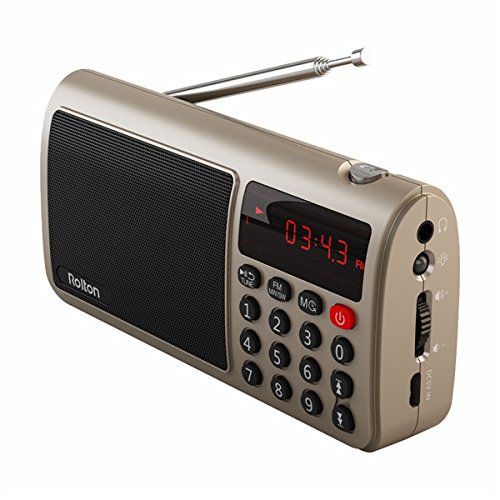
Figure 1: Front view of the Rolton T50 Portable Radio (Red variant). This image displays the main speaker grille, the digital time/frequency display, the numeric keypad for direct tuning, and the power button. The telescopic antenna is extended from the top right side.
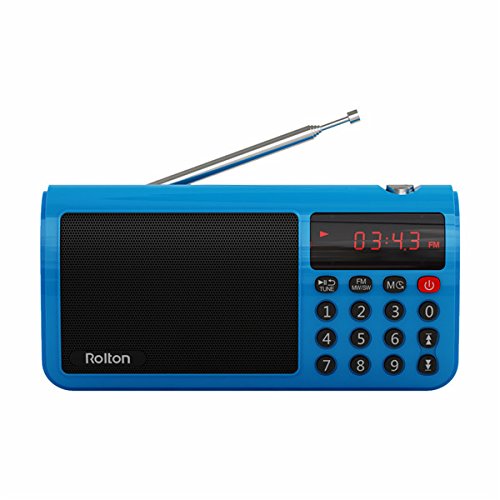
Figure 2: Front view of the Rolton T50 Portable Radio (Blue variant). Similar to the red model, this image highlights the speaker, digital display, and control buttons, including the numeric keypad and power button. The telescopic antenna is also visible.
Key Components:
- Speaker Grille: For audio output.
- Digital Display: Shows time, frequency, and mode information.
- Numeric Keypad (0-9): For direct frequency input or track selection.
- Power Button: Turns the device on/off.
- Mode Button (FM/MW/SW/MS): Switches between radio bands and MP3 mode.
- Tune/Scan Buttons: For manual tuning or automatic station scanning.
- Volume Control: Adjusts audio output level.
- Headphone Jack (3.5mm): For private listening.
- DC 5V Input: For charging the internal battery.
- SD/TF Card Slot: For inserting memory cards with MP3 files.
- Telescopic Antenna: For improved radio reception.
5. Setup
5.1. Charging the Battery
- Connect the small end of the provided USB charging cable to the DC 5V input port on the side of the radio.
- Connect the larger end of the USB cable to a standard USB power adapter (not included) or a computer's USB port.
- The charging indicator light (if present) will illuminate, typically red, during charging and turn off or change color when fully charged.
- A full charge typically takes 2-3 hours.
5.2. Inserting an SD/TF Card
- Locate the SD/TF card slot on the side of the device.
- Insert a compatible SD or TF (MicroSD) card with the metal contacts facing downwards, gently pushing until it clicks into place.
- To remove the card, gently push it in again until it springs out.
6. Operating Instructions
6.1. Power On/Off
- To turn on the radio, press and hold the Power button.
- To turn off the radio, press and hold the Power button again.
6.2. Adjusting Volume
- Use the Volume Dial/Buttons on the side of the device to increase or decrease the audio level.
6.3. Radio Mode (FM/MW/SW)
- Select Band: Press the Mode button repeatedly to cycle through FM, MW (AM), and SW (Shortwave) bands. The selected band will be displayed on the screen.
- Extend Antenna: For optimal FM and SW reception, fully extend the telescopic antenna. For MW (AM) reception, the internal antenna is typically sufficient, but adjusting the radio's orientation may improve signal.
- Automatic Scan: In radio mode, press and hold the Tune/Scan button (often labeled with arrows or 'SCAN') to automatically scan for and save available stations.
- Manual Tuning: Briefly press the Tune/Scan buttons to fine-tune the frequency step by step.
- Direct Frequency Input: Use the numeric keypad to directly enter the desired frequency (e.g., for 98.7 FM, enter 9-8-7). Press the 'Tune' or 'Enter' button (if available) to confirm.
6.4. MP3 Player Mode
- Enter MP3 Mode: If an SD/TF card is inserted, press the Mode button until 'MP3' or 'CARD' is displayed. The device will automatically start playing the first track.
- Play/Pause: Press the Play/Pause button (often combined with the power button or a dedicated button) to pause or resume playback.
- Next/Previous Track: Use the Next/Previous track buttons (often combined with Tune/Scan buttons) to skip tracks.
- Direct Track Selection: Use the numeric keypad to enter the track number and press 'Enter' (if available) to jump to that track.
6.5. Using Headphones
- Plug any standard 3.5mm stereo headphones into the headphone jack on the side of the device for private listening. The external speaker will automatically mute.
7. Maintenance
- Cleaning: Wipe the exterior of the radio with a soft, dry, lint-free cloth. Do not use abrasive cleaners, waxes, or solvents.
- Storage: When not in use for extended periods, store the radio in a cool, dry place, away from direct sunlight and extreme temperatures.
- Battery Care: To prolong battery life, avoid fully discharging the battery frequently. Charge the device regularly, even if not in use.
8. Troubleshooting
| Problem | Possible Cause | Solution |
|---|---|---|
| Radio does not turn on. | Battery is depleted. | Charge the battery using the provided USB cable. |
| No sound from speaker. | Volume is too low or muted. Headphones are connected. | Increase volume. Disconnect headphones. |
| Poor radio reception. | Antenna not extended. Weak signal area. | Fully extend the telescopic antenna. Try repositioning the radio. |
| MP3 files not playing. | SD/TF card not inserted correctly or corrupted. Unsupported file format. | Reinsert the SD/TF card. Ensure files are in MP3 format. Try a different card. |
| Buttons are unresponsive. | Device frozen. | Turn off the device and turn it back on. If possible, remove and reinsert the battery. |
9. Specifications
- Brand: Generic
- Model Number: FFC-BG-1130644
- Tuner Technology: FM, MW (AM), SW
- Frequency Range: FM (up to 108 MHz), MW, SW (specific ranges may vary by model)
- Power Source: Battery Powered (Rechargeable)
- Hardware Interface: 3.5mm Audio Jack, USB Charging Port, SD/TF Card Slot
- Special Feature: Portable, MP3 Player
- GTIN: 764022219719
- ASIN: B077MHGW3W
10. Warranty and Support
This product is covered by a standard manufacturer's warranty. Please refer to the warranty card included in your package for specific terms and conditions. For technical support or service inquiries, please contact your retailer or the manufacturer's customer service department.